Beiträge getaggt mit Performance Tuning
Remove Histograms & Exclude Tables from getting them
As an Addendum to my posting Optimizer Stats: Treat some tables different than AutoTask does , I’d like to refer to this interesting and helpful article from the Oracle Optimizer Dev Group.
This article describes (for 10g & 11g) how to remove existing histograms and exclude tables from getting histograms in the future, when the Automatic Optimizer Stats Gathering takes place. A particular case why that is necessary would be if a skewed varchar2 column has more than 32 characters – but the first 32 characters are identical. Then the histogram will strongly mislead the Optimizer regarding the cardinality of that column.
Exadata Part IV: Flash Cache
With this posting we will look at the Flash Cache, built into the Exadata Database Machine. This feature is one major reason why Exadata is not only beneficial for Data Warehouse but also for OLTP. In a Full Rack, we have 8 Database Servers and 14 Storage Servers. Each Storage Server (brief: Cell) contains 4 PCIe Flash Cards:
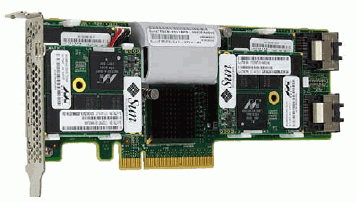 This Flash Card * (s. Addendum at the bottom) delivers 96 GB Flash Storage, devided into 4 Flash Drives. This summarizes to 5 TB Flash Storage for a Full Rack – many Databases will probably fit completely into it. In an OLTP Database, the number of IOs per second deliverable is one of the most critical factors. With the above configuration, we can deliver up to 1 Million IOs per second.
The default way to deal with the Flash Storage is to use it completely as Flash Cache. You may think of Flash Cache as a prolongation of the Database Buffer Cache. It is populated automatically by the system with objects deemed useful to cache them. Without any intervention it is used that way:
CellCLI> list flashcache detail
 name:                   exa5cel02_FLASHCACHE
 cellDisk:                [... list of all 16 flashdisks]
 creationTime:           2011-02-02T01:14:04-08:00
 degradedCelldisks:
 effectiveCacheSize:     365.25G
 id:                     880d826b-47cc-4cf5-95fc-c36d6d315ba8
 size:                   365.25G
 status:                 normal
That was from one of the cells as the celladmin user connected using the command line interface. The whole Flash Storage is in use for Flash Cache ** on that cell. On the Database Layer, we may see the effect like this:
SQL> select name,value  from v$sysstat where name in
('physical read total IO requests','cell flash cache read hits');

NAME                                                                  VALUE
---------------------------------------------------------------- ----------
physical read total IO requests                                    51572139
cell flash cache read hits                                         32344851
That is already a good ratio: The majority of IO requests is resolved from the Flash Cache. We can specify storage attributes on the segment layer to influence the caching behavior of that segment:
SQL> select segment_name,cell_flash_cache from user_segments;
SEGMENT_NA CELL_FL
---------- -------
SALES      KEEP
We have 3 possible values here: DEFAULT (the default), KEEP and NONE. Keep means that the sales table will be stored in the Flash Cache „more aggressively“ than the default. It will in other words increase the chance to read it from there. The table is the same as in the previous posting. Because of this setting and previous selects on the table that populated the Flash Cache with it, I am now able to read it from there. I reconnect to initialize v$mystat:
SQL> connect adam/adam
Connected.
SQL> set timing on
SQL>  select count(*) from sales;

 COUNT(*)
----------
 20000000

Elapsed: 00:00:00.50
SQL> select name,value  from v$mystat natural join v$statname where name in
('physical read total IO requests','cell flash cache read hits');

NAME                                                                  VALUE
---------------------------------------------------------------- ----------
physical read total IO requests                                       10265
cell flash cache read hits                                            10265
The second possibility to deal with the Flash Storage is to take a part of it for building ASM diskgroups upon. All files on these ASM diskgroups will then reside permanently on Flash Storage:
CellCLI> drop flashcache
Flash cache exa5cel01_FLASHCACHE successfully dropped

CellCLI> create flashcache all size=100g
Flash cache exa5cel01_FLASHCACHE successfully created

CellCLI> create griddisk all flashdisk prefix=flashdrive
GridDisk flashdrive_FD_00_exa5cel01 successfully created
GridDisk flashdrive_FD_01_exa5cel01 successfully created
GridDisk flashdrive_FD_02_exa5cel01 successfully created
GridDisk flashdrive_FD_03_exa5cel01 successfully created
GridDisk flashdrive_FD_04_exa5cel01 successfully created
GridDisk flashdrive_FD_05_exa5cel01 successfully created
GridDisk flashdrive_FD_06_exa5cel01 successfully created
GridDisk flashdrive_FD_07_exa5cel01 successfully created
GridDisk flashdrive_FD_08_exa5cel01 successfully created
GridDisk flashdrive_FD_09_exa5cel01 successfully created
GridDisk flashdrive_FD_10_exa5cel01 successfully created
GridDisk flashdrive_FD_11_exa5cel01 successfully created
GridDisk flashdrive_FD_12_exa5cel01 successfully created
GridDisk flashdrive_FD_13_exa5cel01 successfully created
GridDisk flashdrive_FD_14_exa5cel01 successfully created
GridDisk flashdrive_FD_15_exa5cel01 successfully created
The Flash Cache for this cell is now reduced to 100 GB; all means „upon all 16 Flash Drives“ here. I am doing the same on the second cell – my Database Machine is limited to only one Server Node and two Cells. That gives me 32 Grid Disks based on Flash Drives to create ASM diskgroups upon:
CellCLI> drop flashcache
Flash cache exa5cel02_FLASHCACHE successfully dropped

CellCLI> create flashcache all size=100g
Flash cache exa5cel02_FLASHCACHE successfully created

CellCLI> create griddisk all flashdisk prefix=flashdrive
GridDisk flashdrive_FD_00_exa5cel02 successfully created
GridDisk flashdrive_FD_01_exa5cel02 successfully created
GridDisk flashdrive_FD_02_exa5cel02 successfully created
GridDisk flashdrive_FD_03_exa5cel02 successfully created
GridDisk flashdrive_FD_04_exa5cel02 successfully created
GridDisk flashdrive_FD_05_exa5cel02 successfully created
GridDisk flashdrive_FD_06_exa5cel02 successfully created
GridDisk flashdrive_FD_07_exa5cel02 successfully created
GridDisk flashdrive_FD_08_exa5cel02 successfully created
GridDisk flashdrive_FD_09_exa5cel02 successfully created
GridDisk flashdrive_FD_10_exa5cel02 successfully created
GridDisk flashdrive_FD_11_exa5cel02 successfully created
GridDisk flashdrive_FD_12_exa5cel02 successfully created
GridDisk flashdrive_FD_13_exa5cel02 successfully created
GridDisk flashdrive_FD_14_exa5cel02 successfully created
GridDisk flashdrive_FD_15_exa5cel02 successfully created

CellCLI> list griddisk flashdrive_FD_10_exa5cel02 detail
 name:                   flashdrive_FD_10_exa5cel02
 availableTo:
 cellDisk:               FD_10_exa5cel02
 comment:
 creationTime:           2011-02-02T02:56:52-08:00
 diskType:               FlashDisk
 errorCount:             0
 id:                     0000012d-e604-87f2-0000-000000000000
 offset:                 6.28125G
 size:                   16.578125G
 status:                 active
Changing to the Database Server Node to create the ASM diskgroup as sysasm:
SQL> select path,header_status, os_mb,free_mb from v$asm_disk where path like '%flash%'

PATH                                               HEADER_STATU      OS_MB    FREE_MB
-------------------------------------------------- ------------ ---------- ----------
o/192.168.14.10/flashdrive_FD_14_exa5cel02         CANDIDATE         16976          0
o/192.168.14.9/flashdrive_FD_12_exa5cel01          CANDIDATE         16976          0
o/192.168.14.10/flashdrive_FD_05_exa5cel02         CANDIDATE         16976          0
o/192.168.14.10/flashdrive_FD_11_exa5cel02         CANDIDATE         16976          0
o/192.168.14.10/flashdrive_FD_08_exa5cel02         CANDIDATE         16976          0
o/192.168.14.10/flashdrive_FD_15_exa5cel02         CANDIDATE         16976          0
o/192.168.14.10/flashdrive_FD_00_exa5cel02         CANDIDATE         16976          0
o/192.168.14.10/flashdrive_FD_03_exa5cel02         CANDIDATE         16976          0
o/192.168.14.10/flashdrive_FD_06_exa5cel02         CANDIDATE         16976          0
o/192.168.14.10/flashdrive_FD_12_exa5cel02         CANDIDATE         16976          0
o/192.168.14.10/flashdrive_FD_09_exa5cel02         CANDIDATE         16976          0
o/192.168.14.10/flashdrive_FD_01_exa5cel02         CANDIDATE         16976          0
o/192.168.14.10/flashdrive_FD_04_exa5cel02         CANDIDATE         16976          0
o/192.168.14.10/flashdrive_FD_13_exa5cel02         CANDIDATE         16976          0
o/192.168.14.10/flashdrive_FD_07_exa5cel02         CANDIDATE         16976          0
o/192.168.14.10/flashdrive_FD_10_exa5cel02         CANDIDATE         16976          0
o/192.168.14.9/flashdrive_FD_07_exa5cel01          CANDIDATE         16976          0
o/192.168.14.9/flashdrive_FD_04_exa5cel01          CANDIDATE         16976          0
o/192.168.14.9/flashdrive_FD_10_exa5cel01          CANDIDATE         16976          0
o/192.168.14.9/flashdrive_FD_01_exa5cel01          CANDIDATE         16976          0
o/192.168.14.9/flashdrive_FD_13_exa5cel01          CANDIDATE         16976          0
o/192.168.14.9/flashdrive_FD_08_exa5cel01          CANDIDATE         16976          0
o/192.168.14.9/flashdrive_FD_05_exa5cel01          CANDIDATE         16976          0
o/192.168.14.9/flashdrive_FD_02_exa5cel01          CANDIDATE         16976          0
o/192.168.14.9/flashdrive_FD_14_exa5cel01          CANDIDATE         16976          0
o/192.168.14.9/flashdrive_FD_11_exa5cel01          CANDIDATE         16976          0
o/192.168.14.9/flashdrive_FD_00_exa5cel01          CANDIDATE         16976          0
o/192.168.14.9/flashdrive_FD_09_exa5cel01          CANDIDATE         16976          0
o/192.168.14.9/flashdrive_FD_03_exa5cel01          CANDIDATE         16976          0
o/192.168.14.9/flashdrive_FD_15_exa5cel01          CANDIDATE         16976          0
o/192.168.14.9/flashdrive_FD_06_exa5cel01          CANDIDATE         16976          0
o/192.168.14.10/flashdrive_FD_02_exa5cel02         CANDIDATE         16976          0

32 rows selected.
SQL> create diskgroup flashdrive normal redundancy
disk 'o/*/flashdrive*'
attribute 'compatible.rdbms'='11.2.0.0.0',
'compatible.asm'='11.2.0.0.0',
'cell.smart_scan_capable'='TRUE',
'au_size'='4M';

Diskgroup created.
Please notice the Allocation Unit size of 4MB, necessary for Exadata. Normal Redundancy is strongly recommended – automatically each cell is also a Failure Group. In other words: Should one Storage Server crash, no loss of Data will happen, regardless whether we use Flash Drives or spinning drives to build the diskgroups upon. After the creation, we use the diskgroup like any other:
SQL>  create tablespace veryfast datafile '+flashdrive' size 10g;

Tablespace created.
Any segment created in this tablespace will reside on Flash Drives permanently.
Let’s take the opportunity to give an example for Information Lifecycle Management (ILM):
SQL> create tablespace compahigh datafile size 1g;
Tablespace created.
SQL> alter tablespace compahigh default compress for archive high;
Tablespace altered.
The tablespace got created on spinning drives, because my DB_CREATE_FILE_DEST parameter points to such a diskgroup. Same for the next two:
SQL> create tablespace querylow datafile size 1g;
Tablespace created.
SQL> alter tablespace querylow default compress for query low;
Tablespace altered.
SQL> create tablespace ordinary datafile size 1g;
Tablespace created.
My plan is to store one large partitioned table partly compressed, partly uncompressed on spinning drives and partly on Flash Drives – the newest and most volatile part.
SQL> create table sales_part
(id number, flag number, product char(25),channel_id number,cust_id number,
amount_sold number, order_date date, ship_date date)
partition by range (order_date)
interval (numtoyminterval(1,'year'))
store in (veryfast)
(
partition archhigh values less than (to_date('01.01.1991','dd.mm.yyyy')) tablespace compahigh,
partition querylow values less than (to_date('01.01.1998','dd.mm.yyyy')) tablespace querylow,
partition ordi1998 values less than (to_date('01.01.1999','dd.mm.yyyy')) tablespace ordinary,
partition ordi1999 values less than (to_date('01.01.2000','dd.mm.yyyy')) tablespace ordinary,
partition ordi2000 values less than (to_date('01.01.2001','dd.mm.yyyy')) tablespace ordinary,
partition ordi2001 values less than (to_date('01.01.2002','dd.mm.yyyy')) tablespace ordinary,
partition ordi2002 values less than (to_date('01.01.2003','dd.mm.yyyy')) tablespace ordinary,
partition ordi2003 values less than (to_date('01.01.2004','dd.mm.yyyy')) tablespace ordinary,
partition ordi2004 values less than (to_date('01.01.2005','dd.mm.yyyy')) tablespace ordinary,
partition ordi2005 values less than (to_date('01.01.2006','dd.mm.yyyy')) tablespace ordinary
)
;

Table created.
This uses the 11g New Feature Interval Partitioning to create new partitions automatically on Flash Drives. Now loading the table from the old sales table:
SQL> alter table sales_part nologging;

Table altered.

SQL> insert /*+ append */ into sales_part select * from sales order by order_date;

20000000 rows created.
Notice the order by above. It makes it later on possible not only to do partition pruning but also to use Storage Indexes if we query after ORDER_DATE or even SHIP_DATE. The single partitions now look like this:
SQL> select partition_name,tablespace_name,bytes/1024/1024 as mb
from user_segments where segment_name='SALES_PART';

PARTITION_NAME                 TABLESPACE_NAME                        MB
------------------------------ ------------------------------ ----------
ARCHHIGH                       COMPAHIGH                               8
ORDI1998                       ORDINARY                               56
ORDI1999                       ORDINARY                               56
ORDI2000                       ORDINARY                               56
ORDI2001                       ORDINARY                               56
ORDI2002                       ORDINARY                               56
ORDI2003                       ORDINARY                               56
ORDI2004                       ORDINARY                               56
ORDI2005                       ORDINARY                               56
QUERYLOW                       QUERYLOW                               40
SYS_P101                       VERYFAST                               56
SYS_P102                       VERYFAST                               56
SYS_P103                       VERYFAST                               56
SYS_P104                       VERYFAST                               56
SYS_P105                       VERYFAST                               56
SYS_P106                       VERYFAST                                8

16 rows selected.

SQL> select count(*) from sales_part partition (archhigh);

 COUNT(*)
----------
 5330000

SQL>  select count(*) from sales_part partition (querylow);

 COUNT(*)
----------
 5114000

SQL> select count(*) from sales_part partition (ordi1998);

 COUNT(*)
----------
 730000

SQL>  select count(*) from sales_part partition (sys_p101);

 COUNT(*)
----------
 730000
During the life cycle of the data, partitions may no longer be highly volatile and can be moved to spinning drives or even get compressed:
SQL> alter table sales_part move partition sys_p101 tablespace ordinary;

Table altered.

SQL> alter table sales_part move partition ordi1998 compress for query low tablespace querylow;

Table altered.

SQL> select partition_name,tablespace_name,bytes/1024/1024 as mb
from user_segments where segment_name='SALES_PART';

PARTITION_NAME                 TABLESPACE_NAME                        MB
------------------------------ ------------------------------ ----------
ARCHHIGH                       COMPAHIGH                               8
ORDI1998                       QUERYLOW                                8
ORDI1999                       ORDINARY                               56
ORDI2000                       ORDINARY                               56
ORDI2001                       ORDINARY                               56
ORDI2002                       ORDINARY                               56
ORDI2003                       ORDINARY                               56
ORDI2004                       ORDINARY                               56
ORDI2005                       ORDINARY                               56
QUERYLOW                       QUERYLOW                               40
SYS_P101                       ORDINARY                               56
SYS_P102                       VERYFAST                               56
SYS_P103                       VERYFAST                               56
SYS_P104                       VERYFAST                               56
SYS_P105                       VERYFAST                               56
SYS_P106                       VERYFAST                                8

16 rows selected.
We have no indexes in place – so there is no rebuild needed 🙂
Summary: Flash Storage inside the Oracle Exadata Database Machine is used completely as Flash Cache by default, effectively working as an extension of the Database Buffer Cache and delivering faster Access together with a very high IO per Second rate which is especially important for OLTP. Additionally, we may take a part of the Flash Storage to build ASM diskgroups upon it. Files placed on these diskgroups will reside permanently on Flash Storage – no Caching needed.
* Addendum: The posting reflects the state of X2. With X3, Cells come with 4 x F40 Flashcards that deliver each 400 GB Flash capacity, now to a total of 1600 GB Flash capacity for each Storage Server. Given that the F40 is also faster than the old F20 and together with the new Write Back Flash Cache technology, there will be even less likely a need to build ASM diskgroups upon Flash storage than with X2.
** Second Addendum: Already with newer versions of X2, we introduced Flash Logging, which takes 512 MB Flash Storage from each cell (regardless whether it is X2 or X3). This relatively small amount reduces the capacity of the Flash Cache accordingly. See here for a more detailed explanation (Page 6).
Exadata Part II: Storage Index
Another important feature of the Exadata Database Machine that makes it more than just a collection of High-End Hardware are Storage Indexes. Storage Indexes are constructed automatically inside of the memory of the Storage Servers when Database segments (like heap tables) are being scanned. The Storage Cells are divided into 1 MB chunks and inside of these chunks, we record the minimum and maximum values of the columns of the table that allocated space inside that chunk. It is very well possible that these Storage Indexes make many of your „conventional indexes“ obsolete. Look at following drastic example:
SQL> connect adam/adam
Connected.
SQL> select bytes/1024/1024/1024 as gb from user_segments where segment_name='SALES';

 GB
----------
 1.5
This demonstration table was created with the following statement
SQL> create table sales as
select
rownum as id,
rownum + 1 as flag,
'Oracle Enterprise Edition' as product,
mod(rownum,5) as channel_id,
mod(rownum,1000) as cust_id ,
5000 as amount_sold,
trunc(sysdate - 10000 + mod(rownum,10000))
as order_date,
trunc(sysdate - 9999 + mod(rownum,10000))
as ship_date
from dual connect by level<=2e7;
I needed to put WORKAREA_SIZE_POLICY=MANUAL and I specified a SORT_AREA_SIZE=1048576000 to be able to do the connect by level<=2e7, by the way. That is because of the limitation of 200M pga memory for a single session when using PGA_AGGREGATE_TARGET. Anyway, please notice that id has unique values and there is no conventional index present.
SQL> set timing on
SQL> select * from sales where id=4711;

 ID       FLAG PRODUCT                   CHANNEL_ID    CUST_ID AMOUNT_SOLD ORDER_DAT SHIP_DATE
---------- ---------- ------------------------- ---------- ---------- ----------- --------- ---------
 4711       4712 Oracle Enterprise Edition          1        711        5000 28-JUL-96 29-JUL-96

Elapsed: 00:00:00.11
I have just scanned 1.5 Gigabyte of data in fractions of a second! [Previously said in 11 Milliseconds, but that was of course a mistake – apart from SQL*Plus not being able to produce that exact timing, I just got the unit wrong] That was possible, because the Storage Cells knew that they could exclude 1499 chunks from scanning. 4711 was only possibly present inside one of the chunks. Please notice that that was not a Smart Scan in the first place – we did not offload much I/O on the Storage Layer. Instead, we avoided I/O almost completely:
SQL> select name,value/1024/1024 as mb from v$statname natural join v$mystat
where name in
('cell physical IO interconnect bytes returned by smart scan',
'cell physical IO bytes saved by storage index');   2    3    4

NAME                                                                     MB
---------------------------------------------------------------- ----------
cell physical IO bytes saved by storage index                    1483.67969
cell physical IO interconnect bytes returned by smart scan       .001525879
To show the difference, I will do a Smart Scan. I connect again to initialize v$mystat
SQL> connect adam/adam
Connected.
SQL> select count(*) from sales where channel_id=1;

 COUNT(*)
----------
 4000000

Elapsed: 00:00:02.04
SQL> select name,value/1024/1024 as mb from v$statname natural join v$mystat
where name in
('cell physical IO interconnect bytes returned by smart scan',
'cell physical IO bytes saved by storage index');  2    3    4

NAME                                                                     MB
---------------------------------------------------------------- ----------
cell physical IO bytes saved by storage index                             0
cell physical IO interconnect bytes returned by smart scan       46.7903976
In this case, we scanned 1.5 Gig on the Storage Layer but delivered only 46 MB to the Database Layer. Now back to the Storage Index. Recently, I encountered the opinion that Storage Indexes would not work together with Bind Variables for some reason. That is not the case:
SQL> connect adam/adam
Connected.
SQL> vari n number
SQL> exec :n:=4711

PL/SQL procedure successfully completed.

SQL> set timing on
SQL> select * from sales where id=:n;

 ID       FLAG PRODUCT                   CHANNEL_ID    CUST_ID AMOUNT_SOLD ORDER_DAT SHIP_DATE
---------- ---------- ------------------------- ---------- ---------- ----------- --------- ---------
 4711       4712 Oracle Enterprise Edition          1        711        5000 28-JUL-96 29-JUL-96

Elapsed: 00:00:00.04
SQL>  select name,value/1024/1024 as mb from v$statname natural join v$mystat
where name in
('cell physical IO interconnect bytes returned by smart scan',
'cell physical IO bytes saved by storage index');  2    3    4

NAME                                                                     MB
---------------------------------------------------------------- ----------
cell physical IO bytes saved by storage index                    1483.67969
cell physical IO interconnect bytes returned by smart scan       .001525879
The Storage Index clearly could get used. Same with implicit datatype conversion:
SQL> vari c char(4)
SQL> exec :c:='4711'
SQL>  select * from sales where id=:c;

 ID       FLAG PRODUCT                   CHANNEL_ID    CUST_ID AMOUNT_SOLD ORDER_DAT SHIP_DATE
---------- ---------- ------------------------- ---------- ---------- ----------- --------- ---------
 4711       4712 Oracle Enterprise Edition          1        711        5000 28-JUL-96 29-JUL-96

Elapsed: 00:00:00.03
SQL>  select name,value/1024/1024 as mb from v$statname natural join v$mystat
where name in
('cell physical IO interconnect bytes returned by smart scan',
'cell physical IO bytes saved by storage index');  2    3    4

NAME                                                                     MB
---------------------------------------------------------------- ----------
cell physical IO bytes saved by storage index                    2967.35938
cell physical IO interconnect bytes returned by smart scan       .003051758
It would have surprised me a lot if Bind Variables would introduce any issues with Storage Indexes, because they are processed on the Database Layer. In fact, from the Optimizers viewpoint all these statements lead to the same execution plan: Full Table Scan. There could be an issue (but not exclusively related to Bind Variables), if we would have conventional indexes present here as well, because the Optimizer might favor them over the Storage Index. The Optimizer is not aware of Storage Indexes. Before I get another comment from Kevin suggesting to show joins with the example, let’s just do that:
SQL> select * from channels;

CHANNEL_ID CHANNEL_DESC
---------- ----------------------------------------
 0 Telesales
 1 Web
 2 Field
 3 Retail
 4 Promotion
 99 Special
SQL> create table customers as select distinct cust_id, 'John Doe' as cust_name from sales;

Table created.
Channels and Customers are now two dimension tables.
SQL> set timing on
SQL> select product,channel_desc,cust_name
from sales natural join channels
natural join customers
where id=4711;
 2    3    4
PRODUCT                   CHANNEL_DESC                             CUST_NAM
------------------------- ---------------------------------------- --------
Oracle Enterprise Edition Web                                      John Doe

Elapsed: 00:00:00.06
SQL> select name,value/1024/1024 as mb from v$statname natural join v$mystat
where name in
('cell physical IO interconnect bytes returned by smart scan',
'cell physical IO bytes saved by storage index');  2    3    4

NAME                                                                     MB
---------------------------------------------------------------- ----------
cell physical IO bytes saved by storage index                    1483.67969
cell physical IO interconnect bytes returned by smart scan       .001495361
Storage Indexes can obviously be used in this case as well. When we select on columns with non unique values, it depends on how well clustered the values are, whether it is beneficial to use a Storage Index. The values of order_date column of the sales table are spread across the whole table, which makes the usage of a Storage Index impossible to speed up the query:
SQL> connect adam/adam
Connected.
SQL> set timing on
SQL> select count(*) from sales where order_date=to_date('11.03.2009','dd.mm.yyyy');

 COUNT(*)
----------
 2000

Elapsed: 00:00:02.30
SQL> select name,value/1024/1024 as mb from v$statname natural join v$mystat
where name in
('cell physical IO interconnect bytes returned by smart scan',
'cell physical IO bytes saved by storage index');
 2    3    4
NAME                                                                     MB
---------------------------------------------------------------- ----------
cell physical IO bytes saved by storage index                             0
cell physical IO interconnect bytes returned by smart scan       .672538757
When we create the same table, but ordered by order_date, this changes:
SQL> create table sales_order as select * from sales where 1=2;
Table created.
SQL> alter table sales_order nologging;
Table altered.
SQL> insert /*+ append */ into sales_order select * from sales order by order_date;

20000000 rows created.
SQL> commit;

Commit complete.
Now we need to access the new table multiple times to get the Storage Index built:
SQL> connect adam/adam
Connected.
SQL>  select count(*) from sales_order where order_date=to_date('11.03.2009','dd.mm.yyyy');

 COUNT(*)
----------
 2000

Elapsed: 00:00:02.02
SQL>  select count(*) from sales_order where order_date=to_date('11.03.2009','dd.mm.yyyy');

 COUNT(*)
----------
 2000

Elapsed: 00:00:01.73
SQL>  select count(*) from sales_order where order_date=to_date('11.03.2009','dd.mm.yyyy');

 COUNT(*)
----------
 2000

Elapsed: 00:00:00.03
SQL> select name,value/1024/1024 as mb from v$statname natural join v$mystat
where name in
('cell physical IO interconnect bytes returned by smart scan',
'cell physical IO bytes saved by storage index');  2    3    4

NAME                                                                     MB
---------------------------------------------------------------- ----------
cell physical IO bytes saved by storage index                    1488.77344
cell physical IO interconnect bytes returned by smart scan       .506607056
Now the Storage has „learned“ that it is beneficial to have a Storage Index on the sales_order table. This index will be kept as long as the Cells are up. The Storage Index is created over all the table_columns, apparently. Please notice that I now access the column ship_date (strongly correlated to order_date) for the first time:
SQL> select count(*) from sales_order where ship_date=to_date('11.03.2009','dd.mm.yyyy');

 COUNT(*)
----------
 2000

Elapsed: 00:00:00.37
SQL> select name,value/1024/1024 as mb from v$statname natural join v$mystat
where name in
('cell physical IO interconnect bytes returned by smart scan',
'cell physical IO bytes saved by storage index');   2    3    4

NAME                                                                     MB
---------------------------------------------------------------- ----------
cell physical IO bytes saved by storage index                    2765.77344
cell physical IO interconnect bytes returned by smart scan       .562469482
Conclusion: Storage Indexes are another Smart Storage feature of Exadata Database Machine. They may make many conventional indexes obsolete. Although they are created and maintained automatically by the Storage Servers, it is important to know their behavior. Especially, it is relevant that (non unique) column values that we later on query for ocurr ordered to be able to benefit from Storage Indexes.
Pickleball spielen auf YouTube


 Pickleball spielen