Beiträge getaggt mit High Availability
Using Flashback in a Data Guard Environment
If Logical Mistakes happen, we can address them with the Flashback techniques, introduced in Oracle Database 10g already, even if in an Data Guard Environment. In case of „Flashback Table To Timestamp“ or „Flashback Table To Before Drop“, there is nothing special to take into account regarding the Standby Database. It will simply replicate these actions accordingly.
If we do „Flashback Database“ instead, that needs a special treatment of the Standby Database. This posting is designed to show you how to do that:
DGMGRL> show configuration
Configuration
Name: mycf
Enabled: YES
Protection Mode: MaxAvailability
Databases:
prima - Primary database
physt - Physical standby database
Fast-Start Failover: DISABLED
Current status for "mycf":
SUCCESS
This is an 11g Database, but the shown technique should work the same with 10g also. Prima & Physt are both creating Flashback Logs:
SQL> connect sys/oracle@prima as sysdba
Connected.
SQL> select database_role,flashback_on from v$database;
DATABASE_ROLE FLASHBACK_ON
---------------- ------------------
PRIMARY YES
SQL> connect sys/oracle@physt as sysdba
Connected.
SQL> select database_role,flashback_on from v$database;
DATABASE_ROLE FLASHBACK_ON
---------------- ------------------
PHYSICAL STANDBY YES
I will now introduce the „Logical Mistake“ on the Primary Database:
SQL> select * from scott.dept;
DEPTNO DNAME LOC
---------- -------------- -------------
10 ACCOUNTING NEW YORK
20 RESEARCH DALLAS
30 SALES CHICAGO
40 OPERATIONS BOSTON
SQL> drop user scott cascade;
User dropped.
The Redo Protocol gets transmitted with SYNC to the Standby Database and is applied there with Real-Time Apply. In other words: The Logical Mistake has already reached the Standby Database. We could have configured a Delay in the Apply there to address such scenarios. But that is somewhat „old fashioned“; the modern way is to go with flashback. The background behind that is, that in case of a Disaster, hitting the Primary Site, a Delay would cause a longer Failover time. I will now flashback the Primary to get back Scott:
SQL> shutdown immediate
Database closed.
Database dismounted.
ORACLE instance shut down.
SQL> startup mount
ORACLE instance started.
Total System Global Area 313860096 bytes
Fixed Size 1299624 bytes
Variable Size 230689624 bytes
Database Buffers 75497472 bytes
Redo Buffers 6373376 bytes
Database mounted.
SQL> flashback database to timestamp systimestamp - interval '15' minute;
Flashback complete.
SQL> alter database open resetlogs;
Database altered.
SQL> select * from scott.dept;
DEPTNO DNAME LOC
---------- -------------- -------------
10 ACCOUNTING NEW YORK
20 RESEARCH DALLAS
30 SALES CHICAGO
40 OPERATIONS BOSTON
There he is again! Until now, that was not different from a Flashback Database Operation without Data Guard. But now my Standby Database is no longer able to do Redo Apply, because it is „in the future of the Primary Database“. We are in step 2) of the below picture now that I added to illustrate the situation.
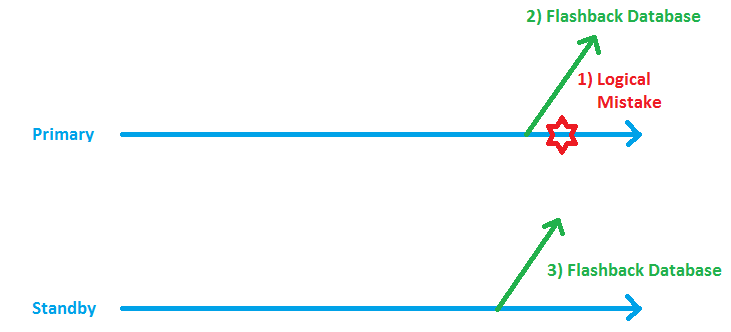
Now I need to put the Standby it into a time, shortly before the present time of the Primary, in order to restart the Redo Apply successfully:
DGMGRL> show configuration
Configuration
Name: mycf
Enabled: YES
Protection Mode: MaxAvailability
Databases:
prima - Primary database
physt - Physical standby database
Fast-Start Failover: DISABLED
Current status for "mycf":
Warning: ORA-16607: one or more databases have failed
DGMGRL> show database physt statusreport
STATUS REPORT
INSTANCE_NAME SEVERITY ERROR_TEXT
 *      ERROR ORA-16700: the standby database has diverged
                         from the primary database
* ERROR ORA-16766: Redo Apply is stopped
Please notice that the show statusreport clause is a new feature of 11g. In 10g, you need to look into the Broker Logfile to retrieve that problem.
SQL> connect sys/oracle@prima as sysdba
Connected.
SQL> select resetlogs_change# from v$database;
RESETLOGS_CHANGE#
-----------------
294223
SQL> connect sys/oracle@physt as sysdba
Connected.
SQL> flashback database to scn 294221;
Flashback complete.
I subtracted 2 from the Resetlogs Change No. above to make sure that we get the Standby close before the present time of the Primary. Now we need to restart the Redo Apply again:
DGMGRL> show configuration
Configuration
Name: mycf
Enabled: YES
Protection Mode: MaxAvailability
Databases:
prima - Primary database
physt - Physical standby database
Fast-Start Failover: DISABLED
Current status for "mycf":
Warning: ORA-16607: one or more databases have failed
DGMGRL> edit database physt set state=apply-on;
Succeeded.
DGMGRL> show configuration
Configuration
Name: mycf
Enabled: YES
Protection Mode: MaxAvailability
Databases:
prima - Primary database
physt - Physical standby database
Fast-Start Failover: DISABLED
Current status for "mycf":
SUCCESS
That was it!
Conclusion: Flashback is the natural counterpart of Real-Time Apply. You can address Logical Mistakes easily with it and you do not need to Delay the actualization of the Standby Database.
My book about Oracle HA, especially Data Guard is published
Added a page that refers to it.
Oracle HA Architecture Article published in OU EMEA Newsletter
I proudly notice that my article about Oracle Database HA Architecture made it into the current Oracle University EMEA Newsletter 🙂
Pickleball spielen auf YouTube


 Pickleball spielen