Archiv für die Kategorie TOI
11gR2 RAC Architecture Picture
From my just finished RAC course – it was an LVC without whiteboard, which forced me to do the sketches on the computer. You might find it useful. It literally takes the whole day (at least) to explain it, though. And yes: It is oversimplified and some things are missing (I paint all the time in that course) 🙂
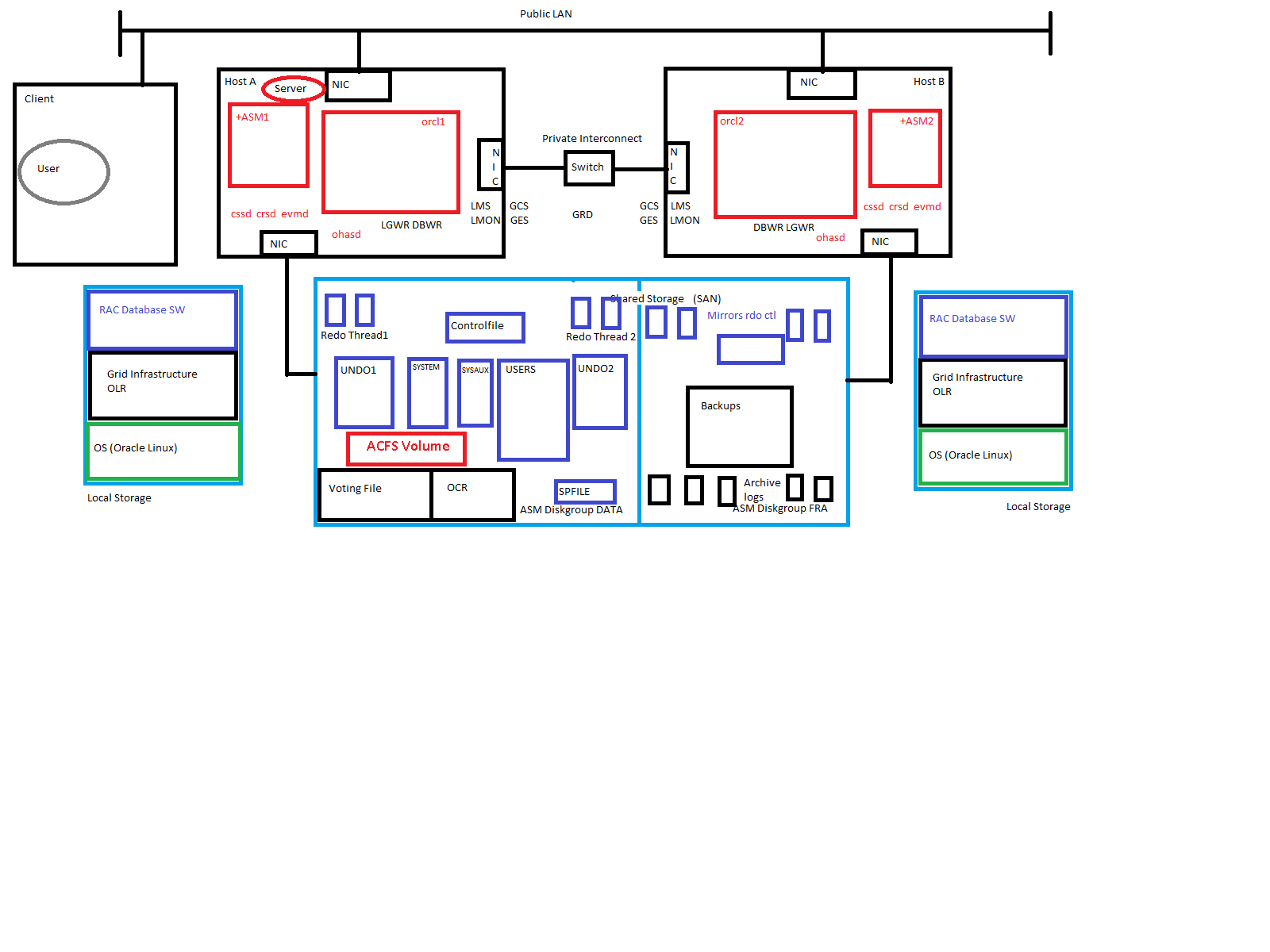 Just for me to memorize:
ohasd starts the agents
- orarootagent -> crsd, ctssd …
- cssdagent -> cssd
- oraagent -> evmd, asm …
crsd starts the agents
- orarootagent -> node vip, SCAN vip …
- oraagent -> Local Listener, SCAN Listener, Diskgroups, Database, Services …
Addendum: The corporation kindly offered to translate my above amateurish sketch into a professional graphic which I gladly accepted. See the brushed up sketch below:
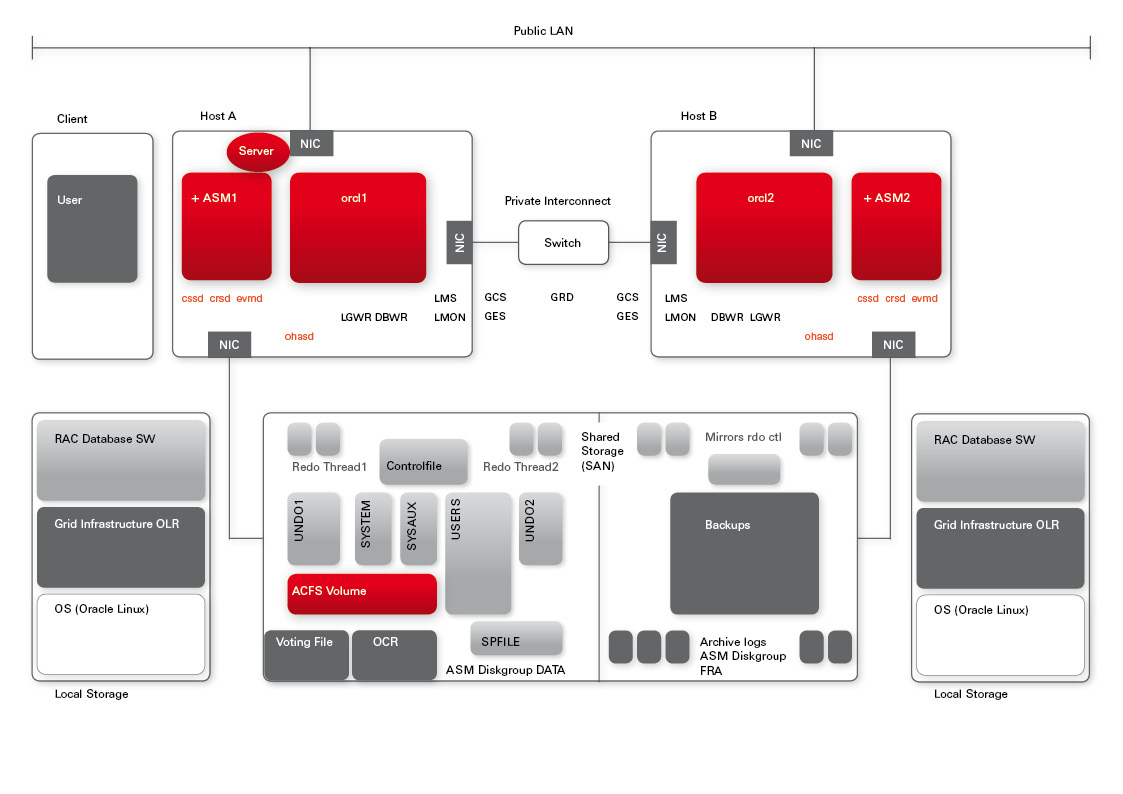 I like it – just seems to me that due to corporate identity requirements, we are a little short in colours 🙂
See & modify the attributes of Oracle Restart resources with crsctl
I am presently teaching 11gR2 New Features for DBAs on a Private Event, where one attendee asked how we could retrieve and possibly modify the restart attempts, ohasd is trying for a resource, governed by Oracle Restart. My first guess was that this should be possible similar as with the Grid Infrastructure clusterware utility crsctl, but the commands are not listed in the Online Documentation about Oracle Restart. So I investigated a little and that is what I found out:
$ crsctl status res ora.orcl.db -f
NAME=ora.orcl.db
TYPE=ora.database.type
STATE=OFFLINE
TARGET=ONLINE
ACL=owner:oracle:--x,pgrp:dba:--x,other::r--,group:oinstall:r-x,user:oracle:rwx
ACTION_FAILURE_TEMPLATE=
ACTION_SCRIPT=
ACTIVE_PLACEMENT=1
AGENT_FILENAME=%CRS_HOME%/bin/oraagent%CRS_EXE_SUFFIX%
AUTO_START=restore
CARDINALITY=1
CARDINALITY_ID=0
CHECK_INTERVAL=1
CHECK_TIMEOUT=600
CLUSTER_DATABASE=false
CREATION_SEED=16
CURRENT_RCOUNT=0
DB_UNIQUE_NAME=orcl
DEFAULT_TEMPLATE=PROPERTY(RESOURCE_CLASS=database) PROPERTY(DB_UNIQUE_NAME= CONCAT(PARSE(%NAME%, ., 2), %USR_ORA_DOMAIN%, .)) ELEMENT(INSTANCE_NAME= %GEN_USR_ORA_INST_NAME%)
DEGREE=1
DESCRIPTION=Oracle Database resource
ENABLED=1
FAILOVER_DELAY=0
FAILURE_COUNT=0
FAILURE_HISTORY=
FAILURE_INTERVAL=60
FAILURE_THRESHOLD=1
GEN_AUDIT_FILE_DEST=/u01/app/oracle/admin/orcl/adump
GEN_USR_ORA_INST_NAME=orcl
HOSTING_MEMBERS=
ID=ora.orcl.db
INCARNATION=0
INSTANCE_FAILOVER=0
LAST_FAULT=0
LAST_RESTART=0
LAST_SERVER=
LOAD=1
LOGGING_LEVEL=1
MANAGEMENT_POLICY=AUTOMATIC
NLS_LANG=
NOT_RESTARTING_TEMPLATE=
OFFLINE_CHECK_INTERVAL=0
ORACLE_HOME=/u01/app/oracle/acfsmounts/acfs_db1
PLACEMENT=balanced
PROFILE_CHANGE_TEMPLATE=
RESTART_ATTEMPTS=2
ROLE=PRIMARY
SCRIPT_TIMEOUT=60
SERVER_POOLS=
SPFILE=+DATA/orcl/spfileorcl.ora
START_DEPENDENCIES=hard(ora.DATA.dg,ora.FRA.dg) weak(type:ora.listener.type,uniform:ora.ons,uniform:ora.eons) pullup(ora.DATA.dg,ora.FRA.dg)
START_TIMEOUT=600
STATE_CHANGE_TEMPLATE=
STATE_CHANGE_VERS=0
STATE_DETAILS=
STOP_DEPENDENCIES=hard(intermediate:ora.asm,shutdown:ora.DATA.dg,shutdown:ora.FRA.dg)
STOP_TIMEOUT=600
UPTIME_THRESHOLD=1h
USR_ORA_DB_NAME=orcl
USR_ORA_DOMAIN=
USR_ORA_ENV=
USR_ORA_FLAGS=
USR_ORA_INST_NAME=orcl
USR_ORA_OPEN_MODE=open
USR_ORA_OPI=false
USR_ORA_STOP_MODE=immediate
VERSION=11.2.0.1.0
We see amongst others the highlighted Restart Attempts and the Uptime Threshold of the Database resource orcl with their default values. We can also modify them as follows:
$ crsctl modify res ora.orcl.db -attr "RESTART_ATTEMPTS=1"
Now if within 1 hour, the Database Instance fails more than 1 times, ohasd will no longer try to restart it. This can be watched in the ohasd logfile. I open a second terminal to monitor the ohasd logfile and kill the smon of the orcl instance from the first terminal. After the second kill -9 on the smon process, ohasd refuses to restart the instance, with this entry:
$ cat /u01/app/oracle/product/11.2.0/grid/log/edd2r6p0/ohasd/ohasd.log | grep attempt
2011-11-08 16:05:26.944: [   CRSPE][2781559696] No Local Restart of [ora.orcl.db 1 1], restart attempt exhausted
The Uptime Threshold will start anew after the command
$ srvctl start database -d orcl
Auto DOP: Differences of parallel_degree_policy=auto/limited
Recently, I delivered a Seminar about Parallel Processing in 11g where I came across some interesting findings, that I’d like to share with the Oracle Community. See my introduction into the 11g New Feature Auto DOP here, if that topic is completely new for you. There are big differences in the handling of Hints resp. Table-assigned parallel degrees, depending on the setting of parallel_degree_policy.
The parameter defaults to MANUAL, which gives you the known behavior of versions before 11g. LIMITED will only assign a system computed degree of parallelism (DOP) for tables, decorated with a parallel degree of DEFAULT, while prallel_degree_policy=AUTO will consider to assign a system computed DOP to all tables. Let’s see some details:
SQL> select * from v$version;

BANNER
--------------------------------------------------------------------------------
Oracle Database 11g Enterprise Edition Release 11.2.0.1.0 - Production
PL/SQL Release 11.2.0.1.0 - Production
CORE    11.2.0.1.0      Production
TNS for Linux: Version 11.2.0.1.0 - Production
NLSRTL Version 11.2.0.1.0 - Production
I did my tests on 11.2.0.1 and 11.2.0.2.
SQL> grant dba to adam identified by adam;

Grant succeeded.

SQL> connect adam/adam@prima
Connected.
SQL> set pages 300
SQL> show parameter parallel

NAME                                 TYPE        VALUE
------------------------------------ ----------- ------------------------------
fast_start_parallel_rollback         string      LOW
parallel_adaptive_multi_user         boolean     TRUE
parallel_automatic_tuning            boolean     FALSE
parallel_degree_limit                string      CPU
parallel_degree_policy               string      MANUAL
parallel_execution_message_size      integer     16384
parallel_force_local                 boolean     FALSE
parallel_instance_group              string
parallel_io_cap_enabled              boolean     FALSE
parallel_max_servers                 integer     20
parallel_min_percent                 integer     0
parallel_min_servers                 integer     0
parallel_min_time_threshold          string      AUTO
parallel_server                      boolean     FALSE
parallel_server_instances            integer     1
parallel_servers_target              integer     8
parallel_threads_per_cpu             integer     2
recovery_parallelism                 integer     0

SQL> create table t as select * from dual;
Table created.
That is my test case. All the red parameters have default values. The table t is of course way too small to justify a parallel operation; especially, it will not meet the parallel_min_time_threshold of estimated runtime (about 10 seconds with AUTO). The setting parallel_degree_policy=MANUAL would leave the system as dumb as in earlier versions regarding an appropriate DOP, though. It would give me any DOP I demand with Hints or Parallel Degree on the table. See how that is different with AUTO/LIMITED:
SQL> alter system set parallel_degree_policy=auto;

System altered.

SQL> select /*+ parallel (t,8) */ * from t;

D
-
X

SQL> select * from v$pq_sesstat;

STATISTIC                      LAST_QUERY SESSION_TOTAL
------------------------------ ---------- -------------
Queries Parallelized                    0             0
DML Parallelized                        0             0
DDL Parallelized                        0             0
DFO Trees                               0             0
Server Threads                          0             0
Allocation Height                       0             0
Allocation Width                        0             0
Local Msgs Sent                         0             0
Distr Msgs Sent                         0             0
Local Msgs Recv'd                       0             0
Distr Msgs Recv'd                       0             0

11 rows selected.
Although this was a valid hint, I got no parallel operation! That is different with LIMITED:
SQL> alter system set parallel_degree_policy=limited;

System altered.

SQL> select /*+ parallel (t,8) */ * from t;

D
-
X

SQL> select * from v$pq_sesstat;

STATISTIC                      LAST_QUERY SESSION_TOTAL
------------------------------ ---------- -------------
Queries Parallelized                    1             1
DML Parallelized                        0             0
DDL Parallelized                        0             0
DFO Trees                               1             1
Server Threads                          8             0
Allocation Height                       8             0
Allocation Width                        1             0
Local Msgs Sent                        26            26
Distr Msgs Sent                         0             0
Local Msgs Recv'd                      26            26
Distr Msgs Recv'd                       0             0

11 rows selected.
Same statement, now I got my (not sensible) DOP. There is a new hint in 11g on the statement level, though, that is also delivering my requested DOP with AUTO:
SQL> connect adam/adam@prima
Connected.
SQL> alter system set parallel_degree_policy=auto;

System altered.
SQL> select /*+ parallel (8) */ * from t;

D
-
X

SQL> select * from v$pq_sesstat;

STATISTIC                      LAST_QUERY SESSION_TOTAL
------------------------------ ---------- -------------
Queries Parallelized                    1             1
DML Parallelized                        0             0
DDL Parallelized                        0             0
DFO Trees                               1             1
Server Threads                          8             0
Allocation Height                       8             0
Allocation Width                        1             0
Local Msgs Sent                        26            26
Distr Msgs Sent                         0             0
Local Msgs Recv'd                      26            26
Distr Msgs Recv'd                       0             0

11 rows selected.
That is the only way to overrule the Auto DOP with parallel_degree_policy=AUTO. Similar that is with Parallel Degree on the table:
SQL> connect adam/adam@prima
Connected.
SQL> alter system set parallel_degree_policy=auto;

System altered.

SQL> alter table t parallel;

Table altered.

SQL> select * from t;

D
-
X

SQL> select * from v$pq_sesstat;

STATISTIC                      LAST_QUERY SESSION_TOTAL
------------------------------ ---------- -------------
Queries Parallelized                    0             0
DML Parallelized                        0             0
DDL Parallelized                        0             0
DFO Trees                               0             0
Server Threads                          0             0
Allocation Height                       0             0
Allocation Width                        0             0
Local Msgs Sent                         0             0
Distr Msgs Sent                         0             0
Local Msgs Recv'd                       0             0
Distr Msgs Recv'd                       0             0

11 rows selected.

SQL> alter table t parallel 8;

Table altered.

SQL> select * from t;

D
-
X

SQL> select * from v$pq_sesstat;

STATISTIC                      LAST_QUERY SESSION_TOTAL
------------------------------ ---------- -------------
Queries Parallelized                    0             0
DML Parallelized                        0             0
DDL Parallelized                        0             0
DFO Trees                               0             0
Server Threads                          0             0
Allocation Height                       0             0
Allocation Width                        0             0
Local Msgs Sent                         0             0
Distr Msgs Sent                         0             0
Local Msgs Recv'd                       0             0
Distr Msgs Recv'd                       0             0

11 rows selected.

SQL>  alter system set parallel_degree_policy=limited;

System altered.

SQL> alter table t parallel;

Table altered.

SQL> select * from t;

D
-
X

SQL> select * from v$pq_sesstat;

STATISTIC                      LAST_QUERY SESSION_TOTAL
------------------------------ ---------- -------------
Queries Parallelized                    0             0
DML Parallelized                        0             0
DDL Parallelized                        0             0
DFO Trees                               0             0
Server Threads                          0             0
Allocation Height                       0             0
Allocation Width                        0             0
Local Msgs Sent                         0             0
Distr Msgs Sent                         0             0
Local Msgs Recv'd                       0             0
Distr Msgs Recv'd                       0             0

11 rows selected.

SQL> alter table t parallel 8;

Table altered.

SQL> select * from t;

D
-
X

SQL> select * from v$pq_sesstat;

STATISTIC                      LAST_QUERY SESSION_TOTAL
------------------------------ ---------- -------------
Queries Parallelized                    1             1
DML Parallelized                        0             0
DDL Parallelized                        0             0
DFO Trees                               1             1
Server Threads                          8             0
Allocation Height                       8             0
Allocation Width                        1             0
Local Msgs Sent                        26            26
Distr Msgs Sent                         0             0
Local Msgs Recv'd                      26            26
Distr Msgs Recv'd                       0             0

11 rows selected.
You saw a behavior like in the below table described:
| parallel_degree_policy | parallel (t,8) | Parallel (8) | degree DEFAULT | degree 8 |
| manual | 8 | 8 | 4 | 8 |
| limited | 8 | 8 | 1 | 8 |
| auto | 1* | 8 | 1 | 1 |
The default degree with parallel_degree_policy=MANUAL is cpu_count * parallel_threads_per_cpu; 4 in my case.
Apart from the shown differences between AUTO and LIMITED, only AUTO enables the also New Features Parallel Statement Queueing and In-Memory Parallel Execution. My personal impression is that LIMITED works like we have hoped that parallel_automatic_tuning would but never did 🙂
Conclusion: parallel_degree_policy=LIMITED will give you the DOP you request and compute an appropriate DOP only with a parallel degree of DEFAULT as an attribute of the table. Use this parameter if you trust that your applications/designers know why they use a certain DOP. parallel_degree_policy=AUTO will overrule any specific DOP you gave – except the new 11g parallel (n) Hint – and consider to do things in parallel for all tables even without a Hint or Degree.
Addendum: See this nice related posting by Gwen Shapira, especially the part about the I/O calibration.
* Second Addendum: With 11.2.0.3, the hint /*+ parallel (t,8) */ determines the DOP to 8, regardless of the parallel_degree_policy setting. Everything else is the same as shown, especially the different behavior of the values AUTO and LIMITED with the parallel degree of the table t explicitly set to 8.
-
Du durchsuchst derzeit die Archive der Kategorie TOI.
Pickleball spielen auf YouTube


 Pickleball spielen