Beiträge getaggt mit High Availability
After Test-Failover, make NEW Primary Standby again
Maybe we want to test Failover, although the Primary is working fine. After the failover succeeded, we have an OLD Primary then and a NEW Primary. There is a well documented way to convert the OLD Primary into a Standby. This procedure is called Reinstate. This posting shows how to make the NEW Primary a Standby again. The OLD Primary will keep on running as Primary – with all productive users connected there still. A special case why we may want to do that is because we tested Failover to a Snapshot Standby that has no network connection to the Primary.
The initial configuration:
DGMGRL> show configuration

Configuration - myconf

  Protection Mode: MaxPerformance
  Databases:
    prima - Primary database
    physt - Physical standby database

Fast-Start Failover: DISABLED

Configuration Status:
SUCCESS
The version is still 11.2.0.1 like in the previous posting. I will now failover to physt while prima keeps running. Attention: If there is a productive service started on the NEW Primary, make sure to stop it. Else new productive connections will access the NEW Primary! We will deliberately cause a Split Brain situation here with two Primary Databases. This may cause problems in a productive environment and is not recommended.
DGMGRL> failover to physt;
Performing failover NOW, please wait...
Error: ORA-16600: not connected to target standby database for failover

Failed.
Unable to failover
DGMGRL> exit
[oracle@uhesse ~]$ dgmgrl sys/oracle@physt
DGMGRL for Linux: Version 11.2.0.1.0 - 64bit Production

Copyright (c) 2000, 2009, Oracle. All rights reserved.

Welcome to DGMGRL, type "help" for information.
Connected.
DGMGRL> failover to physt;
Performing failover NOW, please wait...
Failover succeeded, new primary is "physt"
The error above shows that we cannot failover, connected to the (still working) Primary but must connect to the Standby first. Now there are two Primary Databases:
[oracle@uhesse ~]$ sqlplus sys/oracle@physt as sysdba

SQL*Plus: Release 11.2.0.1.0 Production on Mon Jan 16 10:25:51 2012

Copyright (c) 1982, 2009, Oracle.  All rights reserved.

Connected to:
Oracle Database 11g Enterprise Edition Release 11.2.0.1.0 - 64bit Production
With the Partitioning, OLAP, Data Mining and Real Application Testing options

SQL> select database_role from v$database;

DATABASE_ROLE
----------------
PRIMARY

SQL> connect sys/oracle@prima as sysdba
Connected.
SQL> select database_role from v$database;

DATABASE_ROLE
----------------
PRIMARY
I want to make the NEW Primary a Standby again. Similar to a Reinstate, that needs Flashback Logs. My two Databases generate Flashback Logs, so that requirement is met.
SQL> connect sys/oracle@physt as sysdba
Connected.
SQL> shutdown immediate
Database closed.
Database dismounted.
ORACLE instance shut down.
SQL> startup mount
ORACLE instance started.

Total System Global Area  313159680 bytes
Fixed Size            2212936 bytes
Variable Size          264244152 bytes
Database Buffers       41943040 bytes
Redo Buffers            4759552 bytes
Database mounted.
SQL> flashback database to before resetlogs;

Flashback complete.

SQL> alter database convert to physical standby;

Database altered.
This modified the controlfile and puts the Instance in NOMOUNT. We need to restart into MOUNT:
SQL> shutdown immediate
ORA-01507: database not mounted

ORACLE instance shut down.
SQL> startup mount
ORACLE instance started.

Total System Global Area  313159680 bytes
Fixed Size            2212936 bytes
Variable Size          264244152 bytes
Database Buffers       41943040 bytes
Redo Buffers            4759552 bytes
Database mounted.
SQL> recover managed standby database using current logfile disconnect;
Media recovery complete.
SQL> select status,sequence# from v$managed_standby where process='MRP0';

STATUS          SEQUENCE#
------------ ----------
WAIT_FOR_LOG         12
We want to see here APPLYING LOG – the redo is not yet transmitted from the OLD Primary.
SQL> connect sys/oracle@prima as sysdba
Connected.
SQL> select sequence# from v$log where status='CURRENT';

 SEQUENCE#
----------
    13

SQL> alter system set log_archive_dest_2='service=physt db_unique_name=physt';

System altered.

SQL> alter system set log_archive_dest_state_2=enable;

System altered.

SQL> alter system switch logfile;

System altered.

SQL> connect sys/oracle@physt as sysdba
Connected.
SQL> select status,sequence# from v$managed_standby where process='MRP0';

STATUS          SEQUENCE#
------------ ----------
APPLYING_LOG         15
Everything is fine now on the Database Layer: OLD Primary is still Primary, NEW Primary is again Standby, applying Redo from the OLD Primary. Only the Data Guard Broker is confused now – we need to create a new configuration:
[oracle@uhesse ~]$ dgmgrl sys/oracle@prima
DGMGRL for Linux: Version 11.2.0.1.0 - 64bit Production

Copyright (c) 2000, 2009, Oracle. All rights reserved.

Welcome to DGMGRL, type "help" for information.
Connected.
DGMGRL> show configuration;
ORA-16795: the standby database needs to be re-created

Configuration details cannot be determined by DGMGRL
[oracle@uhesse ~]$ sqlplus sys/oracle@physt as sysdba

SQL*Plus: Release 11.2.0.1.0 Production on Mon Jan 16 10:46:13 2012

Copyright (c) 1982, 2009, Oracle.  All rights reserved.

Connected to:
Oracle Database 11g Enterprise Edition Release 11.2.0.1.0 - 64bit Production
With the Partitioning, OLAP, Data Mining and Real Application Testing options

SQL> alter system set dg_broker_start=false;

System altered.

SQL> connect sys/oracle@prima as sysdba
Connected.
SQL> alter system set dg_broker_start=false;

System altered.

SQL> exit
Disconnected from Oracle Database 11g Enterprise Edition Release 11.2.0.1.0 - 64bit Production
With the Partitioning, OLAP, Data Mining and Real Application Testing options
[oracle@uhesse ~]$ rm $ORACLE_HOME/dbs/dr*
The above deleted the Broker Config Files. Now we create a new Broker Configuration:
[oracle@uhesse ~]$ sqlplus sys/oracle@physt as sysdba

SQL*Plus: Release 11.2.0.1.0 Production on Mon Jan 16 10:48:22 2012

Copyright (c) 1982, 2009, Oracle.  All rights reserved.

Connected to:
Oracle Database 11g Enterprise Edition Release 11.2.0.1.0 - 64bit Production
With the Partitioning, OLAP, Data Mining and Real Application Testing options

SQL> alter system set dg_broker_start=true;

System altered.

SQL> connect sys/oracle@prima as sysdba
Connected.
SQL> alter system set dg_broker_start=true;

System altered.

[oracle@uhesse ~]$ dgmgrl sys/oracle@prima
DGMGRL for Linux: Version 11.2.0.1.0 - 64bit Production

Copyright (c) 2000, 2009, Oracle. All rights reserved.

Welcome to DGMGRL, type "help" for information.
Connected.
DGMGRL> create configuration mycon as primary database is prima connect identifier is prima;
Configuration "mycon" created with primary database "prima"
DGMGRL> add database physt as connect identifier is physt maintained as physical;
Database "physt" added
DGMGRL> enable configuration;
Enabled.
DGMGRL> show configuration;

Configuration - mycon

  Protection Mode: MaxPerformance
  Databases:
    prima - Primary database
    physt - Physical standby database

Fast-Start Failover: DISABLED

Configuration Status:
SUCCESS
That was it 🙂
Failover to Snapshot Standby
In a recent Data Guard course that I tought, the question came up whether it is possible to failover to a Snapshot Standby if the Primary is lost. My answer was that this is of course possible but will take a longer time, because first the Snapshot Standby need to be converted back to Physical Standby and then all the collected Redo Protocol on the Standby site needs to be applied.
However, when we tried to do it, the Broker refused to do the convert and the failover, complaining about the Primary not being reachable. We needed to do the convert without the Broker then. Today, when I wanted to reproduce the issue, it worked like a charm, though:
SQL> select * from v$version;

BANNER
--------------------------------------------------------------------------------
Oracle Database 11g Enterprise Edition Release 11.2.0.1.0 - 64bit Production
PL/SQL Release 11.2.0.1.0 - Production
CORE    11.2.0.1.0    Production
TNS for Linux: Version 11.2.0.1.0 - Production
NLSRTL Version 11.2.0.1.0 - Production
This is the same version we had in the classroom. Now the configuration:
DGMGRL> show configuration

Configuration - myconf

  Protection Mode: MaxPerformance
  Databases:
    prima - Primary database
    physt - Snapshot standby database

Fast-Start Failover: DISABLED

Configuration Status:
SUCCESS
I will now shutdown the Primary like there is an emergency on the Primary Site:
[oracle@uhesse ~]$ sqlplus sys/oracle@prima as sysdba

SQL*Plus: Release 11.2.0.1.0 Production on Sat Jan 14 09:42:47 2012

Copyright (c) 1982, 2009, Oracle.  All rights reserved.

Connected to:
Oracle Database 11g Enterprise Edition Release 11.2.0.1.0 - 64bit Production
With the Partitioning, OLAP, Data Mining and Real Application Testing options

SQL> shutdown abort
ORACLE instance shut down.
Now with the Broker, a convert fails:
[oracle@uhesse ~]$ dgmgrl sys/oracle@physt
DGMGRL for Linux: Version 11.2.0.1.0 - 64bit Production

Copyright (c) 2000, 2009, Oracle. All rights reserved.

Welcome to DGMGRL, type "help" for information.
Connected.
DGMGRL> convert database physt to physical standby;
Converting database "physt" to a Physical Standby database, please wait...
Error: ORA-01034: ORACLE not available
Error: ORA-16625: cannot reach database "prima"

Failed.
Failed to convert database "physt"
That was until this point the same as in the class. But now my failover succeeds, while it did not in the class:
DGMGRL> failover to physt;
Converting database "physt" to a Physical Standby database, please wait...
Operation requires shutdown of instance "physt" on database "physt"
Shutting down instance "physt"...
Database closed.
Database dismounted.
ORACLE instance shut down.
Operation requires startup of instance "physt" on database "physt"
Starting instance "physt"...
ORACLE instance started.
Database mounted.
Continuing to convert database "physt" ...
Operation requires shutdown of instance "physt" on database "physt"
Shutting down instance "physt"...
ORA-01109: database not open

Database dismounted.
ORACLE instance shut down.
Operation requires startup of instance "physt" on database "physt"
Starting instance "physt"...
ORACLE instance started.
Database mounted.
Database "physt" converted successfully
Performing failover NOW, please wait...
Failover succeeded, new primary is "physt"
All is fine now. It worked as it was supposed to. But it was a little scary, though, that it wasn’t possible to do the very same in the class – not sure what was different there. My advice based upon this experience would be to test the failover to a Snapshot Standby that has no connection to the Primary. Also, consider to configure two Standby Databases and use only one as Snapshot Standby. And notice the manual convert in case:
SQL> alter database convert to physical standby;
11gR2 RAC Architecture Picture
From my just finished RAC course – it was an LVC without whiteboard, which forced me to do the sketches on the computer. You might find it useful. It literally takes the whole day (at least) to explain it, though. And yes: It is oversimplified and some things are missing (I paint all the time in that course) 🙂
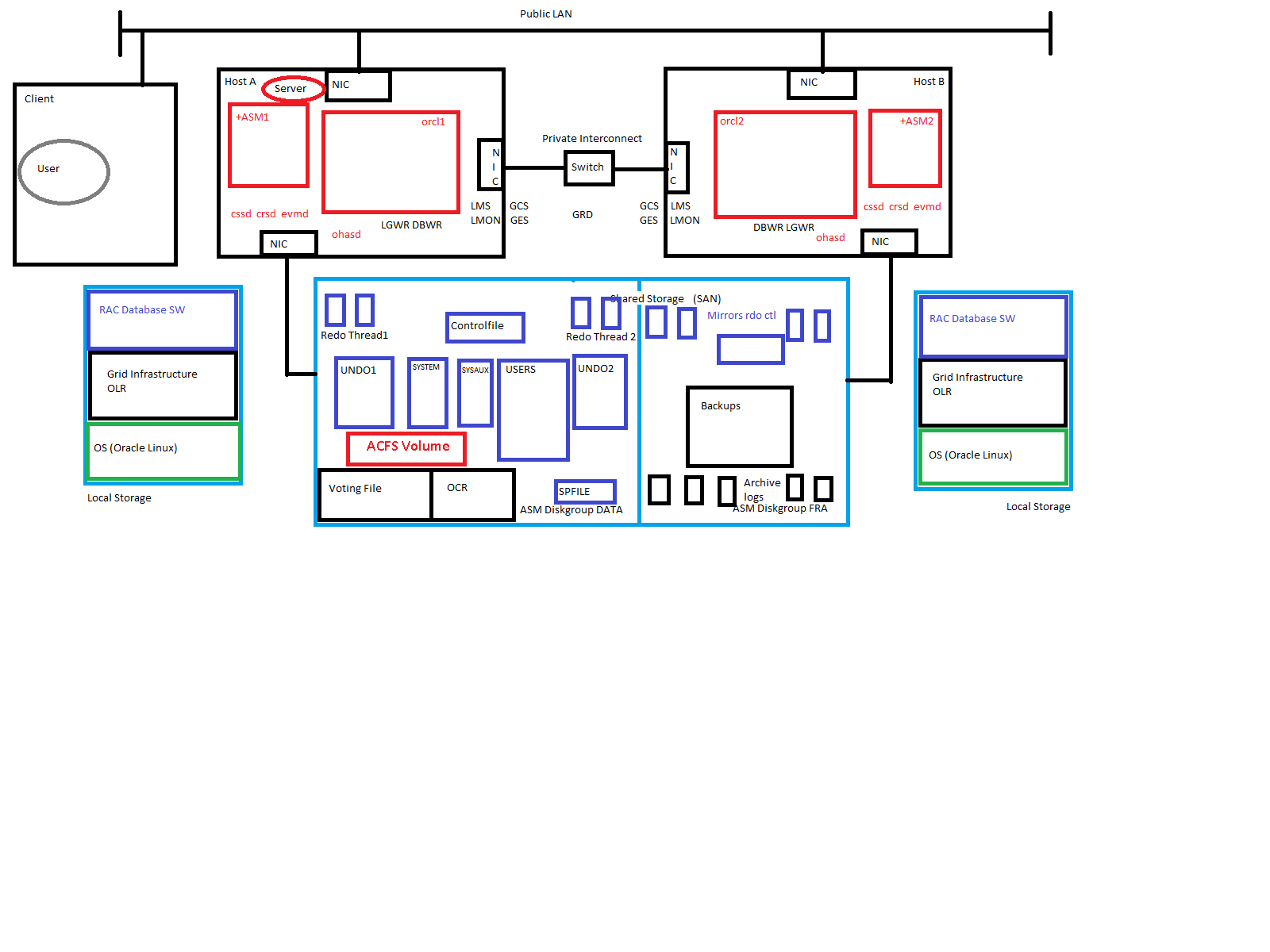 Just for me to memorize:
ohasd starts the agents
- orarootagent -> crsd, ctssd …
- cssdagent -> cssd
- oraagent -> evmd, asm …
crsd starts the agents
- orarootagent -> node vip, SCAN vip …
- oraagent -> Local Listener, SCAN Listener, Diskgroups, Database, Services …
Addendum: The corporation kindly offered to translate my above amateurish sketch into a professional graphic which I gladly accepted. See the brushed up sketch below:
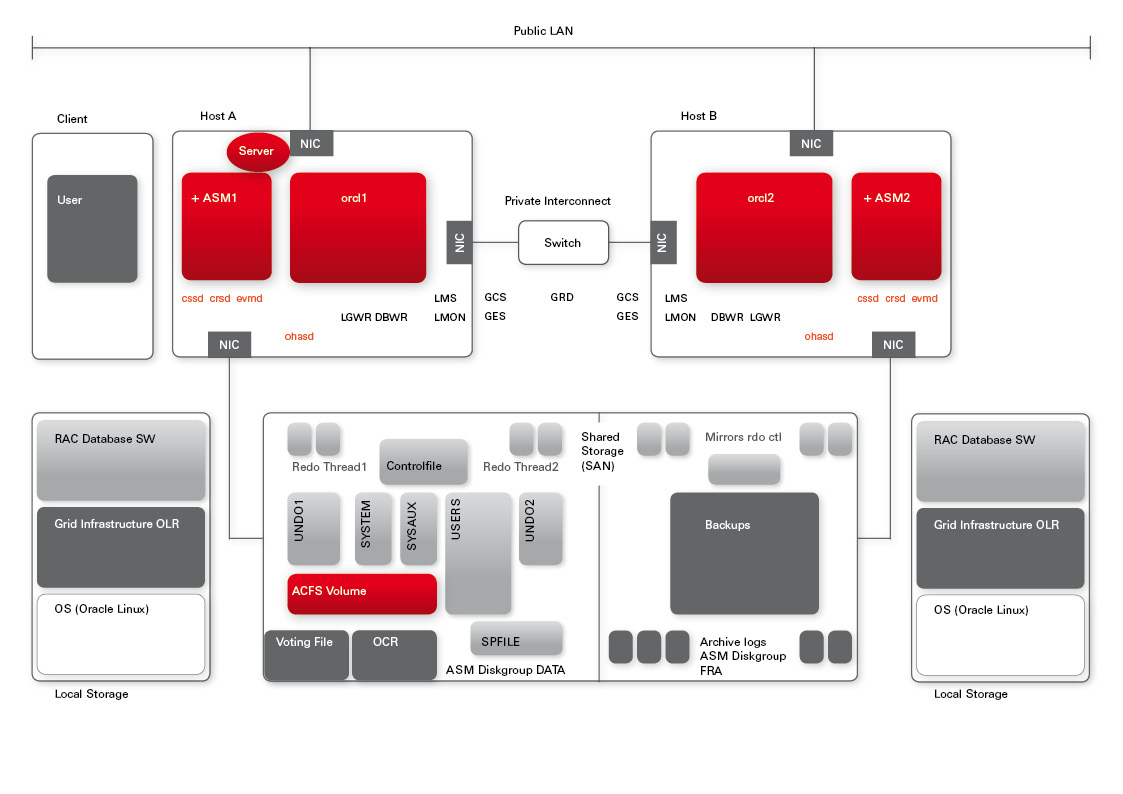 I like it – just seems to me that due to corporate identity requirements, we are a little short in colours 🙂
Pickleball spielen auf YouTube


 Pickleball spielen