Beiträge getaggt mit exadata
What is so smart about Exadata Smart Scan Presentation
For those of you who couldn’t attend my free mini-LVC about Exadata Smart Scan: Here are the Presentation Slides, if you are interested: LunchTimeLVC
I think the quote: „The fastest way of doing something is not to do it“ is from Cary Millsap, by the way
Monitor RAC I/O with gv$iostat_function
I was delivering an 11gR2 New Features course, followed by an 11gR2 RAC accelerated course. That lead me to combine the not so widely known new view v$iostat_function with the RAC area 🙂
We can now very easy monitor what DB function is doing I/O at what instances in our RAC DB:
SQL> select inst_id,function_name,
sum(small_read_megabytes+large_read_megabytes) as read_mb,
sum(small_write_megabytes+large_write_megabytes) as write_mb
from gv$iostat_function
group by cube (inst_id,function_name)
order by inst_id,function_name;
  INST_ID FUNCTION_NAME         READ_MB   WRITE_MB
---------- ------------------ ---------- ----------
         1 ARCH                        0          0
         1 Archive Manager             0          0
         1 Buffer Cache Reads        610          0
         1 DBWR                       12        373
         1 Data Pump                   0          0
         1 Direct Reads             1162          1
         1 Direct Writes               1        167
         1 LGWR                        1        346
         1 Others                   5215       2116
         1 RMAN                        0          0
         1 Recovery                    0          0
         1 Smart Scan                  0          0
         1 Streams AQ                  1          0
         1 XDB                         0          0
         1                          7002       3003
         2 ARCH                        0          0
         2 Archive Manager             0          0
         2 Buffer Cache Reads        187          0
         2 DBWR                       11        520
         2 Data Pump                   0          0
         2 Direct Reads                6          0
         2 Direct Writes               0          0
         2 LGWR                        1        299
         2 Others                   3898       1030
         2 RMAN                        0          0
         2 Recovery                    0          0
         2 Smart Scan                  0          0
         2 Streams AQ                  1          0
         2 XDB                         0          0
         2                          4104       1849
         3 ARCH                        0          0
         3 Archive Manager             0          0
         3 Buffer Cache Reads        131          0
         3 DBWR                        2         79
         3 Data Pump                   0          0
         3 Direct Reads                0          0
         3 Direct Writes               0          0
         3 LGWR                        0         58
         3 Others                   1140        269
         3 RMAN                        0          0
         3 Recovery                    0          0
         3 Smart Scan                  0          0
         3 Streams AQ                  0          0
         3 XDB                         0          0
         3                          1273        406
           ARCH                        0          0
           Archive Manager             0          0
           Buffer Cache Reads        928          0
           DBWR                       25        972
           Data Pump                   0          0
           Direct Reads             1168          1
           Direct Writes               1        167
           LGWR                        2        703
           Others                  10253       3415
           RMAN                        0          0
           Recovery                    0          0
           Smart Scan                  0          0
           Streams AQ                  2          0
           XDB                         0          0
                                   12379       5258

60 rows selected.
This is a 3 node cluster with not so much I/O done yet. Especially no Data Pump related I/O. We change that:
SQL> create directory dpdir as '+data';

Directory created.

SQL> create directory logdir as '/home/oracle/logdir';

Directory created.

SQL> exit
Disconnected from Oracle Database 11g Enterprise Edition Release 11.2.0.1.0 - Production
With the Partitioning, Real Application Clusters, Automatic Storage Management, OLAP,
Data Mining and Real Application Testing options
[oracle@host01 ~]$ mkdir /home/oracle/logdir

expdp full=y directory=dpdir logfile=logdir:mylog.txt
-- Output not shown --
Dump file set for SYS.SYS_EXPORT_FULL_01 is:
  +DATA/expdat.dmp
Job "SYS"."SYS_EXPORT_FULL_01" successfully completed at 18:00:33
The dumpfile was created into the ASM diskgroup DATA here, while the logfile was placed in a conventional directory on the local node. When we look into the diskgroup, we see that an alias was created:
ASMCMD> ls data -al
Type Redund  Striped  Time Sys  Name
                           Y    ORCL/
                           Y    cluster01/
                           N    expdat.dmp => +DATA/ORCL/DUMPSET/SYSSYS_EXPORT_FULL_01_74638_1.272.774121815
gv$iostat_function does show that Data Pump related I/O now:
SQL> select inst_id,function_name,
sum(small_read_megabytes+large_read_megabytes) as read_mb,
sum(small_write_megabytes+large_write_megabytes) as write_mb
from gv$iostat_function
group by cube (inst_id,function_name)
order by inst_id,function_name;
   INST_ID FUNCTION_NAME         READ_MB   WRITE_MB
---------- ------------------ ---------- ----------
         1 ARCH                        0          0
         1 Archive Manager             0          0
         1 Buffer Cache Reads        770          0
         1 DBWR                       14        425
         1 Data Pump                 795        540
         1 Direct Reads             1194          1
         1 Direct Writes               1        167
         1 LGWR                        1        451
         1 Others                   5297       2131
         1 RMAN                        0          0
         1 Recovery                    0          0
         1 Smart Scan                  0          0
         1 Streams AQ                  1          0
         1 XDB                         0          0
         1                          8073       3715
         2 ARCH                        0          0
         2 Archive Manager             0          0
         2 Buffer Cache Reads        191          0
         2 DBWR                       13        541
         2 Data Pump                   0          0
         2 Direct Reads                6          0
         2 Direct Writes               0          0
         2 LGWR                        1        309
         2 Others                   3955       1044
         2 RMAN                        0          0
         2 Recovery                    0          0
         2 Smart Scan                  0          0
         2 Streams AQ                  1          0
         2 XDB                         0          0
         2                          4167       1894
         3 ARCH                        0          0
         3 Archive Manager             0          0
         3 Buffer Cache Reads        142          0
         3 DBWR                        4         83
         3 Data Pump                   0          0
         3 Direct Reads                0          0
         3 Direct Writes               0          0
         3 LGWR                        0         68
         3 Others                   1233        283
         3 RMAN                        0          0
         3 Recovery                    0          0
         3 Smart Scan                  0          0
         3 Streams AQ                  0          0
         3 XDB                         0          0
         3                          1379        434
           ARCH                        0          0
           Archive Manager             0          0
           Buffer Cache Reads       1103          0
           DBWR                       31       1049
           Data Pump                 795        540
           Direct Reads             1200          1
           Direct Writes               1        167
           LGWR                        2        828
           Others                  10485       3458
           RMAN                        0          0
           Recovery                    0          0
           Smart Scan                  0          0
           Streams AQ                  2          0
           XDB                         0          0
                                   13619       6043

60 rows selected.
In this case, all the Data Pump I/O was done by the Instance 1. There is also a relation to Exadata, when you look at the function Smart Scan 🙂
Addendum: The Data Pump export fails if the log file is not redirected out of the ASM diskgroup:
[oracle@host01 ~]$ expdp tables=scott.dept directory=dpdir

Export: Release 11.2.0.1.0 - Production on Thu Feb 2 17:42:37 2012

Copyright (c) 1982, 2009, Oracle and/or its affiliates.  All rights reserved.

Username: / as sysdba

Connected to: Oracle Database 11g Enterprise Edition Release 11.2.0.1.0 - Production
With the Partitioning, Real Application Clusters, Automatic Storage Management, OLAP,
Data Mining and Real Application Testing options
ORA-39002: invalid operation
ORA-39070: Unable to open the log file.
ORA-29283: invalid file operation
ORA-06512: at "SYS.UTL_FILE", line 536
ORA-29283: invalid file operation
Therefore I used a local directory – which is less elegant than using an ACFS based directory:
SQL> drop directory logdir;

Directory dropped.

SQL> create directory logdir as '/u01/app/grid/acfsmounts/data_myvol/logdir';

Directory created.

SQL> exit
Disconnected from Oracle Database 11g Enterprise Edition Release 11.2.0.1.0 - Production
With the Partitioning, Real Application Clusters, Automatic Storage Management, OLAP,
Data Mining and Real Application Testing options
[oracle@host01 ~]$ expdp tables=scott.dept directory=dpdir logfile=logdir:mylog.txt
Export: Release 11.2.0.1.0 - Production on Thu Feb 2 17:06:46 2012

Copyright (c) 1982, 2009, Oracle and/or its affiliates.  All rights reserved.

Username: / as sysdba

-- output not shown --
Master table "SYS"."SYS_EXPORT_TABLE_01" successfully loaded/unloaded
******************************************************************************
Dump file set for SYS.SYS_EXPORT_TABLE_01 is:
  +DATA/expdat.dmp
Job "SYS"."SYS_EXPORT_TABLE_01" successfully completed at 17:07:26
On Exadata, we may use DBFS instead.
Exadata Quarter Rack Architecture Picture
The great success of my 11gR2 RAC Architecture picture encouraged me to publish this sketch that I have developed for an Exadata Storage Server Seminar LVC. In my opinion, a little visualization like that is helpful for many attendees to understand the relations of the various components easier. What do you think?

Addendum: The corporation kindly offered to translate my above amateurish sketch into a professional graphic which I gladly accepted. See the brushed up sketch below:
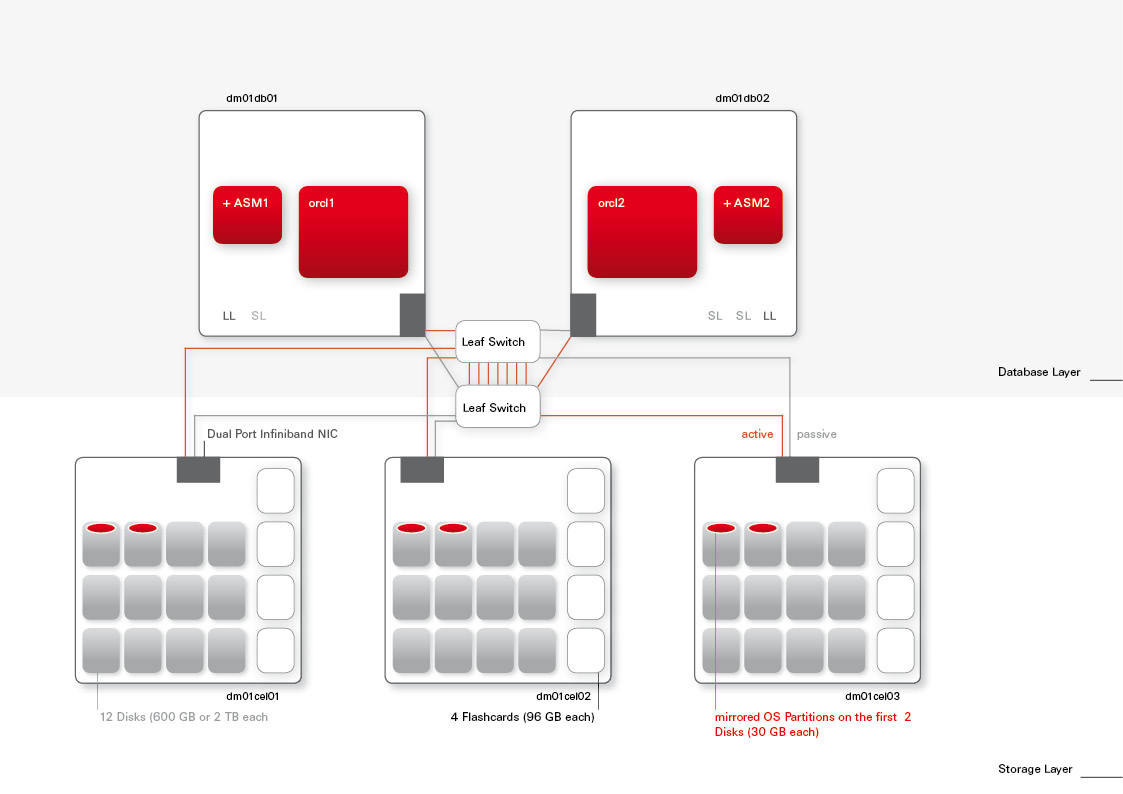 That does look really cool, doesn’t it? 🙂
Pickleball spielen auf YouTube


 Pickleball spielen
