Modify segment attributes on Logical Standby during Migration
Whenever you want to change certain storage attributes of your production tables, a Logical Standby can help. A common case is to do that during a migration. Not only will Data Guard help you to reduce downtime for the migration to the time it takes to do a switchover! With a Logical Standby, the segments do not need to look exactly (physically) the same as on the Primary. That’s where the name comes from 🙂
[oracle@uhesse1 ~]$ dgmgrl sys/oracle@prima
DGMGRL for Linux: Version 11.2.0.3.0 - 64bit Production
Copyright (c) 2000, 2009, Oracle. All rights reserved.
Welcome to DGMGRL, type "help" for information.
 Connected.
 DGMGRL> show configuration
Configuration - myconf
Protection Mode: MaxPerformance
 Databases:
 prima - Primary database
 logst - Logical standby database
Fast-Start Failover: DISABLED
Configuration Status:
 SUCCESS
My demo setup is on 11.2.0.3, but the shown technique should work similar with older versions. I will now create a demo user with a table that gets the default initial extent of 64k in the default tablespace of the database that uses autoallocate as the extent allocation type:
SQL> grant dba to adam identified by adam;

Grant succeeded.

SQL> connect adam/adam@prima
Connected.
SQL> create table t as select * from dual;

Table created.

SQL> select extents,initial_extent from user_segments where segment_name='T';

   EXTENTS INITIAL_EXTENT
---------- --------------
	 1	    65536

SQL> select rowid,t.* from t;

ROWID		   D
------------------ -
AAADSaAAEAAAACTAAA X
I listed the rowid above to show that it will be different on the Logical Standby – but that is no problem because of the supplemental logging we do on the Primary to be able to identify the modified rows on the Logical Standby without that rowid from the Primary. Now let’s assume we want to have the initial extent changed to 8M – a recommendation on Exadata for large segments, by the way. See how easy that can be done:
DGMGRL> edit database logst set state=apply-off;
Succeeded.
DGMGRL> show database logst;

Database - logst

  Role:            LOGICAL STANDBY
  Intended State:  APPLY-OFF
  Transport Lag:   0 seconds
  Apply Lag:       0 seconds
  Instance(s):
    logst

Database Status:
SUCCESS
I need to stop the SQL Apply – not the Redo Transport – before the change on the Logical Standby can be done. Technically speaking, your Recovery Point Objective remains the same as before, but your Recovery Time Objective increases according to the amount of redo that accumulates now in the meantime. Now to the modification of the storage attributes:
SQL> select to_char(event_time,'dd-hh24:mi:ss') as time,event,status from dba_logstdby_events order by 1;

TIME	    EVENT					       STATUS
----------- -------------------------------------------------- -----------------------------------------------------------
29-16:03:07						       Shutdown acknowledged
29-16:03:07						       ORA-16128: User initiated stop apply successfully completed

SQL> alter table adam.t move storage (initial 8m);

Table altered.
If you see any other error message in dba_logstdby_events, fix these errors before you go on with the task. The table uses now 8M initial extents – it is reorganized also during this step. In my simplified example, there is no index on the table. Otherwise indexes need to be rebuilt now. I will restart the SQL Apply and check whether it works again:
DGMGRL> edit database logst set state=apply-on;
Succeeded.
DGMGRL> show database logst;

Database - logst

  Role:            LOGICAL STANDBY
  Intended State:  APPLY-ON
  Transport Lag:   0 seconds
  Apply Lag:       0 seconds
  Instance(s):
    logst

Database Status:
SUCCESS

SQL> update t set dummy='Y' where dummy='X';

1 row updated.

SQL> commit;

Commit complete.
Now back on the Logical Standby:
SQL> connect adam/adam@logst
Connected.
SQL> select to_char(event_time,'dd-hh24:mi:ss') as time,event,status from dba_logstdby_events order by 1;

TIME	    EVENT					       STATUS
----------- -------------------------------------------------- -------------------------------------------
29-16:16:11						       ORA-16111: log mining and apply setting up
29-16:16:11						       Apply LWM 463670, HWM 463670, SCN 464525
29-16:16:11						       APPLY_UNSET: MAX_SGA
29-16:16:11						       APPLY_UNSET: MAX_SERVERS

SQL> select extents,initial_extent from user_segments where segment_name='T';

   EXTENTS INITIAL_EXTENT
---------- --------------
	 1	  8388608

SQL> select rowid,t.* from t;

ROWID		   D
------------------ -
AAADZrAAEAAAAESAAA Y
As you can see, the storage attribute was changed, and the rowid is different here. After a switchover to the Logical Standby, my production table uses now 8m initial extents.
Conclusion: With a Logical Standby in place, it is relatively easy to change storage attributes. It requires a stop of the SQL Apply process, though. You may want to use this approach during a migration to combine the major task (the migration) with some housekeeping. If you ever wondered why Logical Standby is listed under the Logical Migration Methods although it starts with (and has the same limitations as) a Physical Standby – you have just seen the reason. As always: Don’t believe it, test it 🙂
Evidence for successful #Oracle Performance Tuning
This article shows an easy way to determine, whether your Oracle Database Performance Tuning task has been successful – or not. In the end, it boils down to „The objective for tuning an Oracle system could be stated as reducing the time that users spend in performing some action on the database, or simply reducing DB time.“ as the Online Documentation says. Best proof would be a confirmation from the end users that run time got reduced; second best is a proof of reduced DB time, which is discussed here.
A tuning task should always end with such a proof; your gut feeling or high confidence is not sufficient – or as I like to say: „Don’t believe it, test it!“ 🙂
The demo scenario: With an Oracle Enterprise Edition version 11.2.0.3, an application uses these commands to delete rows:
SQL> create table t as select * from dual where 1=2;

Table created.
SQL> begin
 for i in 1..100000 loop
 execute immediate 'delete from t where dummy='||to_char(i);
 end loop;
 end;
 /
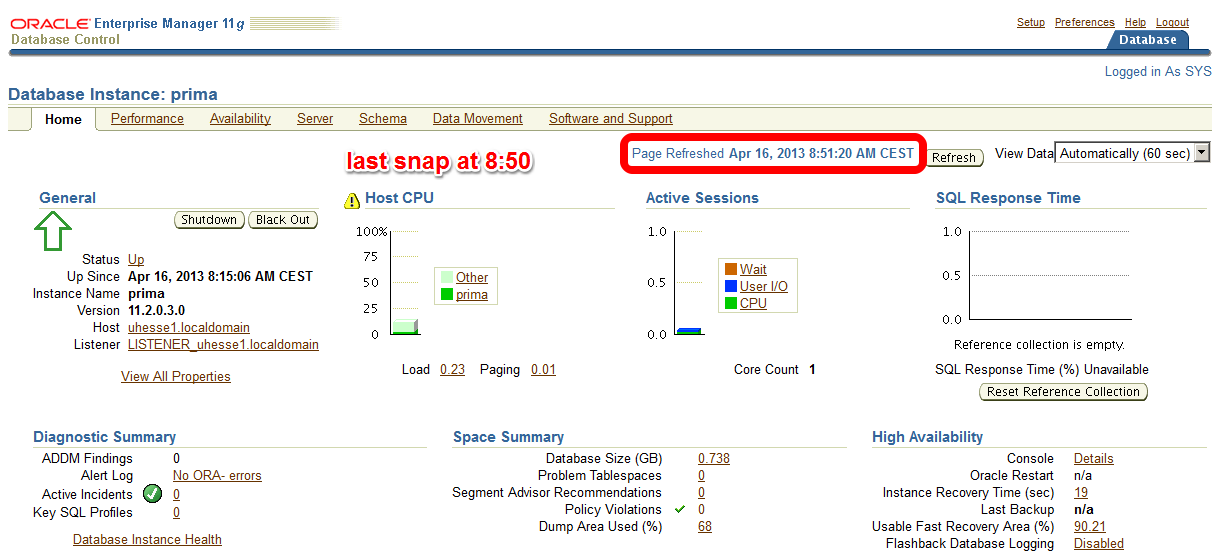
I am pretty sure that this code is not optimal, because it uses Literals instead of Bind Variables where it is not appropriate. Before I implement an improved version of the code, I take a Baseline with Automatic Workload Repository (AWR) snapshots. On my demo system, snapshots are taken every ten minutes:
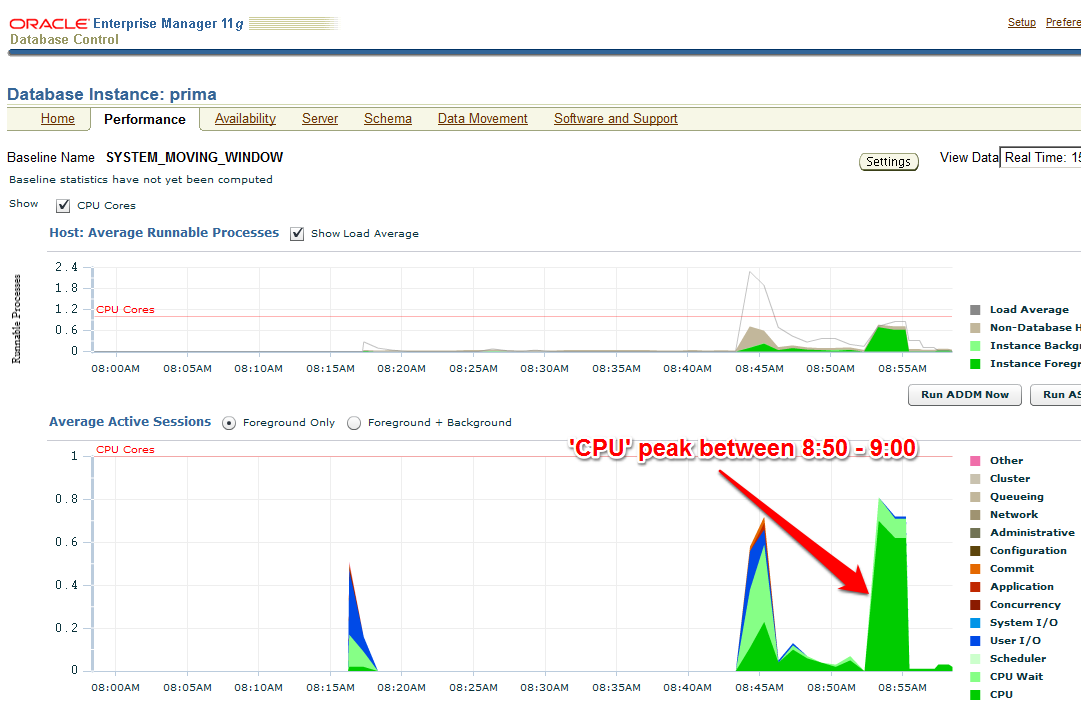
 The code with Literals was just called – now about 10 minutes later on the Enterprise Manager (EM) Performance page:
 The AWR report that I take (with EM or with awrrpt.sql) as the baseline shows the following:
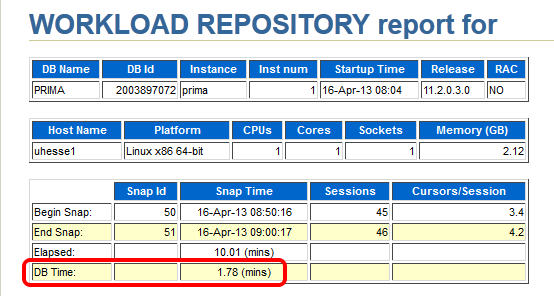 Notice especially the poor Library Cache hit ration, significant for not using Bind Variables – and the meaningless high Buffer Cache hit ration 🙂
 Starting after 9:00 am, my improved code that uses Bind Variables runs:
SQL> begin
 for i in 1..100000 loop
 delete from t where dummy=to_char(i);
 end loop;
 end;
 /
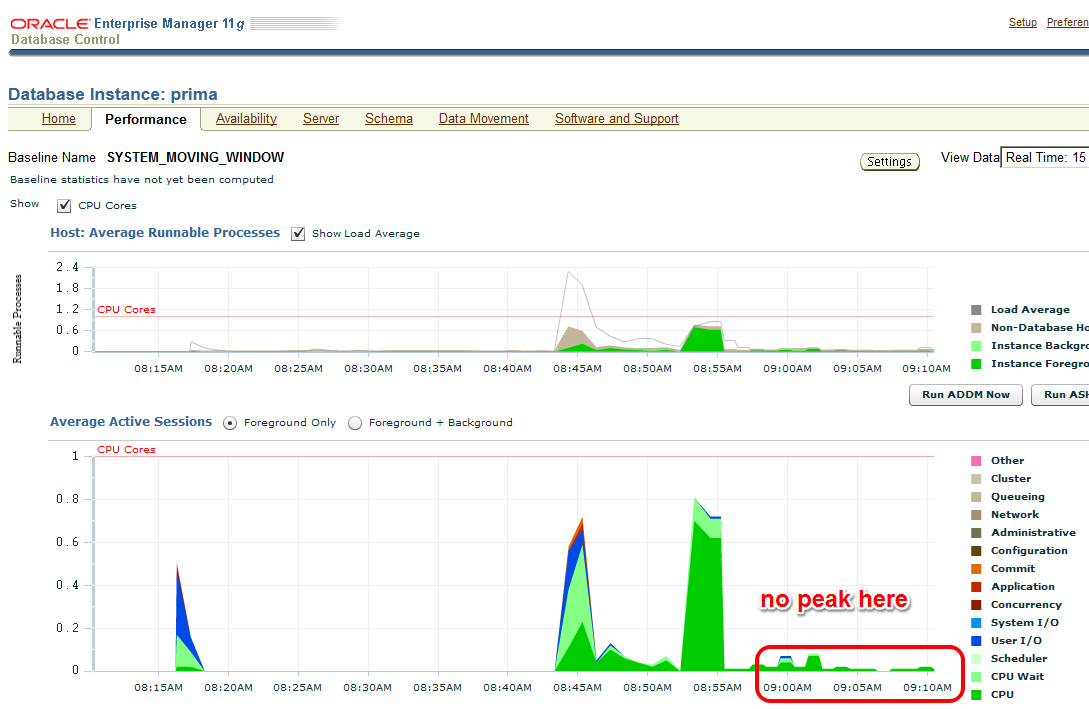
The EM Performance page show no peak during the next 10 minutes which represent my comparison period after the tuning task:
 Let’s look at the AWR report of the second snapshot range after the tuning task:
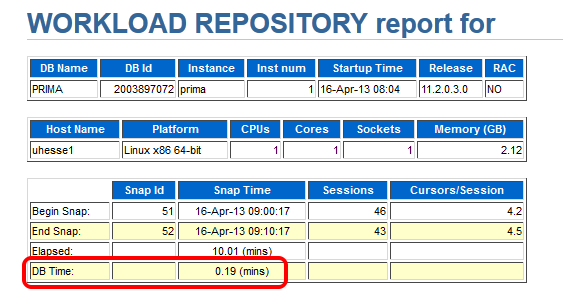 Same wall clock time, same application load, but reduced DB time – I was successful! Could stop here, but some more details:
 The important (especially for OLTP systems) Library Cache hit ratio is now very good. A very convenient way to compare the two snapshot ranges is the ‚AWR Compare Periods‘ feature in EM (or awrddrpt.sql) , which shows us instructively:
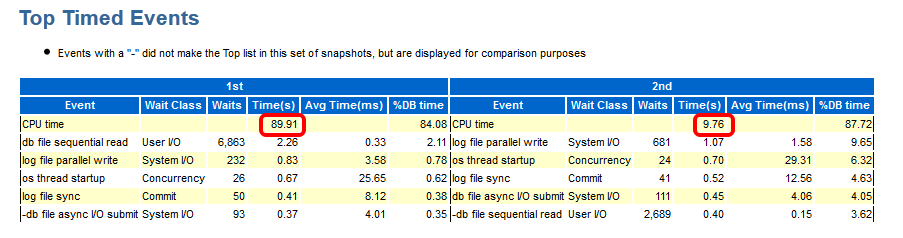
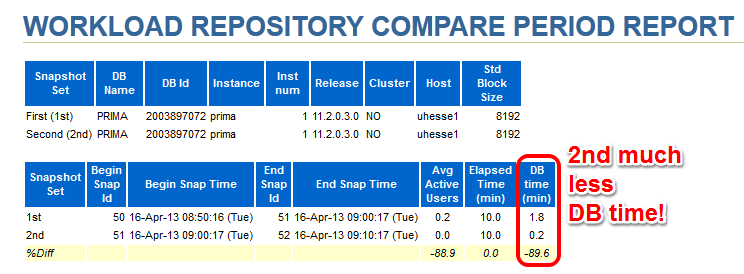 Although in both periods, CPU was the top event (also in % DB time), it took much less time in total for the 2nd period:
 The Time Model Statistics confirm a strongly reduced Parse Time for the 2nd period:
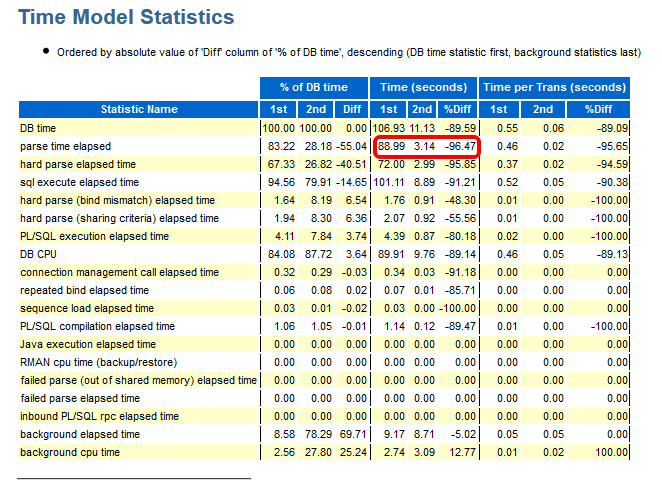 Especially, we see a striking improvement for the run time of the code with Bind Variables: From about 82 seconds down to about 3 seconds!
 This kind of proof (less DB time) can be used also in cases where the reduction of run time for a single statement is not so obvious as in my example. If 1000 users had done each 100 deletes, they would have seen not much difference in run time each – but the parse time summarizes and impacts overall performance similar as seen here. If you would like to see the three original AWR reports were I took the screen shots above from, they are here as PDFs
Conclusion: You will – and should – be able to prove the effectiveness of your Oracle Database Tuning task with a reduction of DB time from an AWR report comparison. After all, you don’t want to waste your efforts, do you? 🙂
Addendum: This posting was published in the Oracle University EMEA Newsletter May 2013
The 3e-Approach
After years of teaching and studying (holding a Bachelor’s Degree in Educational Science), I think I’m now able to put my experience & conclusions into the this formular:

Explain:
Even a complex technical topic (like an Oracle Database) should be explained to the audience in an easy understandable way. That is of course only possible if the instructor knows his stuff thoroughly but also resists the temptation to blind the audience with his deep knowledge in order to appear clever. Things get complex by themselves soon enough. The explanations must be technically correct, though, but they may be simplified. Teaching will always show a model of the reality – and that model should hold water after the knowledge of the audience expands.
Two extremes that illustrate what should be avoided here: 1) „The Expert“ The instructor is deeply involved in some complex technical matter and tells many specific details about that to the audience that they can hardly understand or benefit from, which the instructor does not recognize. 2) „The Ignorant“ The instructor knows little about the subject (reading introductions during breaks) and just fantasizes answers if the questions are too difficult.
Exemplify:
It is not enough to show only slides in order to achieve a good understanding! Demonstrations will not only make the teaching more lively, they will also prove (or sometimes falsify even) the statements of the instructor. They should be reproducible, so that the audience can see for themselves. A claim that essentially only says: „I know that because I’m an expert, trust me!“ is not acceptable.
Empower:
The ultimate goal of the instructor should be to empower the recipients to use the explained technology themselves in an effective and efficient way. Accompanying practices during a course help a lot to reach that goal. In absence of practices, demonstrations are the second best way to empower the audience. They should realize that they can do these things also, not only the instructor. Teaching is not supposed to be a sales pitch for products or services!
That’s already it – easy, right? Some hard work involved under the covers, though…
My best days are when I encounter former attendees of my courses, telling me how much they liked it and that they actually could make use of the contents and implemented this and that feature during a certain project. It happens every now and then, when I think to myself: Empowered – Good Job 🙂
Pickleball spielen auf YouTube


 Pickleball spielen