Parameter to prevent license violation with Active Data Guard
Disclaimer: I got informed that the mentioned underscore parameter is not reliable on every database version and that it never was intended for customer use. That is also why the quoted MOS note has been removed. I leave the article in spite, because I know it got referenced by many sites. And don’t mess with Larry Carpenter 😉
Although Real-Time Query is a great feature, it requires the Active Data Guard option to be licensed AND it is very easy to turn it on. That has been a concern for some customers I encountered. Now I realized that we have an undocumented parameter to prevent exactly that. Thanks to Marc, who mentioned the MOS Note 1436313.1 in a recent comment!
I am here connected to a Physical Standby database, running on 11.2.0.1 and don’t want to use Real-Time Query. The startup command would normally trigger the database to open READ ONLY, together with a Data Guard Broker configuration, Real-Time Query would be started. Not any more:
SQL> alter system set "_query_on_physical"=false scope=spfile;

System altered.

SQL> shutdown immediate
ORA-01109: database not open

Database dismounted.
ORACLE instance shut down.
SQL> startup
ORACLE instance started.

Total System Global Area  521936896 bytes
Fixed Size		    2214936 bytes
Variable Size		  314573800 bytes
Database Buffers	  201326592 bytes
Redo Buffers		    3821568 bytes
Database mounted.
ORA-16669: instance cannot be opened because the Active Data Guard option is
disabled

SQL> host oerr ora 16669
16669, 00000, "instance cannot be opened because the Active Data Guard option is disabled"
// *Cause:  The attempt to open the instance failed because the Active Data
//          Guard option was not enabled and Redo Apply was either running
//          or was about to be started by the Data Guard broker.
// *Action: Stop Redo Apply or set the database state to APPLY-OFF and then
//          open the database.
It is still possible to open the Physical Standby READ ONLY when the MRP background process is stopped:
DGMGRL> edit database physt set state=apply-off;
Succeeded.
SQL> alter database open;

Database altered.

SQL> select open_mode from v$database;

OPEN_MODE
--------------------
READ ONLY
Only drawback is that it is an undocumented parameter, so you should confirm with Oracle Support that it is okay to use it in your case.
Conclusion: There is an easy way to prevent license violation by accident with Real-Time Query. Don’t believe it, ask Oracle Support 🙂
How to add a Logical Standby to an existing #Oracle Data Guard Configuration
The proper way to add a Logical Standby database when the to be converted Physical Standby is already part of a 12c Data Guard configuration is a bit tricky. This is how my configuration looks initially:
DGMGRL> show configuration;

Configuration - myconf

  Protection Mode: MaxAvailability
  Databases:
  prima - Primary database
    sbdb  - Physical standby database

Fast-Start Failover: DISABLED

Configuration Status:
SUCCESS
Now I want to convert sbdb into a Logical Standby database and have the Data Guard Broker manage it. Redo Apply needs to be stopped on the Physical Standby now:
DGMGRL> edit database sbdb set state=apply-off;
Succeeded.
DGMGRL> show database sbdb;

Database - sbdb

  Role:              PHYSICAL STANDBY
  Intended State:    APPLY-OFF
  Transport Lag:     0 seconds (computed 0 seconds ago)
  Apply Lag:         0 seconds (computed 0 seconds ago)
  Apply Rate:        (unknown)
  Real Time Query:   OFF
  Instance(s):
    sbdb

Database Status:
SUCCESS
Important point here is that the Redo Transport is not stopped, just the Apply. Now I create the Logical Standby Dictionary on the Primary – no mistake possible here because the Standby is not opened READ WRITE. After that, I convert sbdb into a Logical Standby database. Unlike a Physical Standby database which has always the same DB_NAME as the Primary, it gets its own database name:
SQL> exec dbms_logstdby.build

PL/SQL procedure successfully completed.

SQL> connect sys/oracle@sbdb as sysdba
Connected.
SQL> alter database recover to logical standby sbdb;

Database altered.
SQL> shutdown immediate
ORA-01507: database not mounted

ORACLE instance shut down.
SQL> startup mount
ORACLE instance started.

Total System Global Area  521936896 bytes
Fixed Size                  2290264 bytes
Variable Size             364907944 bytes
Database Buffers          146800640 bytes
Redo Buffers                7938048 bytes
Database mounted.
SQL> alter database open resetlogs;

Database altered.

SQL> select name,dbid from v$database;

NAME            DBID
--------- ----------
SBDB      1219633322
Now I encounter an expected problem when I try to remove sbdb from the configuration that can be resolved easy:
DGMGRL> remove database sbdb;
Error: ORA-16627: operation disallowed since no standby databases would remain to support protection mode

Failed.
DGMGRL> edit configuration set protection mode as maxperformance;
Succeeded.
DGMGRL> remove database sbdb;
Removed database "sbdb" from the configuration
The next problem took me some more time to resolve.
DGMGRL> add database sbdb as connect identifier is sbdb;
Error: ORA-16803: unable to query a database table or fixed view

Failed.
The solution here is (for me at least) a bit counter-intuitive: Logical Standby Apply needs to be running. That is odd in so far as the Broker way to do that is not yet possible. Instead (on the Standby):
SQL> alter database start logical standby apply immediate;

Database altered.
Now the new Logical Standby can be added:
DGMGRL> add database sbdb as connect identifier is sbdb;
Database "sbdb" added
DGMGRL> enable database sbdb;
Enabled.
The previous remove also removed the database property logxptmode, which was sync. Therefore:
DGMGRL> edit configuration set protection mode as maxavailability;
Error: ORA-16627: operation disallowed since no standby databases would remain to support protection mode

Failed.
DGMGRL> edit database sbdb set property logxptmode=sync;
Property "logxptmode" updated
DGMGRL> edit configuration set protection mode as maxavailability;
Succeeded.
DGMGRL> show configuration;

Configuration - myconf

  Protection Mode: MaxAvailability
  Databases:
  prima - Primary database
    sbdb  - Logical standby database

Fast-Start Failover: DISABLED

Configuration Status:
SUCCESS
Succeeded in the end. Hope you find it useful when you ever encounter this task yourself. As always: Don’t believe it, test it! 🙂
Purpose of the Voting Disk for #Oracle RAC
The Voting Disk provides an additional communication path for the cluster nodes in case of problems with the Interconnect. It prevents Split-Brain scenarios. That is another topic from my recent course Oracle Grid Infrastructure 11g: Manage Clusterware and ASM that I’d like to share with the Oracle Community.
Under normal circumstances, the cluster nodes are able to communicate through the Interconnect. Not only do the cssd background processes interchange a network heartbeat that way, but also things like Cache Fusion are done on that path. The red lines in the picture symbolize the cssd network heartbeat. Additionally, the cssd processes write also into the Voting Disk (respectively Voting File) regularly and interchange a disk heartbeat over that path. The blue lines in the picture stand for that path. Each cssd makes an entry for its node and for the other nodes it can reach over the network:
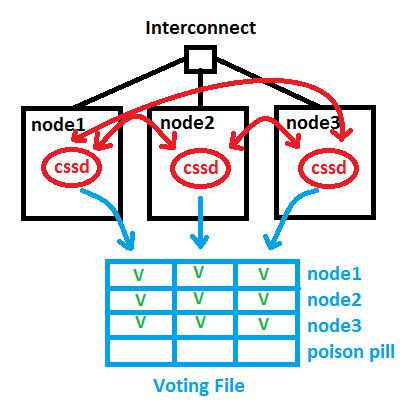 Now in case of a network error, a Split-Brain problem would occur – without a Voting Disk. Suppose node1 has lost the network connection to the Interconnect. In order to prevent that, redundant network cards are recommended since a long time. We introduced HAIP in 11.2.0.2 to make that easier to implement, without the need of bonding, by the way. But here, node1 cannot use the Interconnect anymore. It can still access the Voting Disk, though. Nodes 2 and 3 see their heartbeats still but no longer node1, which is indicated by the green Vs and red fs in the picture. The node with the network problem gets evicted by placing the Poison Pill into the Voting File for node1. cssd of node1 will commit suicide now and leave the cluster:
 The pictures in this posting are almost identical with what I paint on the whiteboard during the course. Hope you find it useful 🙂
Related posting: Voting Disk and OCR in 11gR2: Some changes
Pickleball spielen auf YouTube


 Pickleball spielen