Common Users & SYSDBA with #Oracle 12c Multitenancy
A 12c multitenant database introduces the new concept of local users and common users. This article shows simple use cases why DBAs may want to create common users – in contrast to the common users that are created automatically, like SYS, SYSTEM, MDSYS etc.
A typical requirement is to have a superuser other than SYS, but with the same power. Like the common user C##_SYS in the picture below.
Or suppose we have many pluggable databases (PDBs) and different superusers responsible for different PDBs like C##_ADMIN1 and C##_ADMIN2:
 Let’s implement it as above. Initially, my demo environment looks like this:
SQL> select name,open_mode,con_id from v$pdbs;

NAME                           OPEN_MODE      CON_ID
------------------------------ ---------- ----------
PDB$SEED                       READ ONLY           2
PDB1                           READ WRITE          3
PDB2                           READ WRITE          4
PDB3                           READ WRITE          5

SQL> select * from v$pwfile_users;

USERNAME                       SYSDB SYSOP SYSAS SYSBA SYSDG SYSKM     CON_ID
------------------------------ ----- ----- ----- ----- ----- ----- ----------
SYS                            TRUE  TRUE  FALSE FALSE FALSE FALSE          0
SYSDG                          FALSE FALSE FALSE FALSE TRUE  FALSE          1
SYSBACKUP                      FALSE FALSE FALSE TRUE  FALSE FALSE          1
SYSKM                          FALSE FALSE FALSE FALSE FALSE TRUE           1
At first, I create C##_SYS and grant SYSDBA as a common privilege to that new user:
SQL> create user c##_sys identified by oracle container=all;

User created.

SQL> grant sysdba to c##_sys container=all;

Grant succeeded.

SQL> select * from v$pwfile_users;

USERNAME                       SYSDB SYSOP SYSAS SYSBA SYSDG SYSKM     CON_ID
------------------------------ ----- ----- ----- ----- ----- ----- ----------
SYS                            TRUE  TRUE  FALSE FALSE FALSE FALSE          0
SYSDG                          FALSE FALSE FALSE FALSE TRUE  FALSE          1
SYSBACKUP                      FALSE FALSE FALSE TRUE  FALSE FALSE          1
SYSKM                          FALSE FALSE FALSE FALSE FALSE TRUE           1
C##_SYS                        TRUE  FALSE FALSE FALSE FALSE FALSE          0
C##_SYS can now do anything to any PDB:
SQL> connect c##_sys/oracle@edd2r6p0/pdb1 as sysdba
Connected.
SQL> shutdown immediate
Pluggable Database closed.
SQL> connect / as sysdba
Connected.
SQL> select name,open_mode,con_id from v$pdbs;

NAME                           OPEN_MODE      CON_ID
------------------------------ ---------- ----------
PDB$SEED                       READ ONLY           2
PDB1                           MOUNTED             3
PDB2                           READ WRITE          4
PDB3                           READ WRITE          5

SQL> connect c##_sys/oracle@edd2r6p0/pdb1 as sysdba
Connected.
SQL> startup
Pluggable Database opened.
SQL> connect / as sysdba
Connected.
SQL> select name,open_mode,con_id from v$pdbs;

NAME                           OPEN_MODE      CON_ID
------------------------------ ---------- ----------
PDB$SEED                       READ ONLY           2
PDB1                           READ WRITE          3
PDB2                           READ WRITE          4
PDB3                           READ WRITE          5
Notice that there is a subtle difference in granting SYSDBA of the container database (CDB) as local or common privilege:
SQL> revoke sysdba from c##_sys container=all;

Revoke succeeded.

SQL> grant sysdba to c##_sys;

Grant succeeded.

SQL> select * from v$pwfile_users;

USERNAME                       SYSDB SYSOP SYSAS SYSBA SYSDG SYSKM     CON_ID
------------------------------ ----- ----- ----- ----- ----- ----- ----------
SYS                            TRUE  TRUE  FALSE FALSE FALSE FALSE          0
SYSDG                          FALSE FALSE FALSE FALSE TRUE  FALSE          1
SYSBACKUP                      FALSE FALSE FALSE TRUE  FALSE FALSE          1
SYSKM                          FALSE FALSE FALSE FALSE FALSE TRUE           1
C##_SYS                        TRUE  FALSE FALSE FALSE FALSE FALSE          1

SQL> connect c##_sys/oracle@edd2r6p0/pdb1 as sysdba
ERROR:
ORA-01031: insufficient privileges


Warning: You are no longer connected to ORACLE.
C##_SYS has SYSDBA of the CDB „only“, therefore the error. Although:
SQL> connect c##_sys/oracle as sysdba
Connected.
SQL> show con_name

CON_NAME
------------------------------
CDB$ROOT
SQL> alter session set container=pdb1;

Session altered.

SQL> shutdown immediate
Pluggable Database closed.
SQL> show con_name

CON_NAME
------------------------------
PDB1
SQL> startup
Pluggable Database opened.
SQL> connect c##_sys/oracle as sysdba
Connected.
SQL> select name,open_mode,con_id from v$pdbs;

NAME                           OPEN_MODE      CON_ID
------------------------------ ---------- ----------
PDB$SEED                       READ ONLY           2
PDB1                           READ WRITE          3
PDB2                           READ WRITE          4
PDB3                           READ WRITE          5
However, the proper way is probably granting it as a common privilege:
SQL> revoke sysdba from c##_sys;

Revoke succeeded.

SQL> grant sysdba to c##_sys container=all;

Grant succeeded.
Now to the implementation of C##_ADMIN1 and C##_ADMIN2. The point is here, that SYSDBA can be granted as a local privilege for certain PDBs only, to the effect that different superusers can be responsible for different groups of PDBs:
SQL> create user c##_admin1 identified by oracle container=all;

User created.

SQL> alter session set container=pdb1;

Session altered.

SQL> grant sysdba to c##_admin1 container=current;

Grant succeeded.

SQL> connect / as sysdba
Connected.
SQL> select * from v$pwfile_users;

USERNAME                       SYSDB SYSOP SYSAS SYSBA SYSDG SYSKM     CON_ID
------------------------------ ----- ----- ----- ----- ----- ----- ----------
SYS                            TRUE  TRUE  FALSE FALSE FALSE FALSE          0
SYSDG                          FALSE FALSE FALSE FALSE TRUE  FALSE          1
SYSBACKUP                      FALSE FALSE FALSE TRUE  FALSE FALSE          1
SYSKM                          FALSE FALSE FALSE FALSE FALSE TRUE           1
C##_SYS                        TRUE  FALSE FALSE FALSE FALSE FALSE          0
C##_ADMIN1                     TRUE  FALSE FALSE FALSE FALSE FALSE          3

6 rows selected.
For now, C##_ADMIN1 can only connect to PDB1:
SQL> connect c##_admin1/oracle@edd2r6p0/pdb1 as sysdba
Connected.
SQL> select count(*) from session_privs;

  COUNT(*)
----------
       233

SQL> connect c##_admin1/oracle@edd2r6p0/pdb2 as sysdba
ERROR:
ORA-01017: invalid username/password; logon denied


Warning: You are no longer connected to ORACLE.
The completed implementation of the picture above:
SQL> connect / as sysdba
Connected.
SQL> alter session set container=pdb2;

Session altered.

SQL> grant sysdba to c##_admin1 container=current;

Grant succeeded.

SQL> connect / as sysdba
Connected.
SQL> create user c##_admin2 identified by oracle;

User created.

SQL> alter session set container=pdb3;

Session altered.

SQL> grant sysdba to c##_admin2 container=current;

Grant succeeded.

SQL> connect / as sysdba
Connected.
SQL> select * from v$pwfile_users;

USERNAME                       SYSDB SYSOP SYSAS SYSBA SYSDG SYSKM     CON_ID
------------------------------ ----- ----- ----- ----- ----- ----- ----------
SYS                            TRUE  TRUE  FALSE FALSE FALSE FALSE          0
SYSDG                          FALSE FALSE FALSE FALSE TRUE  FALSE          1
SYSBACKUP                      FALSE FALSE FALSE TRUE  FALSE FALSE          1
SYSKM                          FALSE FALSE FALSE FALSE FALSE TRUE           1
C##_SYS                        TRUE  FALSE FALSE FALSE FALSE FALSE          0
C##_ADMIN1                     TRUE  FALSE FALSE FALSE FALSE FALSE          3
C##_ADMIN1                     TRUE  FALSE FALSE FALSE FALSE FALSE          4
C##_ADMIN2                     TRUE  FALSE FALSE FALSE FALSE FALSE          5

8 rows selected.
The whole example is from my present 12c New Features in Düsseldorf, by the way. Hope you find it useful 🙂
As always: Don’t believe it, test it!
HA of Database Control for RAC made easy
When you install an 11g RAC database without Grid Control respectively Cloud Control present, this is what the DBCA will give you:
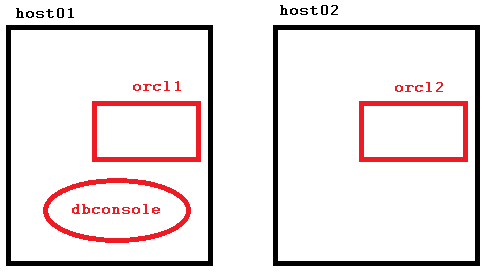 There is one Database Control OC4J Container only, running on host01. Should host01 go down, the Enterprise Manager is no longer available now. We could make that a resource, known to the clusterware and let it failover in that case. But also – and even easier – we can start a second OC4J Container to run on host02 simultaneously like this:
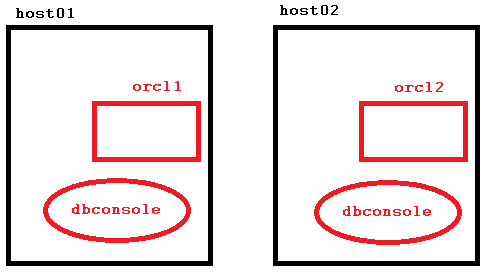 Let’s see how to implement that:
[oracle@host01 ~]$ emca -reconfig dbcontrol -cluster -EM_NODE host02 -EM_NODE_LIST host02

STARTED EMCA at May 14, 2014 5:16:14 PM
EM Configuration Assistant, Version 11.2.0.3.0 Production
Copyright (c) 2003, 2011, Oracle.  All rights reserved.

Enter the following information:
Database unique name: orcl
Service name: orcl
Do you wish to continue? [yes(Y)/no(N)]: yes
May 14, 2014 5:16:26 PM oracle.sysman.emcp.EMConfig perform
INFO: This operation is being logged at /u01/app/oracle/cfgtoollogs/emca/orcl/emca_2014_05_14_17_16_14.log.
May 14, 2014 5:16:29 PM oracle.sysman.emcp.util.DBControlUtil stopOMS
INFO: Stopping Database Control (this may take a while) ...
May 14, 2014 5:16:34 PM oracle.sysman.emcp.EMAgentConfig performDbcReconfiguration
INFO: Propagating /u01/app/oracle/product/11.2.0/dbhome_1/host02_orcl/sysman/config/emd.properties to remote nodes ...
May 14, 2014 5:16:34 PM oracle.sysman.emcp.util.DBControlUtil startOMS
INFO: Starting Database Control (this may take a while) ...
May 14, 2014 5:17:33 PM oracle.sysman.emcp.EMDBPostConfig performDbcReconfiguration
INFO: Database Control started successfully
May 14, 2014 5:17:34 PM oracle.sysman.emcp.EMDBPostConfig showClusterDBCAgentMessage
INFO:
****************  Current Configuration  ****************
 INSTANCE            NODE           DBCONTROL_UPLOAD_HOST
----------        ----------        ---------------------

orcl              host01              host01.example.com
orcl              host02              host02.example.com

Enterprise Manager configuration completed successfully
FINISHED EMCA at May 14, 2014 5:17:34 PM
[oracle@host01 ~]$ emctl status dbconsole
Oracle Enterprise Manager 11g Database Control Release 11.2.0.3.0
Copyright (c) 1996, 2011 Oracle Corporation.  All rights reserved.
https://host01.example.com:1158/em/console/aboutApplication
Oracle Enterprise Manager 11g is running.
------------------------------------------------------------------
Logs are generated in directory /u01/app/oracle/product/11.2.0/dbhome_1/host01_orcl/sysman/log
Not only can I access Database Control at host01 as usual, I can also get it at host02 now:
[oracle@host01 ~]$ ssh host02
Last login: Wed May 14 10:50:32 2014 from host01.example.com
[oracle@host02 ~]$ emctl status dbconsole
Oracle Enterprise Manager 11g Database Control Release 11.2.0.3.0
Copyright (c) 1996, 2011 Oracle Corporation.  All rights reserved.
https://host02.example.com:1158/em/console/aboutApplication
Oracle Enterprise Manager 11g is running.
------------------------------------------------------------------
Logs are generated in directory /u01/app/oracle/product/11.2.0/dbhome_1/host02_orcl/sysman/log
All this is of course not new, but you won’t find it easy in the docs. That is something from my RAC accelerated course last week in Reading, by the way. Even seasoned RAC DBAs are sometimes not aware of that option, so I thought it might be helpful to publish it here briefly 🙂
Consider speaking at #ukoug_tech14
The call for papers is still open for UKOUG Tech 14 – a great event to speak at for sure!
 The board explicitly encourages first-time speakers and women to submit an abstract.
Both doesn’t apply for me, but I have submitted abstracts in spite 🙂
I can say only the best about the past annual conferences of the UK Oracle User Group. Great speakers, very good conditions and an excellent opportunity to get in touch with other Oracle enthusiasts.
So if you – yes, YOU! – are an expert in Oracle Core Technology, but hesitated so far to speak at public events about your topics, this might be the best time to get over it 🙂
Pickleball spielen auf YouTube


 Pickleball spielen