Oracle University Instructors on the Cruise Ship
 I’m really looking forward to speak at the Oracle User Group Norway Spring Seminar 2015, together with my dear colleague Joel Goodman! For sure it’s one of the highlights this year in terms of Oracle Events.
Joel will present about Oracle Automatic Parallel Execution on MAR-12, 6pm and about Oracle 12c Automatic Data Optimization and Heat Map on MAR-13, 9:30am
Yours sincerely will talk about The Data Guard Broker – Why it is recommended on MAR-12, 6pm and about The Recovery Area – Why it is recommended on MAR-13, 8:30am
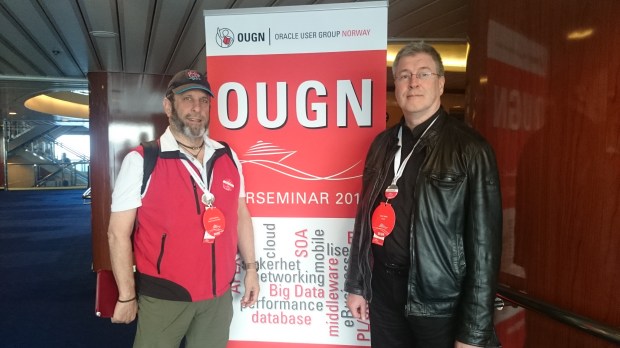
The OUGN board has again gathered an amazing lineup of top-notch speakers for this event, so I will gladly take the opportunity to improve my knowledge 🙂
Data Guard Logical Standby – what does it mean?
With Data Guard, you have the choice between Physical and Logical Standby databases. Let’s see the differences! My demo starts with a Physical Standby, that is then converted into a Logical Standby (therefore the name of the database):
[oracle@uhesse1 ~]$ dgmgrl sys/oracle@prima
DGMGRL for Linux: Version 11.2.0.1.0 - 64bit Production

Copyright (c) 2000, 2009, Oracle. All rights reserved.

Welcome to DGMGRL, type "help" for information.
Connected.
DGMGRL> show configuration;

Configuration - myconf

  Protection Mode: MaxPerformance
  Databases:
    prima - Primary database
    logst - Physical standby database

Fast-Start Failover: DISABLED

Configuration Status:
SUCCESS
For now, logst is still a Physical Standby. It is called that way, because the datafiles of prima and logst are physically identical. I can even restore them from one side to the other:
DGMGRL> edit database logst set state=apply-off;
Succeeded.
DGMGRL> exit
[oracle@uhesse1 ~]$ sqlplus sys/oracle@prima as sysdba

SQL*Plus: Release 11.2.0.1.0 Production on Fri Feb 20 11:43:07 2015

Copyright (c) 1982, 2009, Oracle.  All rights reserved.


Connected to:
Oracle Database 11g Enterprise Edition Release 11.2.0.1.0 - 64bit Production

SYS@prima > select name from v$datafile where file#=4;

NAME
--------------------------------------------------
/u01/app/oracle/oradata/prima/users01.dbf

SYS@prima > alter database datafile 4 offline;

Database altered.
Now I copy the datafile from the standby server uhesse2 to the primary server uhesse1 – there are different ways to do that, but scp is one:
SYS@logst > select name from v$datafile where file#=4;

NAME
--------------------------------------------------
/u01/app/oracle/oradata/logst/users01.dbf

SYS@logst > exit
Disconnected from Oracle Database 11g Enterprise Edition Release 11.2.0.1.0 - 64bit Production
[oracle@uhesse2 ~]$ scp /u01/app/oracle/oradata/logst/users01.dbf uhesse1:/u01/app/oracle/oradata/prima/users01.dbf
The authenticity of host 'uhesse1 (192.168.56.10)' can't be established.
RSA key fingerprint is e9:e7:5b:8b:b2:33:42:26:89:03:54:0c:16:0d:98:57.
Are you sure you want to continue connecting (yes/no)? yes
Warning: Permanently added 'uhesse1,192.168.56.10' (RSA) to the list of known hosts.
oracle@uhesse1's password:
users01.dbf                                                                                               100% 5128KB   5.0MB/s   00:00
[oracle@uhesse2 ~]$
When I try to online the datafile again on prima, it is like if I would have restored it from backup:
SYS@prima > alter database datafile 4 online;
alter database datafile 4 online
*
ERROR at line 1:
ORA-01113: file 4 needs media recovery
ORA-01110: data file 4: '/u01/app/oracle/oradata/prima/users01.dbf'


SYS@prima > recover datafile 4;
Media recovery complete.
SYS@prima > alter database datafile 4 online;

Database altered.
The datafiles and also the archived logfiles are physically identical on both sites here, only the controlfiles are different. v$database (like v$datafile, by the way) derives its content from the controlfile:
SYS@prima > select name,dbid,database_role from v$database;

NAME							 DBID DATABASE_ROLE
-------------------------------------------------- ---------- ----------------
PRIMA						   2012613220 PRIMARY

SYS@prima > connect sys/oracle@logst as sysdba
Connected.
SYS@logst > select name,dbid,database_role from v$database;

NAME							 DBID DATABASE_ROLE
-------------------------------------------------- ---------- ----------------
PRIMA						   2012613220 PHYSICAL STANDBY
Now I will convert it into Logical Standby:
DGMGRL> edit database logst set state=apply-off;
Succeeded.
DGMGRL> exit
[oracle@uhesse1 ~]$ sqlplus sys/oracle@prima as sysdba

SQL*Plus: Release 11.2.0.1.0 Production on Fri Feb 20 17:29:16 2015

Copyright (c) 1982, 2009, Oracle.  All rights reserved.


Connected to:
Oracle Database 11g Enterprise Edition Release 11.2.0.1.0 - 64bit Production

SYS@prima > exec dbms_logstdby.build

PL/SQL procedure successfully completed.

SYS@prima > connect sys/oracle@logst as sysdba
Connected.
SYS@logst > alter database recover to logical standby logst;

Database altered.

SYS@logst > shutdown immediate
ORA-01507: database not mounted


ORACLE instance shut down.
SYS@logst > startup mount
ORACLE instance started.

Total System Global Area  521936896 bytes
Fixed Size		    2214936 bytes
Variable Size		  314573800 bytes
Database Buffers	  201326592 bytes
Redo Buffers		    3821568 bytes
Database mounted.
SYS@logst > alter database open resetlogs;

Database altered.

SYS@logst > select name,dbid,database_role from v$database;

NAME							 DBID DATABASE_ROLE
-------------------------------------------------- ---------- ----------------
LOGST						   3156487356 LOGICAL STANDBY

SYS@logst > exit
Disconnected from Oracle Database 11g Enterprise Edition Release 11.2.0.1.0 - 64bit Production
[oracle@uhesse1 ~]$ dgmgrl sys/oracle@prima
DGMGRL for Linux: Version 11.2.0.1.0 - 64bit Production

Copyright (c) 2000, 2009, Oracle. All rights reserved.

Welcome to DGMGRL, type "help" for information.
Connected.
DGMGRL> remove database logst;
Removed database "logst" from the configuration
DGMGRL> add database logst as connect identifier is logst;
Database "logst" added
DGMGRL> enable database logst;
Enabled.
DGMGRL> show configuration;

Configuration - myconf

  Protection Mode: MaxPerformance
  Databases:
    prima - Primary database
    logst - Logical standby database

Fast-Start Failover: DISABLED

Configuration Status:
SUCCESS
One significant change is that the DBID and the name is now different from the primary database as you see above. And the datafiles are no longer physically identical:
DGMGRL> edit database logst set state=apply-off;
Succeeded.
DGMGRL> exit
[oracle@uhesse1 ~]$ sqlplus sys/oracle@prima as sysdba

SQL*Plus: Release 11.2.0.1.0 Production on Fri Feb 20 17:38:56 2015

Copyright (c) 1982, 2009, Oracle.  All rights reserved.


Connected to:
Oracle Database 11g Enterprise Edition Release 11.2.0.1.0 - 64bit Production

SYS@prima > alter database datafile 4 offline;

Database altered.

SYS@prima > select name from v$datafile where file#=4;

NAME
--------------------------------------------------
/u01/app/oracle/oradata/prima/users01.dbf

SYS@prima > host cp /u01/app/oracle/oradata/prima/users01.dbf /u01/app/oracle/oradata/prima/users01.old
I copy the original file because I know that the restore from logst will not work. It is just to show my point:
[oracle@uhesse2 ~]$ scp /u01/app/oracle/oradata/logst/users01.dbf uhesse1:/u01/app/oracle/oradata/prima/users01.dbf
oracle@uhesse1's password:
users01.dbf                                                                                   100% 5128KB   5.0MB/s   00:00
SYS@prima > alter database datafile 4 online;
alter database datafile 4 online
*
ERROR at line 1:
ORA-01122: database file 4 failed verification check
ORA-01110: data file 4: '/u01/app/oracle/oradata/prima/users01.dbf'
ORA-01206: file is not part of this database - wrong database id
Exactly. logst is now an autonomous database that is just incidentally doing (nearly) the same DML as prima does. It is no longer Oracle-Block-wise the same as prima. The rowids from prima have no meaning on logst any more:
DGMGRL> edit database logst set state=apply-on;
Succeeded.
SYS@prima > insert into scott.dept values (50,'TEST','TEST');
insert into scott.dept values (50,'TEST','TEST')
                  *
ERROR at line 1:
ORA-00376: file 4 cannot be read at this time
ORA-01110: data file 4: '/u01/app/oracle/oradata/prima/users01.dbf'


SYS@prima > host cp /u01/app/oracle/oradata/prima/users01.old /u01/app/oracle/oradata/prima/users01.dbf

SYS@prima > alter database datafile 4 online;
alter database datafile 4 online
*
ERROR at line 1:
ORA-01113: file 4 needs media recovery
ORA-01110: data file 4: '/u01/app/oracle/oradata/prima/users01.dbf'


SYS@prima > recover datafile 4;
Media recovery complete.
SYS@prima > alter database datafile 4 online;

Database altered.

SYS@prima > insert into scott.dept values (50,'TEST','TEST');

1 row created.

SYS@prima > commit;
Commit complete.

SYS@prima > select rowid,dept.* from scott.dept where deptno=50;

ROWID		       DEPTNO DNAME	     LOC
------------------ ---------- -------------- -------------
AAADS8AAEAAAACNAAE	   50 TEST	     TEST
This rowid is what we normally record in the redo entries and it would be sufficient to retrieve that row on the primary and also on a physical standby where we do „Redo Apply“ (another term for „recover database“). But that rowid is different on logst:
SYS@logst > connect sys/oracle@logst as sysdba
Connected.
SYS@logst > select rowid,dept.* from scott.dept where deptno=50;

ROWID DEPTNO DNAME LOC
------------------ ---------- -------------- -------------
AAADS8AAEAAAACOAAA 50 TEST TEST
That is why we need to put additional information – supplemental log data – into the redo entries on the primary. It will help the SQL Apply mechanism to retrieve the row there:
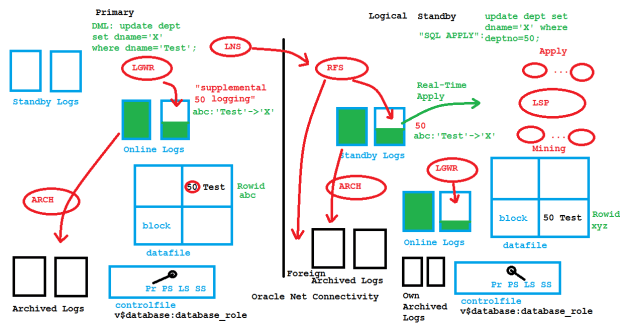
Logical Standby Architecture
The supplemental log data contains at least additionally the primary/unique key like on the picture. In the absence of primary/unique keys, every column of a modified row is written into the redo logs. That may impact the performance of the primary database. Another serious drawback of Logical Standby is that not every datatype and not every operation on the primary is supported for the SQL Apply mechanism. The number of unsupported datatypes decreases version by version, though.
The demo and the sketch above are from my presentation about Transient Logical Standby at the Oracle University Expert Summit 2015 in Dubai – really an amazing location! Hope you find it useful 🙂
Brief introduction to ASM mirroring
Automatic Storage Management (ASM) is becoming the standard for good reasons. Still, the way it mirrors remains a mystery for many customers I encounter, so I decided to cover it briefly here.
ASM Basics: What does normal redundancy mean at all?

It means that every stripe is mirrored once. There is a primary on one disk and a mirror on another disk. All stripes are spread across all disks. High redundancy would mean that every primary stripe has two mirrors, each on another disk. Obviously, the mirroring reduces the usable capacity: It’s one half of the raw capacity for normal redundancy and one third for high redundancy. The normal redundancy as on the picture safeguards against the loss of any one disk.
ASM Basics: Spare capacity

When disks are lost, ASM tries to re-establish redundancy again. Instead of using spare disks, it uses spare capacity. If enough free space in the diskgroup is left (worth the capacity of one disk) that works as on the picture above.
ASM 11g New Feature: DISK_REPAIR_TIME
What if the disk from the picture above is only temporarily offline and comes back online after a short while? These transient failures have been an issue in 10g, because the disk got immediately dropped, followed by a rebalancing to re-establish redundancy. Afterwards an administrator needed to add the disk back to the diskgroup which causes again a rebalancing. To address these transient failures, Fast Mirror Resync was introduced:
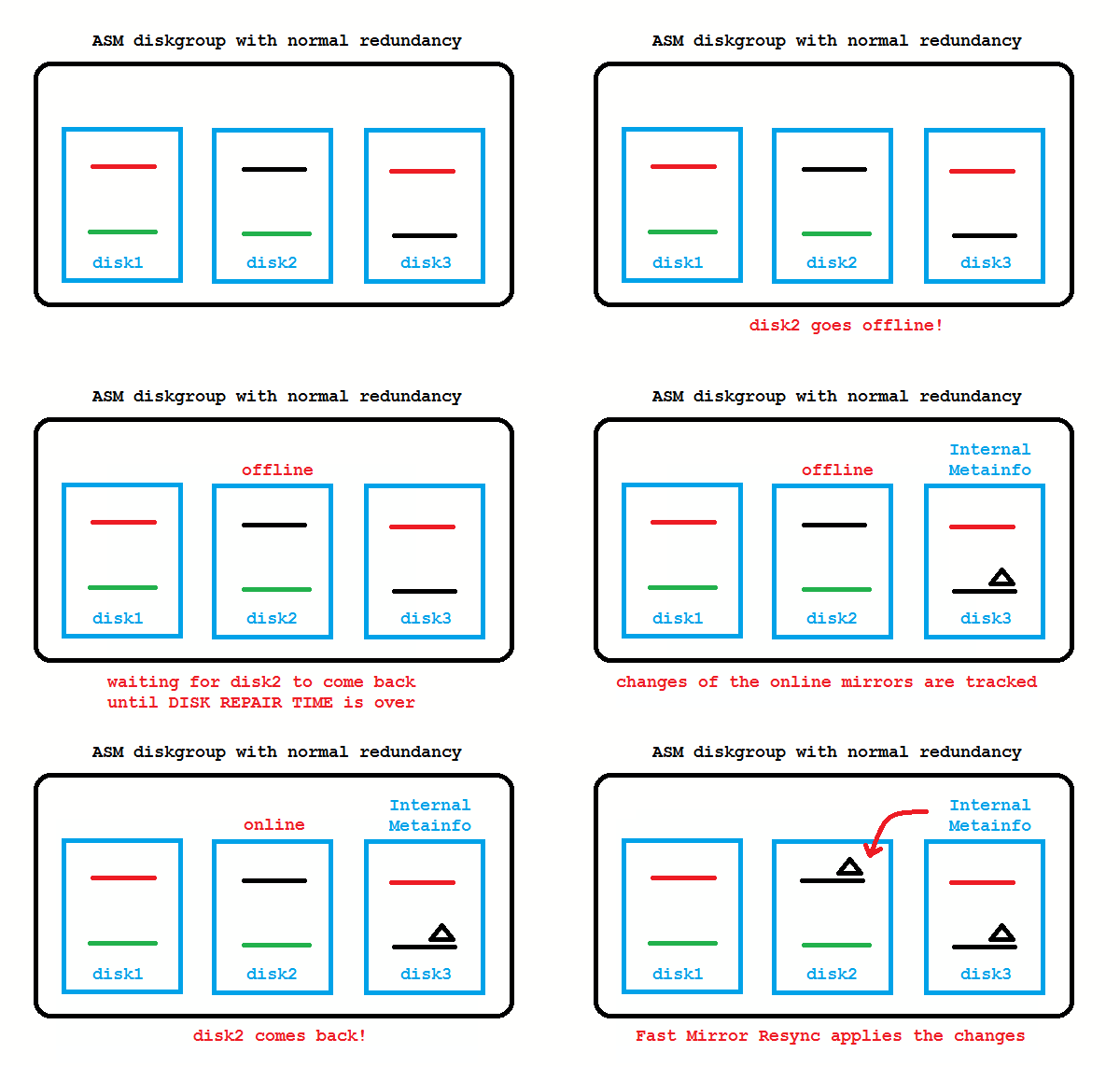
No administrator action required if the disk comes back before DISK_REPAIR_TIME (default is 3.6 hours) is over. If you don’t like that, setting DISK_REPAIR_TIME=0 brings back the 10g behavior.
ASM 12c New Feature: FAILGROUP_REPAIR_TIME
If you do not specify failure groups explicitly, each ASM disk is its own failgroup. Failgroups are the entities across which mirroring is done. In other words: A mirror must always be in another failgroup. So if you create proper failgroups, ASM can mirror according to your storage layout. Say your storage consists of four disk arrays (each with two disks) like on the picture below:
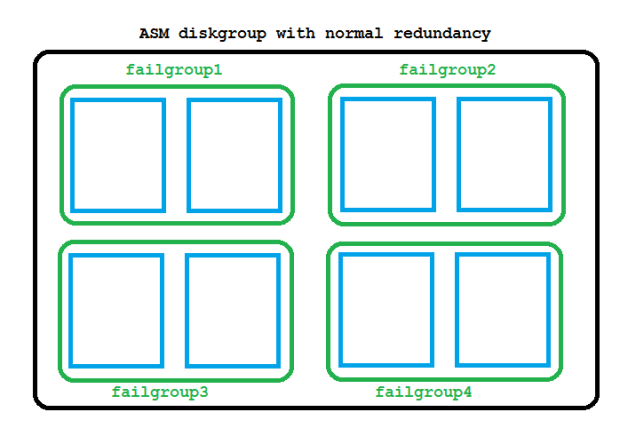
That is not yet the new thing, failgroups have been possible in 10g already. New is that you can now use the Fast Mirror Resync feature also on the failgroup layer with the 12c diskgroup attribute FAILGROUP_REPAIR_TIME. It defaults to 24 hours.
So if maintenance needs to be done with the disk array from the example, this can take up to 24 hours before the failgroup gets dropped.
I hope you found the explanation helpful, many more details are here 🙂
Pickleball spielen auf YouTube


 Pickleball spielen