Archiv für die Kategorie TOI
New organization of the Cluster Stack with Oracle Grid Infrastructure 11gR2
Just a short notice to point you to a very instructive posting of my dear colleage Joel Goodman – the start of a new series related to Oracle Grid Infrastructure & Real Application Clusters 11gR2 that I am now looking forward to with much interest!
Restoring old Optimizer Statistics for troubleshooting purpose
We deliver a Oracle Database 10g (sic!) New Features course this week in our education center in Düsseldorf. Many customers are still on 10g productively and some even just upgrade from 9i to 10g, still being in the process of evaluating 11g. Many new features in the 10g version are related to the optimizer. Some are quite well known to the public, like the obsolence of the rule based optimizer and the presence of a scheduler job that gathers optimizer statistics every night out-of-the-box.
Others lead a more quiet life, one of them is the possibility to restore old optimizer statistics (i.e. as a troubleshooting measure), should there be issues with the newly gathered ones. Since 10g, we do not simply overwrite old optimizer statistics by gathering new. Instead, the old optimizer statistics are automatically historized and kept for one month by default, so that they can be restored easily if that should be desired. Now did you know that? Here we go with a short demonstration of restoring historic optimizer statistics:
SQL> select * from v$version;

BANNER
----------------------------------------------------------------
Oracle Database 10g Enterprise Edition Release 10.2.0.1.0 - Prod
PL/SQL Release 10.2.0.1.0 - Production
CORE    10.2.0.1.0      Production
TNS for Linux: Version 10.2.0.1.0 - Production
NLSRTL Version 10.2.0.1.0 - Production

SQL> grant dba to adam identified by adam;
Grant succeeded.

SQL> connect adam/adam
Connected.

SQL> create table sales as select
rownum as id,
mod(rownum,5) as channel_id,
mod(rownum,1000) as cust_id,
5000 as amount_sold,
sysdate as time_id
from dual connect by level<=3e7;
Table created.

SQL> create index sales_idx on sales(id) nologging;
Index created.

SQL> select segment_name,bytes/1024/1024 as mb from user_segments;

SEGMENT_NAME                     MB
------------------------ ----------
SALES                           942
SALES_IDX                       566
I just created a demo user, a table and an index on that table. Notice that the two segments take about 1.5 Gig space, should you like to reproduce the demo yourself. Right now, there are no optimizer statistics for the table:
SQL> select num_rows,blocks from user_tables;

 NUM_ROWS     BLOCKS
---------- ----------
"NULL values here"
I am now going to gather statistics on the table manually – the same would be done automatically by the standard scheduler job during the night:
SQL> exec dbms_stats.gather_table_stats('ADAM','SALES')

PL/SQL procedure successfully completed.

SQL> select num_rows,blocks from user_tables;

 NUM_ROWS     BLOCKS
---------- ----------
 29933962     119585

SQL> select count(*) from sales;

 COUNT(*)
----------
 30000000
As we can see, the statistics are quite accurate, reflecting well the actual size of the table. The index is used for the following query, as we can tell by runtime already:
SQL> set timing on
SQL> select amount_sold from sales where id=4711;

AMOUNT_SOLD
-----------
 5000

Elapsed: 00:00:00.00
I am now going to introduce a problem with the optimizer statistics artificially by just setting them very inaccurate. A real-world problem that is caused by new optimizer statistics is a little harder to come up with – probably you will never encounter it during your career…
SQL> exec dbms_stats.set_table_stats('ADAM','SALES',numrows=>100,numblks=>1)

PL/SQL procedure successfully completed.

SQL> select num_rows,blocks from user_tables;

 NUM_ROWS     BLOCKS
---------- ----------
 100          1
With the above (completely misleading) statistics, the optimizer will think that a full table scan of the sales table is fairly cheap. Please notice that I ask after id 4712 and not 4711 again, because it could happen that the already computed execution plan (index range scan) is still in the library cache available for reuse. I could also flush the shared pool here to make sure that a new execution plan has to be generated for the id 4711.
SQL> select amount_sold from sales where id=4712;

AMOUNT_SOLD
-----------
 5000

Elapsed: 00:00:01.91
We can tell by the runtime of almost 2 seconds here that this was a full table scan. Proof would be to retrieve the execution plan from the library cache. I leave that to your studies. Please be aware that the autotrace feature might be misleading here. For our scope, it is enough to say that we have an issue caused by generation of new optimizer statistics. We want to get back our good old statistics! Therefore, we look at the historic optimizer statistics:
SQL> alter session set NLS_TIMESTAMP_TZ_FORMAT='yyyy-mm-dd:hh24:mi:ss';

Session altered.

SQL> select table_name,stats_update_time from user_tab_stats_history;

TABLE_NAME                     STATS_UPDATE_TIME
------------------------------ --------------------------------------
SALES                          2010-05-18:09:47:16
SALES                          2010-05-18:09:47:38
We see two rows, representing the old statistics of the sales table. The first was from the time, as there where NULL entries (before the first gather_table_stats). The second row represents the accurate statistics. I am going to restore them:
SQL> begin
dbms_stats.restore_table_stats('ADAM','SALES',
to_timestamp('2010-05-18:09:47:38','yyyy-mm-dd:hh24:mi:ss'));
end;
/
PL/SQL procedure successfully completed.
SQL> select num_rows,blocks from user_tables;
NUM_ROWS BLOCKS
---------- ----------
 29933962     119585
The good old statistics are back, but the statements are still in the library cache and may execute with the same misguided execution plan:
SQL> set timing on
SQL> select amount_sold from sales where id=4712;

AMOUNT_SOLD
-----------
 5000

Elapsed: 00:00:01.92
Still full table scan! The following empties the shared pool and forces the computation of new execution plans, using the accurate statistics:
SQL> alter system flush shared_pool;

System altered.

Elapsed: 00:00:00.04
SQL> select amount_sold from sales where id=4712;

AMOUNT_SOLD
-----------
 5000

Elapsed: 00:00:00.01
We fixed the problem by restoring the old stats. Should the problem persist – because apparently, optimizer statistics did not cause it – we can get back the new computed statistics also:
SQL> select table_name,stats_update_time from user_tab_stats_history;

TABLE_NAME                     STATS_UPDATE_TIME
------------------------------ ---------------------------------------------------------------------------
SALES                          2010-05-18:09:47:16
SALES                          2010-05-18:09:47:38
SALES                          2010-05-18:09:52:30
The last line represents the last historized stats.
SQL> begin
dbms_stats.restore_table_stats('ADAM','SALES',
to_timestamp('2010-05-18:09:52:30','yyyy-mm-dd:hh24:mi:ss'));
end;
/  2    3    4    5

PL/SQL procedure successfully completed.

SQL> select num_rows,blocks from user_tables;

 NUM_ROWS     BLOCKS
---------- ----------
 100          1
Conclusion: If we suspect that new Optimizer Statistics are responsible for a performance problem, we can restore the „good old statistics“ very easy since 10g.
Performance Impact of Logical Standby on the Primary
Implementing High Availabilty for an Oracle Database may impact the performance of the protected Database, depending on the method used. If Data Guard is used, the two protection levels Maximum Availability and Maximum Protection may impact performance of the Primary, as discussed for example in SMITH, MICHAEL T. (2007): Data Guard Redo Transport and Network Best Practices: Oracle Database 10g Release 2, available on OTN.
A special case is the use of a Logical Standby Database, because there is an additional possible Performance Impact, regardless of the protection level: Because the actualization of the Logical Standby is done with SQL Apply, more Redo is generated on the Primary to enable the retrievement of the changed rows on the Standby. With Physical Standby, that is not necessary, because the ROWID recorded on the Primary is the same on the Standby. But on Logical Standby Databases, rows can reside in completely different blocks, so the ROWID from the Primary is meaningless.
Therefore, with Logical Standby present, at least additionally the Primary Key resp. a Unique Column of rows, modified on the Primary Database is recorded. If there is no Primary Key on the table where rows where modified, we record all columns additionally. So depending on the number of columns and the absence of Primary Keys resp. Unique Columns on the production system, a Logical Standby may significantly impact the performance of the Primary Database. Fortunately, we can test that easily before we actually implement a Logical Standby – this posting is designed to show how to do that.
First, we prepare a table without Primary/Unique Columns and relatively many columns:
SQL> drop user adam cascade;
grant dba to adam identified by adam;
connect adam/adam@prima

create table sales as select
rownum as id,
mod(rownum,5) as channel_id,
mod(rownum,1000) as cust_id,
5000 as amount_sold,
sysdate as time_id,
'AAAAAAAAAAAAAAAAAAAAAAAAAAAAAAAAAAAAA' as col1,
'AAAAAAAAAAAAAAAAAAAAAAAAAAAAAAAAAAAAA' as col2,
'AAAAAAAAAAAAAAAAAAAAAAAAAAAAAAAAAAAAA' as col3,
'AAAAAAAAAAAAAAAAAAAAAAAAAAAAAAAAAAAAA' as col4,
'AAAAAAAAAAAAAAAAAAAAAAAAAAAAAAAAAAAAA' as col5,
'AAAAAAAAAAAAAAAAAAAAAAAAAAAAAAAAAAAAA' as col6,
'AAAAAAAAAAAAAAAAAAAAAAAAAAAAAAAAAAAAA' as col7,
'AAAAAAAAAAAAAAAAAAAAAAAAAAAAAAAAAAAAA' as col8,
'AAAAAAAAAAAAAAAAAAAAAAAAAAAAAAAAAAAAA' as col9,
'AAAAAAAAAAAAAAAAAAAAAAAAAAAAAAAAAAAAA' as col10,
'AAAAAAAAAAAAAAAAAAAAAAAAAAAAAAAAAAAAA' as col11,
'AAAAAAAAAAAAAAAAAAAAAAAAAAAAAAAAAAAAA' as col12,
'AAAAAAAAAAAAAAAAAAAAAAAAAAAAAAAAAAAAA' as col13,
'AAAAAAAAAAAAAAAAAAAAAAAAAAAAAAAAAAAAA' as col14,
'AAAAAAAAAAAAAAAAAAAAAAAAAAAAAAAAAAAAA' as col15,
'AAAAAAAAAAAAAAAAAAAAAAAAAAAAAAAAAAAAA' as col16,
'AAAAAAAAAAAAAAAAAAAAAAAAAAAAAAAAAAAAA' as col17,
'AAAAAAAAAAAAAAAAAAAAAAAAAAAAAAAAAAAAA' as col18,
'AAAAAAAAAAAAAAAAAAAAAAAAAAAAAAAAAAAAA' as col19,
'AAAAAAAAAAAAAAAAAAAAAAAAAAAAAAAAAAAAA' as col20
from dual connect by level<=2e5;
That created a table with 200.000 rows and 176 MB in size. We will now record statistics under normal circumstances when no Logical Standby is present.
SQL> exec dbms_workload_repository.create_snapshot
update sales set amount_sold=amount_sold-1;
commit;
exec dbms_workload_repository.create_snapshot
@?/rdbms/admin/awrrpt
The update above took about 27 seconds to complete. We look now at two sections of the AWR-Report:

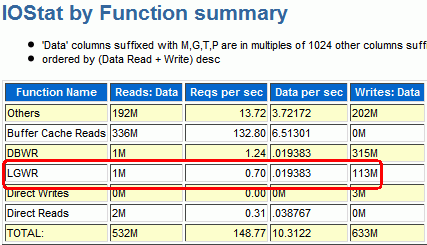
Elapsed Time was 0.86 minutes, DB Time 0.54 minutes, LGWR wrote 113 MB during that period. There is nothing special with these numbers, they only become meaningful by comparison. Now we setup supplemental log data as if there would be a Logical Standby Database present that would need it. If you are on 11g, the creation of a Logical Standby Database automatically turns on Supplemental Logging (You can spot this by looking at the alert logfile of the Primary during creation of the Logical Standby or by looking at v$database).
SQL> alter database add supplemental log data
(primary key, unique index) columns;
exec dbms_workload_repository.create_snapshot
update sales set amount_sold=amount_sold-1;
commit;
exec dbms_workload_repository.create_snapshot

@?/rdbms/admin/awrrpt
alter database drop supplemental log data
(primary key, unique index) columns;
The very same update as before now took about 45 seconds. If we look at the same AWR-sections as before, we can see why:
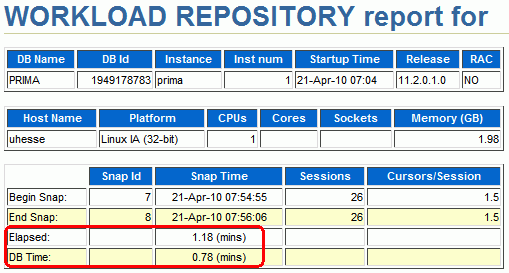
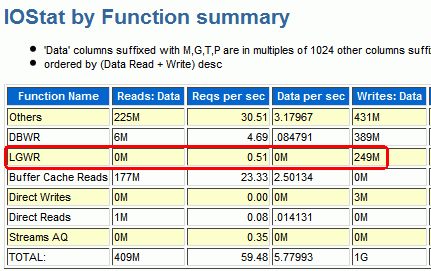
Elapsed Time increased to 1.18 minutes, DB Time increased to 0.78 minutes, LGWR had to write 249 MB now – more than doubled as before! Of course, the impact is artificially high in this example, but you can see how easy this can be tested before a Logical Standby was actually created. Although this demonstration here was with 11g Release 2, it can be done in the same way with lower versions also.
-
Du durchsuchst derzeit die Archive der Kategorie TOI.
Pickleball spielen auf YouTube


 Pickleball spielen