Archiv für die Kategorie TOI
Reorganizing Tables in Oracle – is it worth the effort?

This topic seems to be some kind of „Evergreen“, since it comes up regularly in my courses and also in the OTN Discussion Forum. I decided therefore to cover it briefly here in order to be able to point to this post in the future.
Short answer: Probably not
If the intention of the reorganizing operation is to gain space resp. „defragment“ the table, this operation is very likely just a waste of effort & resources. I will try to illustrate my point with a simple demonstration that anybody with access to an Oracle Database can easily reproduce. My demo Database is 11gR2, but the same can be done with 10g also. If you are on an even older version, there is no SHRINK SPACE available, so you would have to use MOVE instead. I prepare a little demo Table with 1Mio rows now – the time_id population was the hardest part of that demo for me 🙂
SQL> create table sales as
select
'Oracle Enterprise Edition' as product,
mod(rownum,5) as channel_id,
mod(rownum,1000) as cust_id ,
5000 as amount_sold,
to_date
('01.' || lpad(to_char(mod(rownum,12)+1),2,'0') || '.2010' ,'dd.mm.yyyy')
as time_id
from dual connect by level<=1e6;  Table created.  SQL> select time_id ,count(*)
from sales group by time_id
order by 1;

TIME_ID     COUNT(*)
--------- ----------
01-JAN-10      83333
01-FEB-10      83334
01-MAR-10      83334
01-APR-10      83334
01-MAY-10      83334
01-JUN-10      83333
01-JUL-10      83333
01-AUG-10      83333
01-SEP-10      83333
01-OCT-10      83333
01-NOV-10      83333
01-DEC-10      83333

12 rows selected.
SQL> select segment_name,bytes/1024/1024 as mb from user_segments;
SEGMENT_NAME MB
-------------------- ----------
SALES 54
The table contains about 83000 rows per month. Now I will delete the first quarter of rows:
SQL> delete from sales where time_id<to_date('01.04.2010','dd.mm.yyyy');

250001 rows deleted.

SQL> commit;

Commit complete.
SQL> select segment_name,bytes/1024/1024 as mb from user_segments;

SEGMENT_NAME                 MB
-------------------- ----------
SALES                        54
This is the starting point of a possible reorganization: Although 250k rows got deleted, the table consumes the same space as before. In other words: The High Water Mark did not move. A reorganization would move the High Water Mark and would regain the space that was consumed by the 250k rows, like shown in the below picture:

The question is: Is that necessary? If inserts would take place after the deletion again, then the space would get reused without any need to reorganize:
SQL> insert into sales
select
rownum as id,
mod(rownum,5) as channel_id,
mod(rownum,1000) as cust_id ,
5000 as amount_sold,
to_date
('01.' || lpad(to_char(mod(rownum,3)+1),2,'0') || '.2011' ,'dd.mm.yyyy')
as time_id
from dual connect by level<=2.5e5;

250000 rows created.

SQL> commit;

Commit complete.

SQL> select time_id ,count(*)
from sales group by time_id
order by 1;

TIME_ID     COUNT(*)
--------- ----------
01-APR-10      83334
01-MAY-10      83334
01-JUN-10      83333
01-JUL-10      83333
01-AUG-10      83333
01-SEP-10      83333
01-OCT-10      83333
01-NOV-10      83333
01-DEC-10      83333
01-JAN-11      83333
01-FEB-11      83334
01-MAR-11      83333

12 rows selected.
I inserted a new quarter of rows. The table remains in the same size as before:
SQL> select segment_name,bytes/1024/1024 as mb from user_segments;

SEGMENT_NAME                 MB
-------------------- ----------
SALES                        54
That is exactly the point I like to emphasize: If you have inserts following deletes, reorganization of tables is not necessary! Only if that is not the case (Table gets no longer inserts after deletion), you may reorganize it:
SQL> delete from sales where time_id<to_date('01.07.2010','dd.mm.yyyy');  250001 rows deleted. SQL > commit;
Commit complete.

SQL> alter table sales enable row movement;

Table altered.
SQL> alter table sales shrink space;

Table altered.
SQL> select segment_name,bytes/1024/1024 as mb from user_segments;

SEGMENT_NAME                 MB
-------------------- ----------
SALES                     40.25
The space consumed by the table got reduced now and is usable for other segments. Although the table is not locked during the SHRINK SPACE operation and users can do DML on the table as usual, the operation is not „for free“ in terms of resource consumption. It does a lot of I/O, creates a lot before images that consume space in the UNDO tablespace and the operation modifies many blocks, so lots of redo protocol (and therefore many archived logs, probably) gets generated.
If you really think that you need that kind of reorganization regularly, you should probably evaluate the Partitioning Option here:
SQL> create table sales_part
(product char(25), channel_id number,
 cust_id number, amount_sold number, time_id date)
partition by range (time_id)
interval (numtoyminterval(3,'month'))
(partition p1 values less than (to_date('01.04.2010','dd.mm.yyyy')))
;
Above command created a table that is partitioned by the quarter. We could simply drop a partition instead of deleting lots of rows and we would never need to reorganize to regain space here. If you are on 10g, the feature INTERVAL PARTITIONING is not available there. You can then use RANGE PARTITIONING with the additional effort that you need to create the necessary range partitions manually.
Conclusion: Before you decide to reorganize a table, make sure that this is really necessary, because likely it isn’t 🙂
Watch me explaining the above on YouTube:
Using Flashback in a Data Guard Environment
If Logical Mistakes happen, we can address them with the Flashback techniques, introduced in Oracle Database 10g already, even if in an Data Guard Environment. In case of „Flashback Table To Timestamp“ or „Flashback Table To Before Drop“, there is nothing special to take into account regarding the Standby Database. It will simply replicate these actions accordingly.
If we do „Flashback Database“ instead, that needs a special treatment of the Standby Database. This posting is designed to show you how to do that:
DGMGRL> show configuration
Configuration
Name: mycf
Enabled: YES
Protection Mode: MaxAvailability
Databases:
prima - Primary database
physt - Physical standby database
Fast-Start Failover: DISABLED
Current status for "mycf":
SUCCESS
This is an 11g Database, but the shown technique should work the same with 10g also. Prima & Physt are both creating Flashback Logs:
SQL> connect sys/oracle@prima as sysdba
Connected.
SQL> select database_role,flashback_on from v$database;
DATABASE_ROLE FLASHBACK_ON
---------------- ------------------
PRIMARY YES
SQL> connect sys/oracle@physt as sysdba
Connected.
SQL> select database_role,flashback_on from v$database;
DATABASE_ROLE FLASHBACK_ON
---------------- ------------------
PHYSICAL STANDBY YES
I will now introduce the „Logical Mistake“ on the Primary Database:
SQL> select * from scott.dept;
DEPTNO DNAME LOC
---------- -------------- -------------
10 ACCOUNTING NEW YORK
20 RESEARCH DALLAS
30 SALES CHICAGO
40 OPERATIONS BOSTON
SQL> drop user scott cascade;
User dropped.
The Redo Protocol gets transmitted with SYNC to the Standby Database and is applied there with Real-Time Apply. In other words: The Logical Mistake has already reached the Standby Database. We could have configured a Delay in the Apply there to address such scenarios. But that is somewhat „old fashioned“; the modern way is to go with flashback. The background behind that is, that in case of a Disaster, hitting the Primary Site, a Delay would cause a longer Failover time. I will now flashback the Primary to get back Scott:
SQL> shutdown immediate
Database closed.
Database dismounted.
ORACLE instance shut down.
SQL> startup mount
ORACLE instance started.
Total System Global Area 313860096 bytes
Fixed Size 1299624 bytes
Variable Size 230689624 bytes
Database Buffers 75497472 bytes
Redo Buffers 6373376 bytes
Database mounted.
SQL> flashback database to timestamp systimestamp - interval '15' minute;
Flashback complete.
SQL> alter database open resetlogs;
Database altered.
SQL> select * from scott.dept;
DEPTNO DNAME LOC
---------- -------------- -------------
10 ACCOUNTING NEW YORK
20 RESEARCH DALLAS
30 SALES CHICAGO
40 OPERATIONS BOSTON
There he is again! Until now, that was not different from a Flashback Database Operation without Data Guard. But now my Standby Database is no longer able to do Redo Apply, because it is „in the future of the Primary Database“. We are in step 2) of the below picture now that I added to illustrate the situation.
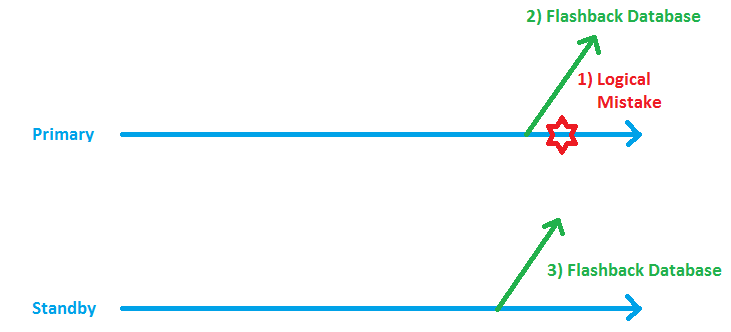
Now I need to put the Standby it into a time, shortly before the present time of the Primary, in order to restart the Redo Apply successfully:
DGMGRL> show configuration
Configuration
Name: mycf
Enabled: YES
Protection Mode: MaxAvailability
Databases:
prima - Primary database
physt - Physical standby database
Fast-Start Failover: DISABLED
Current status for "mycf":
Warning: ORA-16607: one or more databases have failed
DGMGRL> show database physt statusreport
STATUS REPORT
INSTANCE_NAME SEVERITY ERROR_TEXT
 *      ERROR ORA-16700: the standby database has diverged
                         from the primary database
* ERROR ORA-16766: Redo Apply is stopped
Please notice that the show statusreport clause is a new feature of 11g. In 10g, you need to look into the Broker Logfile to retrieve that problem.
SQL> connect sys/oracle@prima as sysdba
Connected.
SQL> select resetlogs_change# from v$database;
RESETLOGS_CHANGE#
-----------------
294223
SQL> connect sys/oracle@physt as sysdba
Connected.
SQL> flashback database to scn 294221;
Flashback complete.
I subtracted 2 from the Resetlogs Change No. above to make sure that we get the Standby close before the present time of the Primary. Now we need to restart the Redo Apply again:
DGMGRL> show configuration
Configuration
Name: mycf
Enabled: YES
Protection Mode: MaxAvailability
Databases:
prima - Primary database
physt - Physical standby database
Fast-Start Failover: DISABLED
Current status for "mycf":
Warning: ORA-16607: one or more databases have failed
DGMGRL> edit database physt set state=apply-on;
Succeeded.
DGMGRL> show configuration
Configuration
Name: mycf
Enabled: YES
Protection Mode: MaxAvailability
Databases:
prima - Primary database
physt - Physical standby database
Fast-Start Failover: DISABLED
Current status for "mycf":
SUCCESS
That was it!
Conclusion: Flashback is the natural counterpart of Real-Time Apply. You can address Logical Mistakes easily with it and you do not need to Delay the actualization of the Standby Database.
Performance Monitoring: Active Session History at work
Teaching an Oracle Database 10g Performance Tuning course this week, I introduced the 10g New Feature Active Session History (ASH) to the students. That was one major improvement – together with the Automatic Workload Repository (AWR) and the Automatic Database Diagnostic Monitor (ADDM) – of the 10g version. Way better than STATSPACK was before!
Imagine you are a DBA on a production system and get an emergency call like „The Database is dead slow!“. You are supposed to spot the cause as soon as possible. ASH kicks in here: We sample the Wait-Events of active sessions every second into the ASH-Buffer. It is accessed most comfortable with the Enterprise Manager GUI from the Performance Page (Button ASH Report there). Or with little effort from the command line like this:
-----------------------------------------
--
-- Top 10 CPU consumers in last 5 minutes
--
-----------------------------------------
SQL> select * from
(
select session_id, session_serial#, count(*)
from v$active_session_history
where session_state= 'ON CPU' and
 sample_time > sysdate - interval '5' minute
group by session_id, session_serial#
order by count(*) desc
)
where rownum <= 10;
--------------------------------------------
--
-- Top 10 waiting sessions in last 5 minutes
--
--------------------------------------------
SQL> select * from
(
select session_id, session_serial#,count(*)
from v$active_session_history
where session_state='WAITING'  and
 sample_time >  sysdate - interval '5' minute
group by session_id, session_serial#
order by count(*) desc
)
where rownum <= 10;
These 2 queries should spot the most incriminating sessions of the last 5 minutes. But who is that and what SQL was running?
--------------------
--
-- Who is that SID?
--
--------------------

set lines 200
col username for a10
col osuser for a10
col machine for a10
col program for a10
col resource_consumer_group for a10
col client_info for a10

SQL> select  serial#,
 username,
 osuser,
 machine,
 program,
 resource_consumer_group,
 client_info
from v$session where sid=&sid;

-------------------------
--
-- What did that SID do?
--
-------------------------

SQL> select distinct sql_id, session_serial# from v$active_session_history
where sample_time >  sysdate - interval '5' minute
and session_id=&sid;
----------------------------------------------
--
-- Retrieve the SQL from the Library Cache:
--
----------------------------------------------
col sql_text for a80
SQL> select sql_text from v$sql where sql_id='&sqlid';
You may spot the cause of the current performance problem in very short time with the shown technique. But beware: You need to purchase the Diagnostic Pack in order to be allowed to use AWR, ADDM and ASH 🙂
-
Du durchsuchst derzeit die Archive der Kategorie TOI.
Pickleball spielen auf YouTube


 Pickleball spielen