Beiträge getaggt mit Performance Tuning
How to reduce Buffer Busy Waits with Hash Partitioned Tables in #Oracle

Large OLTP sites may suffer from Buffer Busy Waits. Hash Partitioning is one way to reduce it on both, Indexes and Tables. My last post demonstrated that for Indexes, now let’s see how it looks like with Tables. Initially there is a normal table that is not yet hash partitioned. If many sessions do insert now simultaneously, the problem shows:
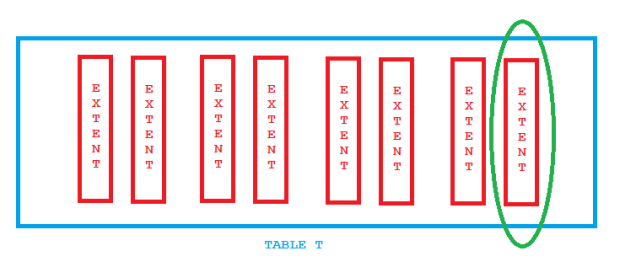
Contention with a heap table
The last extent becomes a hot spot; all inserts go there and only a limited number of blocks is available. Therefore we will see Buffer Busy Waits. The playground:
SQL> create table t (id number, sometext varchar2(50));

Table created.

create sequence id_seq;

Sequence created.

create or replace procedure manyinserts as
begin
 for i in 1..10000 loop
  insert into t values (id_seq.nextval, 'DOES THIS CAUSE BUFFER BUSY WAITS?');
 end loop;
 commit;
end;
/

Procedure created.

create or replace procedure manysessions as
v_jobno number:=0;
begin
FOR i in 1..100 LOOP
 dbms_job.submit(v_jobno,'manyinserts;', sysdate);
END LOOP;
commit;
end;
/

Procedure created.
The procedure manysessions is the way how I simulate OLTP end user activity on my demo system. Calling it leads to 100 job sessions. Each does 10.000 inserts:
SQL> exec manysessions

PL/SQL procedure successfully completed.

SQL> select count(*) from t;

  COUNT(*)
----------
   1000000

SQL> select object_name,subobject_name,value from v$segment_statistics
     where owner='ADAM'
     and statistic_name='buffer busy waits'
     and object_name = 'T';

OBJECT_NAM SUBOBJECT_	   VALUE
---------- ---------- ----------
T			    2985
So we got thousands of Buffer Busy Waits that way. Now the remedy:
SQL> drop table t purge;

Table dropped.

SQL> create table t (id number, sometext varchar2(50))
     partition by hash (id) partitions 32;

Table created.


SQL> alter procedure manyinserts compile;

Procedure altered.

SQL> alter procedure manysessions compile;

Procedure altered.

SQL> exec manysessions

PL/SQL procedure successfully completed.

SQL> select count(*) from t;

  COUNT(*)
----------
   1000000

SQL> select object_name,subobject_name,value from v$segment_statistics
     where owner='ADAM'
     and statistic_name='buffer busy waits'
     and object_name = 'T';

OBJECT_NAM SUBOBJECT_	   VALUE
---------- ---------- ----------
T	   SYS_P249	       0
T	   SYS_P250	       1
T	   SYS_P251	       0
T	   SYS_P252	       0
T	   SYS_P253	       0
T	   SYS_P254	       0
T	   SYS_P255	       0
T	   SYS_P256	       1
T	   SYS_P257	       0
T	   SYS_P258	       0
T	   SYS_P259	       1
T	   SYS_P260	       0
T	   SYS_P261	       0
T	   SYS_P262	       0
T	   SYS_P263	       0
T	   SYS_P264	       1
T	   SYS_P265	       1
T	   SYS_P266	       0
T	   SYS_P267	       0
T	   SYS_P268	       0
T	   SYS_P269	       0
T	   SYS_P270	       0
T	   SYS_P271	       1
T	   SYS_P272	       0
T	   SYS_P273	       0
T	   SYS_P274	       0
T	   SYS_P275	       1
T	   SYS_P276	       0
T	   SYS_P277	       0
T	   SYS_P278	       0
T	   SYS_P279	       2
T	   SYS_P280	       0

32 rows selected.

SQL> select sum(value) from v$segment_statistics
     where owner='ADAM'
     and statistic_name='buffer busy waits'
     and object_name = 'T';

SUM(VALUE)
----------
	 9

SQL> select 2985-9 as waits_gone from dual;

WAITS_GONE
----------
      2976
The hot spot is gone:
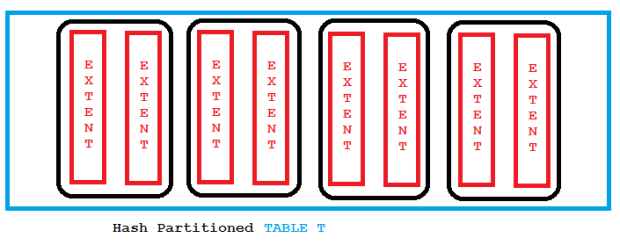
This emphasizes again that Partitioning is not only for the Data Warehouse. Hash Partitioning in particular can be used to fight contention in OLTP environments.
How to reduce Buffer Busy Waits with Hash Partitioned Indexes in #Oracle

Buffer Busy Waits can be a serious problem for large OLTP systems on both tables and indexes. If e.g. many inserts from multiple sessions occur simultaneously, they may have to compete about the same index leaf blocks like the picture below shows:

Index Leaf Block Contention
For the demo below, I’m using 100 jobs running at the same time to simulate 100 end user session that do inserts into table t with an ordinary index i that is not yet partitioned:
SQL> create table t (id number, sometext varchar2(50));

Table created.

SQL> create index i on t(id);

Index created.

SQL> create sequence id_seq;

Sequence created.

SQL> create or replace procedure manyinserts as
     begin
      for i in 1..10000 loop
       insert into t values (id_seq.nextval, 'DOES THIS CAUSE BUFFER BUSY WAITS?');
      end loop;
      commit;
     end;
     /

Procedure created.

SQL> create or replace procedure manysessions as
     v_jobno number:=0;
     begin
      for i in 1..100 loop
       dbms_job.submit(v_jobno,'manyinserts;', sysdate);
      end loop;
      commit;
     end;
     /

Procedure created.

SQL> exec manysessions

PL/SQL procedure successfully completed.
After a couple of minutes the jobs are done and the table is populated:
SQL> select count(*) from t;

  COUNT(*)
----------
   1000000

SQL> select object_name,subobject_name,value
     from v$segment_statistics where owner='ADAM'
     and statistic_name='buffer busy waits'
     and object_name = 'I';

OBJECT_NAM SUBOBJECT_	   VALUE
---------- ---------- ----------
I			  167363
There have been Buffer Busy Waits on the table t as well of course, but let’s focus on the index here. Now the same load but with a Hash Partitioned index instead:
SQL> drop index i;

Index dropped.

SQL> truncate table t;

Table truncated.

SQL> create index i on t(id) global
     partition by hash(id) partitions 32;

Index created.
Notice that you have to say GLOBAL even though the table is not partitioned itself, so LOCAL is impossible. How about the effect?
SQL> exec manysessions

PL/SQL procedure successfully completed.

SQL> select count(*) from t;

  COUNT(*)
----------
   1000000

SQL> select object_name,subobject_name,value
     from v$segment_statistics where owner='ADAM'
     and statistic_name='buffer busy waits'
     and object_name = 'I';


OBJECT_NAM SUBOBJECT_	   VALUE
---------- ---------- ----------
I	   SYS_P249	     138
I	   SYS_P250	     122
I	   SYS_P251	     138
I	   SYS_P252	     120
I	   SYS_P253	     134
I	   SYS_P254	     116
I	   SYS_P255	     132
I	   SYS_P256	     129
I	   SYS_P257	     126
I	   SYS_P258	     140
I	   SYS_P259	     126
I	   SYS_P260	     129
I	   SYS_P261	     142
I	   SYS_P262	     142
I	   SYS_P263	     156
I	   SYS_P264	     155
I	   SYS_P265	     165
I	   SYS_P266	     121
I	   SYS_P267	     142
I	   SYS_P268	     148
I	   SYS_P269	     120
I	   SYS_P270	     112
I	   SYS_P271	     168
I	   SYS_P272	     130
I	   SYS_P273	     129
I	   SYS_P274	     137
I	   SYS_P275	     147
I	   SYS_P276	     131
I	   SYS_P277	     132
I	   SYS_P278	     136
I	   SYS_P279	     124
I	   SYS_P280	     138

32 rows selected.
Instead of having just one hot part, we now have as many ‚warm parts‘ as there are partitions, like the picture below tries to show:
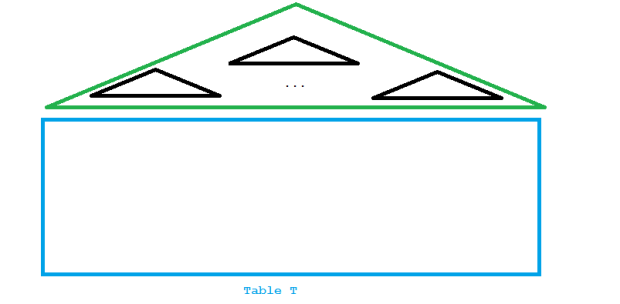
Reduced contention with hash partitioned index
Precisely this was achieved by the solution:
SQL> select sum(value) from v$segment_statistics
     where owner='ADAM'
     and statistic_name='buffer busy waits'
     and object_name = 'I';

SUM(VALUE)
----------
      4325

SQL> select 167363-4325 as waits_gone from dual;

WAITS_GONE
----------
    163038
Give me an Oracle Database and I don’t need a calculator 🙂
Watch me explaining the above on YouTube:
How to speed up Data Pump Import by suppressing redo generation in #Oracle 12c

With your database in archive log mode, a Data Pump Import may be severely slowed down by the writing of much redo into online logs and the the generation of many archive logs. A 12c New Feature enables you to avoid that slow down by suppressing redo generation for the import only. You can keep the database in archive log mode the whole time. Let’s see that in action!
First without the new feature:
[oracle@uhesse ~]$ sqlplus adam/adam

SQL*Plus: Release 12.1.0.2.0 Production on Tue Oct 25 20:25:25 2016

Copyright (c) 1982, 2014, Oracle.  All rights reserved.

Last Successful login time: Tue Oct 25 2016 20:24:55 +02:00

Connected to:
Oracle Database 12c Enterprise Edition Release 12.1.0.2.0 - 64bit Production
With the Partitioning, OLAP, Advanced Analytics and Real Application Testing options

SQL> select log_mode from v$database;

LOG_MODE
------------------------------------
ARCHIVELOG

SQL> select * from v$recovery_area_usage;

FILE_TYPE		       PERCENT_SPACE_USED PERCENT_SPACE_RECLAIMABLE NUMBER_OF_FILES	CON_ID
------------------------------ ------------------ ------------------------- --------------- ----------
CONTROL FILE					0			  0		  0	     0
REDO LOG					0			  0		  0	     0
ARCHIVED LOG				    15.37			 15		 10	     0
BACKUP PIECE				    25.17			  0		  2	     0
IMAGE COPY					0			  0		  0	     0
FLASHBACK LOG					0			  0		  0	     0
FOREIGN ARCHIVED LOG				0			  0		  0	     0
AUXILIARY DATAFILE COPY 			0			  0		  0	     0

8 rows selected.

SQL> exit
Disconnected from Oracle Database 12c Enterprise Edition Release 12.1.0.2.0 - 64bit Production
With the Partitioning, OLAP, Advanced Analytics and Real Application Testing options
[oracle@uhesse ~]$ impdp adam/adam tables=sales directory=DPDIR

Import: Release 12.1.0.2.0 - Production on Tue Oct 25 20:26:45 2016

Copyright (c) 1982, 2014, Oracle and/or its affiliates.  All rights reserved.

Connected to: Oracle Database 12c Enterprise Edition Release 12.1.0.2.0 - 64bit Production
With the Partitioning, OLAP, Advanced Analytics and Real Application Testing options
Master table "ADAM"."SYS_IMPORT_TABLE_01" successfully loaded/unloaded
Starting "ADAM"."SYS_IMPORT_TABLE_01":  adam/******** tables=sales directory=DPDIR
Processing object type TABLE_EXPORT/TABLE/TABLE
Processing object type TABLE_EXPORT/TABLE/TABLE_DATA
. . imported "ADAM"."SALES"                              510.9 MB 10000000 rows
Processing object type TABLE_EXPORT/TABLE/STATISTICS/TABLE_STATISTICS
Processing object type TABLE_EXPORT/TABLE/STATISTICS/MARKER
Job "ADAM"."SYS_IMPORT_TABLE_01" successfully completed at Tue Oct 25 20:29:46 2016 elapsed 0 00:03:00
[oracle@uhesse ~]$ sqlplus adam/adam

SQL*Plus: Release 12.1.0.2.0 Production on Tue Oct 25 20:30:03 2016

Copyright (c) 1982, 2014, Oracle.  All rights reserved.

Last Successful login time: Tue Oct 25 2016 20:26:45 +02:00

Connected to:
Oracle Database 12c Enterprise Edition Release 12.1.0.2.0 - 64bit Production
With the Partitioning, OLAP, Advanced Analytics and Real Application Testing options

SQL> select * from v$recovery_area_usage;

FILE_TYPE		       PERCENT_SPACE_USED PERCENT_SPACE_RECLAIMABLE NUMBER_OF_FILES	CON_ID
------------------------------ ------------------ ------------------------- --------------- ----------
CONTROL FILE					0			  0		  0	     0
REDO LOG					0			  0		  0	     0
ARCHIVED LOG				    30.63			 15		 17	     0
BACKUP PIECE				    25.17			  0		  2	     0
IMAGE COPY					0			  0		  0	     0
FLASHBACK LOG					0			  0		  0	     0
FOREIGN ARCHIVED LOG				0			  0		  0	     0
AUXILIARY DATAFILE COPY 			0			  0		  0	     0

8 rows selected.
The import took 3 minutes and generated 7 archive logs. Now with the new feature:
SQL> drop table sales purge;

Table dropped.

SQL> exit
Disconnected from Oracle Database 12c Enterprise Edition Release 12.1.0.2.0 - 64bit Production
With the Partitioning, OLAP, Advanced Analytics and Real Application Testing options
[oracle@uhesse ~]$ impdp adam/adam tables=adam.sales directory=DPDIR transform=disable_archive_logging:Y

Import: Release 12.1.0.2.0 - Production on Tue Oct 25 20:31:20 2016

Copyright (c) 1982, 2014, Oracle and/or its affiliates.  All rights reserved.

Connected to: Oracle Database 12c Enterprise Edition Release 12.1.0.2.0 - 64bit Production
With the Partitioning, OLAP, Advanced Analytics and Real Application Testing options
Master table "ADAM"."SYS_IMPORT_TABLE_01" successfully loaded/unloaded
Starting "ADAM"."SYS_IMPORT_TABLE_01":  adam/******** tables=adam.sales directory=DPDIR transform=disable_archive_logging:Y
Processing object type TABLE_EXPORT/TABLE/TABLE
Processing object type TABLE_EXPORT/TABLE/TABLE_DATA
. . imported "ADAM"."SALES"                              510.9 MB 10000000 rows
Processing object type TABLE_EXPORT/TABLE/STATISTICS/TABLE_STATISTICS
Processing object type TABLE_EXPORT/TABLE/STATISTICS/MARKER
Job "ADAM"."SYS_IMPORT_TABLE_01" successfully completed at Tue Oct 25 20:32:15 2016 elapsed 0 00:00:54

[oracle@uhesse ~]$ sqlplus adam/adam

SQL*Plus: Release 12.1.0.2.0 Production on Tue Oct 25 20:32:25 2016

Copyright (c) 1982, 2014, Oracle.  All rights reserved.

Last Successful login time: Tue Oct 25 2016 20:31:20 +02:00

Connected to:
Oracle Database 12c Enterprise Edition Release 12.1.0.2.0 - 64bit Production
With the Partitioning, OLAP, Advanced Analytics and Real Application Testing options

SQL> select * from v$recovery_area_usage;

FILE_TYPE		       PERCENT_SPACE_USED PERCENT_SPACE_RECLAIMABLE NUMBER_OF_FILES	CON_ID
------------------------------ ------------------ ------------------------- --------------- ----------
CONTROL FILE					0			  0		  0	     0
REDO LOG					0			  0		  0	     0
ARCHIVED LOG				    30.63			 15		 17	     0
BACKUP PIECE				    25.17			  0		  2	     0
IMAGE COPY					0			  0		  0	     0
FLASHBACK LOG					0			  0		  0	     0
FOREIGN ARCHIVED LOG				0			  0		  0	     0
AUXILIARY DATAFILE COPY 			0			  0		  0	     0

8 rows selected.

SQL> select logging from user_tables where table_name='SALES';

LOGGING
---------
YES
About three times faster and no archive log generated! The table is still in logging mode after the import. Keep in mind to take a backup of the datafile that contains the table now, though! For the same reason you should take a backup after a NOLOGGING operation 🙂
Pickleball spielen auf YouTube


 Pickleball spielen