Beiträge getaggt mit Data Guard
Data Guard Logical Standby – what does it mean?
With Data Guard, you have the choice between Physical and Logical Standby databases. Let’s see the differences! My demo starts with a Physical Standby, that is then converted into a Logical Standby (therefore the name of the database):
[oracle@uhesse1 ~]$ dgmgrl sys/oracle@prima
DGMGRL for Linux: Version 11.2.0.1.0 - 64bit Production

Copyright (c) 2000, 2009, Oracle. All rights reserved.

Welcome to DGMGRL, type "help" for information.
Connected.
DGMGRL> show configuration;

Configuration - myconf

  Protection Mode: MaxPerformance
  Databases:
    prima - Primary database
    logst - Physical standby database

Fast-Start Failover: DISABLED

Configuration Status:
SUCCESS
For now, logst is still a Physical Standby. It is called that way, because the datafiles of prima and logst are physically identical. I can even restore them from one side to the other:
DGMGRL> edit database logst set state=apply-off;
Succeeded.
DGMGRL> exit
[oracle@uhesse1 ~]$ sqlplus sys/oracle@prima as sysdba

SQL*Plus: Release 11.2.0.1.0 Production on Fri Feb 20 11:43:07 2015

Copyright (c) 1982, 2009, Oracle.  All rights reserved.


Connected to:
Oracle Database 11g Enterprise Edition Release 11.2.0.1.0 - 64bit Production

SYS@prima > select name from v$datafile where file#=4;

NAME
--------------------------------------------------
/u01/app/oracle/oradata/prima/users01.dbf

SYS@prima > alter database datafile 4 offline;

Database altered.
Now I copy the datafile from the standby server uhesse2 to the primary server uhesse1 – there are different ways to do that, but scp is one:
SYS@logst > select name from v$datafile where file#=4;

NAME
--------------------------------------------------
/u01/app/oracle/oradata/logst/users01.dbf

SYS@logst > exit
Disconnected from Oracle Database 11g Enterprise Edition Release 11.2.0.1.0 - 64bit Production
[oracle@uhesse2 ~]$ scp /u01/app/oracle/oradata/logst/users01.dbf uhesse1:/u01/app/oracle/oradata/prima/users01.dbf
The authenticity of host 'uhesse1 (192.168.56.10)' can't be established.
RSA key fingerprint is e9:e7:5b:8b:b2:33:42:26:89:03:54:0c:16:0d:98:57.
Are you sure you want to continue connecting (yes/no)? yes
Warning: Permanently added 'uhesse1,192.168.56.10' (RSA) to the list of known hosts.
oracle@uhesse1's password:
users01.dbf                                                                                               100% 5128KB   5.0MB/s   00:00
[oracle@uhesse2 ~]$
When I try to online the datafile again on prima, it is like if I would have restored it from backup:
SYS@prima > alter database datafile 4 online;
alter database datafile 4 online
*
ERROR at line 1:
ORA-01113: file 4 needs media recovery
ORA-01110: data file 4: '/u01/app/oracle/oradata/prima/users01.dbf'


SYS@prima > recover datafile 4;
Media recovery complete.
SYS@prima > alter database datafile 4 online;

Database altered.
The datafiles and also the archived logfiles are physically identical on both sites here, only the controlfiles are different. v$database (like v$datafile, by the way) derives its content from the controlfile:
SYS@prima > select name,dbid,database_role from v$database;

NAME							 DBID DATABASE_ROLE
-------------------------------------------------- ---------- ----------------
PRIMA						   2012613220 PRIMARY

SYS@prima > connect sys/oracle@logst as sysdba
Connected.
SYS@logst > select name,dbid,database_role from v$database;

NAME							 DBID DATABASE_ROLE
-------------------------------------------------- ---------- ----------------
PRIMA						   2012613220 PHYSICAL STANDBY
Now I will convert it into Logical Standby:
DGMGRL> edit database logst set state=apply-off;
Succeeded.
DGMGRL> exit
[oracle@uhesse1 ~]$ sqlplus sys/oracle@prima as sysdba

SQL*Plus: Release 11.2.0.1.0 Production on Fri Feb 20 17:29:16 2015

Copyright (c) 1982, 2009, Oracle.  All rights reserved.


Connected to:
Oracle Database 11g Enterprise Edition Release 11.2.0.1.0 - 64bit Production

SYS@prima > exec dbms_logstdby.build

PL/SQL procedure successfully completed.

SYS@prima > connect sys/oracle@logst as sysdba
Connected.
SYS@logst > alter database recover to logical standby logst;

Database altered.

SYS@logst > shutdown immediate
ORA-01507: database not mounted


ORACLE instance shut down.
SYS@logst > startup mount
ORACLE instance started.

Total System Global Area  521936896 bytes
Fixed Size		    2214936 bytes
Variable Size		  314573800 bytes
Database Buffers	  201326592 bytes
Redo Buffers		    3821568 bytes
Database mounted.
SYS@logst > alter database open resetlogs;

Database altered.

SYS@logst > select name,dbid,database_role from v$database;

NAME							 DBID DATABASE_ROLE
-------------------------------------------------- ---------- ----------------
LOGST						   3156487356 LOGICAL STANDBY

SYS@logst > exit
Disconnected from Oracle Database 11g Enterprise Edition Release 11.2.0.1.0 - 64bit Production
[oracle@uhesse1 ~]$ dgmgrl sys/oracle@prima
DGMGRL for Linux: Version 11.2.0.1.0 - 64bit Production

Copyright (c) 2000, 2009, Oracle. All rights reserved.

Welcome to DGMGRL, type "help" for information.
Connected.
DGMGRL> remove database logst;
Removed database "logst" from the configuration
DGMGRL> add database logst as connect identifier is logst;
Database "logst" added
DGMGRL> enable database logst;
Enabled.
DGMGRL> show configuration;

Configuration - myconf

  Protection Mode: MaxPerformance
  Databases:
    prima - Primary database
    logst - Logical standby database

Fast-Start Failover: DISABLED

Configuration Status:
SUCCESS
One significant change is that the DBID and the name is now different from the primary database as you see above. And the datafiles are no longer physically identical:
DGMGRL> edit database logst set state=apply-off;
Succeeded.
DGMGRL> exit
[oracle@uhesse1 ~]$ sqlplus sys/oracle@prima as sysdba

SQL*Plus: Release 11.2.0.1.0 Production on Fri Feb 20 17:38:56 2015

Copyright (c) 1982, 2009, Oracle.  All rights reserved.


Connected to:
Oracle Database 11g Enterprise Edition Release 11.2.0.1.0 - 64bit Production

SYS@prima > alter database datafile 4 offline;

Database altered.

SYS@prima > select name from v$datafile where file#=4;

NAME
--------------------------------------------------
/u01/app/oracle/oradata/prima/users01.dbf

SYS@prima > host cp /u01/app/oracle/oradata/prima/users01.dbf /u01/app/oracle/oradata/prima/users01.old
I copy the original file because I know that the restore from logst will not work. It is just to show my point:
[oracle@uhesse2 ~]$ scp /u01/app/oracle/oradata/logst/users01.dbf uhesse1:/u01/app/oracle/oradata/prima/users01.dbf
oracle@uhesse1's password:
users01.dbf                                                                                   100% 5128KB   5.0MB/s   00:00
SYS@prima > alter database datafile 4 online;
alter database datafile 4 online
*
ERROR at line 1:
ORA-01122: database file 4 failed verification check
ORA-01110: data file 4: '/u01/app/oracle/oradata/prima/users01.dbf'
ORA-01206: file is not part of this database - wrong database id
Exactly. logst is now an autonomous database that is just incidentally doing (nearly) the same DML as prima does. It is no longer Oracle-Block-wise the same as prima. The rowids from prima have no meaning on logst any more:
DGMGRL> edit database logst set state=apply-on;
Succeeded.
SYS@prima > insert into scott.dept values (50,'TEST','TEST');
insert into scott.dept values (50,'TEST','TEST')
                  *
ERROR at line 1:
ORA-00376: file 4 cannot be read at this time
ORA-01110: data file 4: '/u01/app/oracle/oradata/prima/users01.dbf'


SYS@prima > host cp /u01/app/oracle/oradata/prima/users01.old /u01/app/oracle/oradata/prima/users01.dbf

SYS@prima > alter database datafile 4 online;
alter database datafile 4 online
*
ERROR at line 1:
ORA-01113: file 4 needs media recovery
ORA-01110: data file 4: '/u01/app/oracle/oradata/prima/users01.dbf'


SYS@prima > recover datafile 4;
Media recovery complete.
SYS@prima > alter database datafile 4 online;

Database altered.

SYS@prima > insert into scott.dept values (50,'TEST','TEST');

1 row created.

SYS@prima > commit;
Commit complete.

SYS@prima > select rowid,dept.* from scott.dept where deptno=50;

ROWID		       DEPTNO DNAME	     LOC
------------------ ---------- -------------- -------------
AAADS8AAEAAAACNAAE	   50 TEST	     TEST
This rowid is what we normally record in the redo entries and it would be sufficient to retrieve that row on the primary and also on a physical standby where we do „Redo Apply“ (another term for „recover database“). But that rowid is different on logst:
SYS@logst > connect sys/oracle@logst as sysdba
Connected.
SYS@logst > select rowid,dept.* from scott.dept where deptno=50;

ROWID DEPTNO DNAME LOC
------------------ ---------- -------------- -------------
AAADS8AAEAAAACOAAA 50 TEST TEST
That is why we need to put additional information – supplemental log data – into the redo entries on the primary. It will help the SQL Apply mechanism to retrieve the row there:
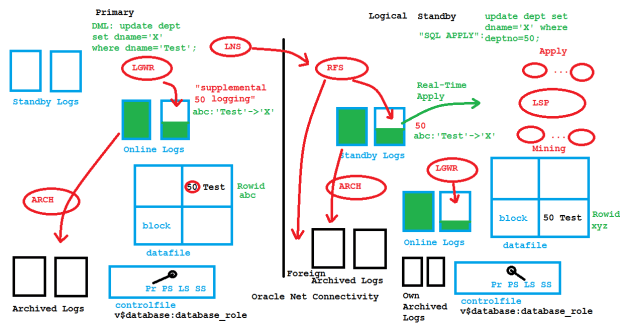
Logical Standby Architecture
The supplemental log data contains at least additionally the primary/unique key like on the picture. In the absence of primary/unique keys, every column of a modified row is written into the redo logs. That may impact the performance of the primary database. Another serious drawback of Logical Standby is that not every datatype and not every operation on the primary is supported for the SQL Apply mechanism. The number of unsupported datatypes decreases version by version, though.
The demo and the sketch above are from my presentation about Transient Logical Standby at the Oracle University Expert Summit 2015 in Dubai – really an amazing location! Hope you find it useful 🙂
Foreign Archived Log in #Oracle – what does it mean?
When you look into V$RECOVERY_AREA_USAGE, you see a strange row at the bottom:
SQL> select * from v$recovery_area_usage;

FILE_TYPE               PERCENT_SPACE_USED PERCENT_SPACE_RECLAIMABLE NUMBER_OF_FILES     CON_ID
----------------------- ------------------ ------------------------- --------------- ----------
CONTROL FILE                             0                         0               0          0
REDO LOG                                 0                         0               0          0
ARCHIVED LOG                         10.18                         0              73          0
BACKUP PIECE                             0                         0               0          0
IMAGE COPY                               0                         0               0          0
FLASHBACK LOG                            0                         0               0          0
FOREIGN ARCHIVED LOG                     0                         0               0          0
AUXILIARY DATAFILE COPY                  0                         0               0          0
Curious what that could be? You will see values other than zero on a Logical Standby Database:
SQL> connect sys/oracle@logst as sysdba
Connected.
SQL> select database_role from v$database;

DATABASE_ROLE
----------------
LOGICAL STANDBY

SQL> select * from v$recovery_area_usage;

FILE_TYPE               PERCENT_SPACE_USED PERCENT_SPACE_RECLAIMABLE NUMBER_OF_FILES     CON_ID
----------------------- ------------------ ------------------------- --------------- ----------
CONTROL FILE                             0                         0               0          0
REDO LOG                                 0                         0               0          0
ARCHIVED LOG                         14.93                         0               9          0
BACKUP PIECE                             0                         0               0          0
IMAGE COPY                               0                         0               0          0
FLASHBACK LOG                            0                         0               0          0
FOREIGN ARCHIVED LOG                  2.03                         0              26          0
AUXILIARY DATAFILE COPY                  0                         0               0          0
In contrast to a Physical Standby Database, this one writes not only into standby logs but also into online logs while being in standby role. That leads to two different kinds of archive logs:
 When DML (like insert and update) is done on the primary 1) that leads to redo entries into online logs 2) that are simultaneously shipped to the standby and written there into standby logs 2) also. The online logs on the primary and the standby logs on the standby will be archived 3) eventually. So far that is the same for both physical and logical standby. But now a difference: Logical standby databases do SQL Apply 4) by logmining the standby or the archive logs that came from the primary. That generates similar DML on the standby which in turn leads LGWR there to write redo into online logs 5) that will eventually get archived 6) as well.
A logical standby could do recovery only with its own archive logs (if there was a backup taken before) but not with the foreign archive logs. Therefore, those foreign archive logs can and do get deleted automatically. V$ARCHIVED_LOG and V$FOREIGN_ARCHIVED_LOG can be queried to monitor the two different kinds of logs.
That was one topic of the course Oracle Database 12c: Data Guard Administration that I delivered as an LVC – therefore the picture. Hope you find it useful 🙂
Let the Data Guard Broker control LOG_ARCHIVE_* parameters!
When using the Data Guard Broker, you don’t need to set any LOG_ARCHIVE_* parameter for the databases that are part of your Data Guard configuration. The broker is doing that for you. Forget about what you may have heard about VALID_FOR – you don’t need that with the broker. Actually, setting any of the LOG_ARCHIVE_* parameters with an enabled broker configuration might even confuse the broker and lead to warning or error messages. Let’s look at a typical example about the redo log transport mode. There is a broker configuration enabled with one primary database prima and one physical standby physt. The broker config files are mirrored on each site and spfiles are in use that the broker (the DMON background process, to be precise) can access:
 When connecting to the broker, you should always connect to a DMON running on the primary site. The only exception from this rule is when you want to do a failover: That must be done connected to the standby site. I will now change the redo log transport mode to sync for the standby database. It helps when you think of the log transport mode as an attribute (respectively a property) of a certain database in your configuration, because that is how the broker sees it also.
[oracle@uhesse1 ~]$ dgmgrl sys/oracle@prima
DGMGRL for Linux: Version 11.2.0.3.0 - 64bit Production

Copyright (c) 2000, 2009, Oracle. All rights reserved.

Welcome to DGMGRL, type "help" for information.
Connected.
DGMGRL> edit database physt set property logxptmode=sync;
Property "logxptmode" updated
In this case, physt is a standby database that is receiving redo from primary database prima, which is why the LOG_ARCHIVE_DEST_2 parameter of that primary was changed accordingly:
[oracle@uhesse1 ~]$ sqlplus sys/oracle@prima as sysdba

SQL*Plus: Release 11.2.0.3.0 Production on Tue Sep 30 17:21:41 2014

Copyright (c) 1982, 2011, Oracle.  All rights reserved.


Connected to:
Oracle Database 11g Enterprise Edition Release 11.2.0.3.0 - 64bit Production
With the Partitioning, OLAP and Data Mining options

SQL> show parameter log_archive_dest_2

NAME				     TYPE	 VALUE
------------------------------------ ----------- ------------------------------
log_archive_dest_2		     string	 service="physt", LGWR SYNC AFF
						 IRM delay=0 optional compressi
						 on=disable max_failure=0 max_c
						 onnections=1 reopen=300 db_uni
						 que_name="physt" net_timeout=3
						 0, valid_for=(all_logfiles,pri
						 mary_role)
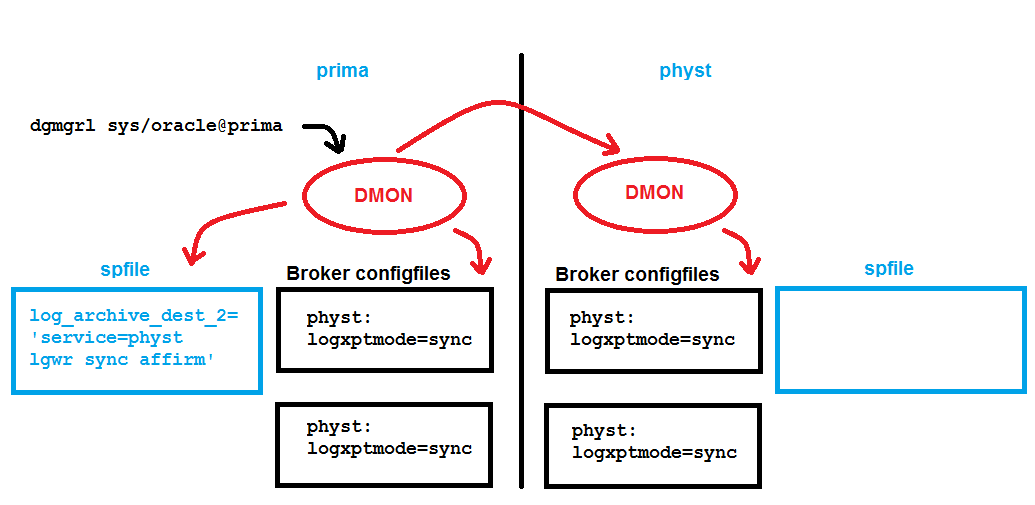
The mirrored broker configuration files on all involved database servers contain that logxptmode property now. There is no new entry in the spfile of physt required. The present configuration allows now to raise the protection mode:
DGMGRL> edit configuration set protection mode as maxavailability;
Succeeded.
The next broker command is done to support a switchover later on while keeping the higher protection mode:
DGMGRL> edit database prima set property logxptmode=sync;
Property "logxptmode" updated
Notice that this doesn’t lead to any spfile entry; only the broker config files store that new property. In case of a switchover, prima will then receive redo with sync.
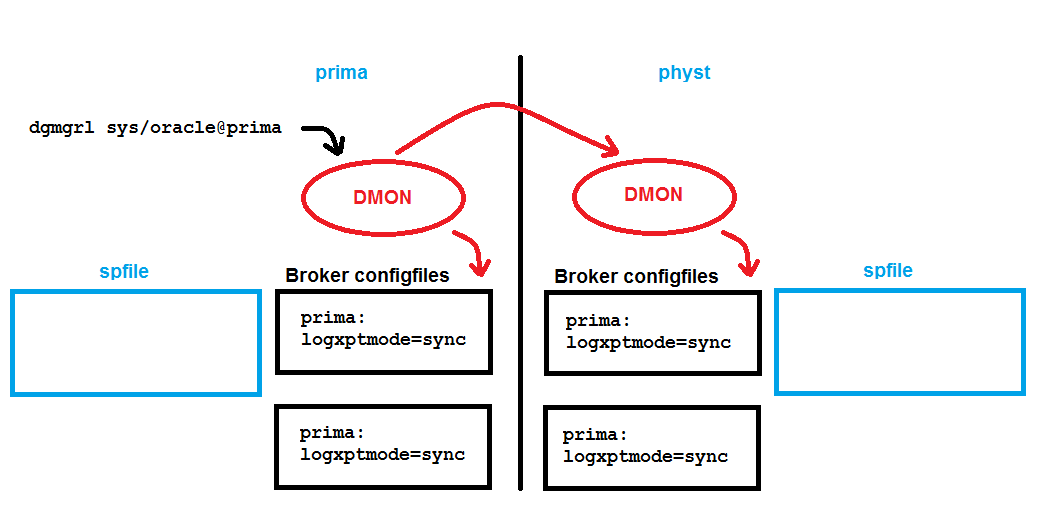 Now let’s do that switchover and see how the broker ensures automatically that the new primary physt will ship redo to prima:
DGMGRL> show configuration;

Configuration - myconf

  Protection Mode: MaxAvailability
  Databases:
    prima - Primary database
    physt - Physical standby database

Fast-Start Failover: DISABLED

Configuration Status:
SUCCESS

DGMGRL> switchover to physt;
Performing switchover NOW, please wait...
New primary database "physt" is opening...
Operation requires shutdown of instance "prima" on database "prima"
Shutting down instance "prima"...
ORACLE instance shut down.
Operation requires startup of instance "prima" on database "prima"
Starting instance "prima"...
ORACLE instance started.
Database mounted.
Switchover succeeded, new primary is "physt"
All I did was the switchover command, and without me specifying any LOG_ARCHIVE* parameter, the broker did it all like this picture shows:
 Especially, now the spfile of the physt database got the new entry:
[oracle@uhesse2 ~]$ sqlplus sys/oracle@physt as sysdba

SQL*Plus: Release 11.2.0.3.0 Production on Tue Oct 14 15:43:41 2014

Copyright (c) 1982, 2011, Oracle.  All rights reserved.


Connected to:
Oracle Database 11g Enterprise Edition Release 11.2.0.3.0 - 64bit Production
With the Partitioning, OLAP and Data Mining options

SQL> show parameter log_archive_dest_2

NAME				     TYPE	 VALUE
------------------------------------ ----------- ------------------------------
log_archive_dest_2		     string	 service="prima", LGWR SYNC AFF
						 IRM delay=0 optional compressi
						 on=disable max_failure=0 max_c
						 onnections=1 reopen=300 db_uni
						 que_name="prima" net_timeout=3
						 0, valid_for=(all_logfiles,pri
						 mary_role)
Not only is it not necessary to specify any of the LOG_ARCHIVE* parameters, it is actually a bad idea to do so. The guideline here is: Let the broker control them! Else it will at least complain about it with warning messages. So as an example what you should not do:
[oracle@uhesse1 ~]$ sqlplus sys/oracle@prima as sysdba

SQL*Plus: Release 11.2.0.3.0 Production on Tue Oct 14 15:57:11 2014

Copyright (c) 1982, 2011, Oracle.  All rights reserved.


Connected to:
Oracle Database 11g Enterprise Edition Release 11.2.0.3.0 - 64bit Production
With the Partitioning, OLAP and Data Mining options

SQL> alter system set log_archive_trace=4096;

System altered.
Although that is the correct syntax, the broker now gets confused, because that parameter setting is not in line with what is in the broker config files. Accordingly that triggers a warning:
DGMGRL> show configuration;

Configuration - myconf

  Protection Mode: MaxAvailability
  Databases:
    physt - Primary database
    prima - Physical standby database
      Warning: ORA-16792: configurable property value is inconsistent with database setting

Fast-Start Failover: DISABLED

Configuration Status:
WARNING

DGMGRL> show database prima statusreport;
STATUS REPORT
       INSTANCE_NAME   SEVERITY ERROR_TEXT
               prima    WARNING ORA-16714: the value of property LogArchiveTrace is inconsistent with the database setting
In order to resolve that inconsistency, I will do it also with a broker command – which is what I should have done instead of the alter system command in the first place:
DGMGRL> edit database prima set property LogArchiveTrace=4096;
Property "logarchivetrace" updated
DGMGRL> show configuration;

Configuration - myconf

  Protection Mode: MaxAvailability
  Databases:
    physt - Primary database
    prima - Physical standby database

Fast-Start Failover: DISABLED

Configuration Status:
SUCCESS
Thanks to a question from Noons (I really appreciate comments!), let me add the complete list of initialization parameters that the broker is supposed to control. Most but not all is LOG_ARCHIVE*
LOG_ARCHIVE_DEST_n
LOG_ARCHIVE_DEST_STATE_n
ARCHIVE_LAG_TARGET
DB_FILE_NAME_CONVERT
LOG_ARCHIVE_FORMAT
LOG_ARCHIVE_MAX_PROCESSES
LOG_ARCHIVE_MIN_SUCCEED_DEST
LOG_ARCHIVE_TRACE
LOG_FILE_NAME_CONVERT
STANDBY_FILE_MANAGEMENT
Pickleball spielen auf YouTube


 Pickleball spielen