Beiträge getaggt mit 12c New Features
AUDIT_SYS_OPERATIONS defaults to TRUE in #Oracle 12c
A small but remarkable change in Oracle Database 12c is the default value of AUDIT_SYS_OPERATIONS has changed to TRUE now. In other words, all actions done by the superuser sys are being audited now by default!
[oracle@uhesse ~]$ sqlplus / as sysdba

SQL*Plus: Release 12.1.0.2.0 Production on Fri Jul 24 15:23:10 2015

Copyright (c) 1982, 2014, Oracle.  All rights reserved.


Connected to:
Oracle Database 12c Enterprise Edition Release 12.1.0.2.0 - 64bit Production
With the Partitioning, OLAP, Advanced Analytics and Real Application Testing options

SQL> select name,value from v$spparameter where isspecified='TRUE';

NAME                                     VALUE
---------------------------------------- --------------------------------------------------
memory_target                            1073741824
control_files                            /u01/app/oracle/oradata/prima/control01.ctl
db_block_size                            8192
compatible                               12.1.0.2
db_recovery_file_dest                    /u02/fra
db_recovery_file_dest_size               2147483648
undo_management                          auto
undo_tablespace                          undotbs1
remote_login_passwordfile                exclusive
db_name                                  prima
diagnostic_dest                          /u01/app/oracle

11 rows selected.


SQL> show parameter sys_oper

NAME                                 TYPE        VALUE
------------------------------------ ----------- ------------------------------
audit_sys_operations                 boolean     TRUE
SQL> select count(*) from scott.dept;

  COUNT(*)
----------
         4

SQL> show parameter audit_file

NAME                                 TYPE        VALUE
------------------------------------ ----------- ------------------------------
audit_file_dest                      string      /u01/app/oracle/product/12.1.0
                                                 /dbhome_1/rdbms/audit
SQL> exit
Disconnected from Oracle Database 12c Enterprise Edition Release 12.1.0.2.0 - 64bit Production
With the Partitioning, OLAP, Advanced Analytics and Real Application Testing options
[oracle@uhesse ~]$ cd /u01/app/oracle/product/12.1.0/dbhome_1/rdbms/audit

[oracle@uhesse audit]$ cat prima_ora_6204_20150724152310753136143795.aud
Audit file /u01/app/oracle/product/12.1.0/dbhome_1/rdbms/audit/prima_ora_6204_20150724152310753136143795.aud
Oracle Database 12c Enterprise Edition Release 12.1.0.2.0 - 64bit Production
With the Partitioning, OLAP, Advanced Analytics and Real Application Testing options
ORACLE_HOME = /u01/app/oracle/product/12.1.0/dbhome_1
System name:    Linux
Node name:      uhesse
Release:        3.8.13-68.2.2.el7uek.x86_64
Version:        #2 SMP Tue May 12 14:38:58 PDT 2015
Machine:        x86_64
Instance name: prima
Redo thread mounted by this instance: 1
Oracle process number: 41
Unix process pid: 6204, image: oracle@uhesse (TNS V1-V3)

Fri Jul 24 15:23:10 2015 +02:00
LENGTH : '160'
ACTION :[7] 'CONNECT'
DATABASE USER:[1] '/'
PRIVILEGE :[6] 'SYSDBA'
CLIENT USER:[6] 'oracle'
CLIENT TERMINAL:[5] 'pts/1'
STATUS:[1] '0'
DBID:[10] '2113606181'
[Output shortened...]
Fri Jul 24 15:23:56 2015 +02:00
LENGTH : '185'
ACTION :[31] 'select count(*) from scott.dept'
DATABASE USER:[1] '/'
PRIVILEGE :[6] 'SYSDBA'
CLIENT USER:[6] 'oracle'
CLIENT TERMINAL:[5] 'pts/1'
STATUS:[1] '0'
DBID:[10] '2113606181'
Something you might need to know as a DBA, don’t you think? 🙂
Kostenlose Webinare zur neuen #Oracle Datenbankversion: #12cjetzt

Hochkarätige Referenten zum Thema Oracle Database 12c – Jetzt!
Wie und warum Sie jetzt auf 12c kommen sollten erläutern wir in sieben Webinaren von je einer Stunde Dauer. Die Webinare finden an jeweils verschiedenen Tagen statt, beginnend am 11. August, wo Mike Dietrich zum Thema Upgrade (natürlich) vortragen wird.
Einfach anmelden und bequem und kostenlos informieren – das ist doch ein unschlagbares Angebot, oder? Finde ich auch 🙂
Transport Tablespace using RMAN Backupsets in #Oracle 12c
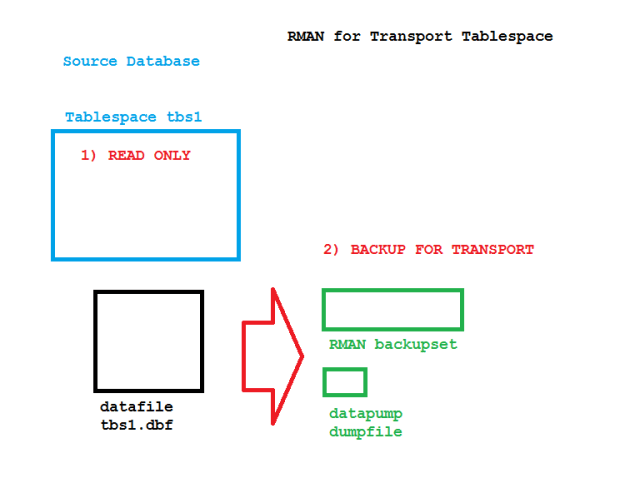
Using backupsets for Transportable Tablespaces reduces the volume of data you need to ship to the destination database. See how that works:
RMAN TTS on the source database
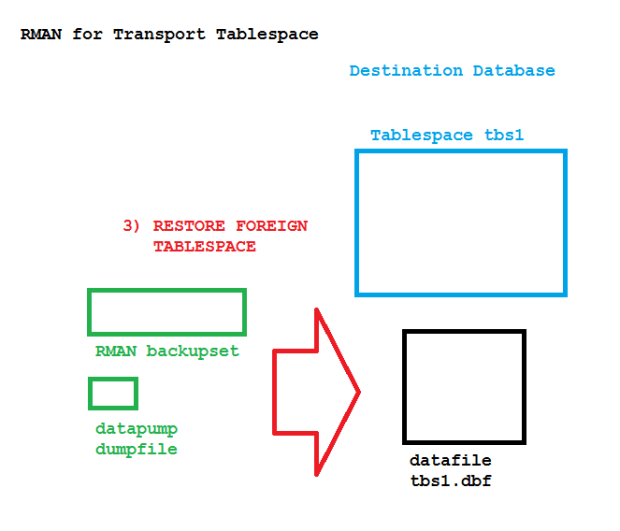
The tablespace is made READ ONLY before the new BACKUP FOR TRANSPORT command is done. At this point, you can also convert the platform and the endian format if required. Then on the destination site:
RMAN TTS on the destination database
The FOREIGN keyword indicates that this doesn’t use a backup taken at the destination. Practical example:
[oracle@uhesse ~]$ sqlplus sys/oracle@prima as sysdba

SQL*Plus: Release 12.1.0.2.0 Production on Mon Jul 6 08:36:30 2015

Copyright (c) 1982, 2014, Oracle.  All rights reserved.


Connected to:
Oracle Database 12c Enterprise Edition Release 12.1.0.2.0 - 64bit Production
With the Partitioning, OLAP, Advanced Analytics and Real Application Testing options

SQL> select * from v$tablespace;

       TS# NAME                           INC BIG FLA ENC     CON_ID
---------- ------------------------------ --- --- --- --- ----------
         0 SYSTEM                         YES NO  YES              0
         1 SYSAUX                         YES NO  YES              0
         2 UNDOTBS1                       YES NO  YES              0
         3 TEMP                           NO  NO  YES              0
         4 USERS                          YES NO  YES              0
         5 TBS1                           YES NO  YES              0

6 rows selected.

SQL> select table_name,owner from dba_tables where tablespace_name='TBS1';

TABLE_NAME
--------------------
OWNER
--------------------
T
ADAM


SQL> alter tablespace tbs1 read only;

Tablespace altered.

SQL> exit
Disconnected from Oracle Database 12c Enterprise Edition Release 12.1.0.2.0 - 64bit Production
With the Partitioning, OLAP, Advanced Analytics and Real Application Testing options
[oracle@uhesse ~]$ rman target sys/oracle@prima

Recovery Manager: Release 12.1.0.2.0 - Production on Mon Jul 6 08:37:28 2015

Copyright (c) 1982, 2014, Oracle and/or its affiliates.  All rights reserved.

connected to target database: PRIMA (DBID=2113606181)

RMAN> report schema;

using target database control file instead of recovery catalog
Report of database schema for database with db_unique_name PRIMA

List of Permanent Datafiles
===========================
File Size(MB) Tablespace           RB segs Datafile Name
---- -------- -------------------- ------- ------------------------
1    347      SYSTEM               YES     /u01/app/oracle/oradata/prima/system01.dbf
2    244      SYSAUX               NO      /u01/app/oracle/oradata/prima/sysaux01.dbf
3    241      UNDOTBS1             YES     /u01/app/oracle/oradata/prima/undotbs01.dbf
4    602      USERS                NO      /u01/app/oracle/oradata/prima/users01.dbf
5    100      TBS1                 NO      /u01/app/oracle/oradata/prima/tbs1.dbf

List of Temporary Files
=======================
File Size(MB) Tablespace           Maxsize(MB) Tempfile Name
---- -------- -------------------- ----------- --------------------
1    40       TEMP                 32767       /u01/app/oracle/oradata/prima/temp01.dbt

RMAN> host 'mkdir /tmp/stage';

host command complete

RMAN> configure device type disk backup type to compressed backupset;

old RMAN configuration parameters:
CONFIGURE DEVICE TYPE DISK BACKUP TYPE TO COMPRESSED BACKUPSET PARALLELISM 1;
new RMAN configuration parameters:
CONFIGURE DEVICE TYPE DISK BACKUP TYPE TO COMPRESSED BACKUPSET PARALLELISM 1;
new RMAN configuration parameters are successfully stored

RMAN> backup for transport format '/tmp/stage/tbs1.bkset'
      datapump format '/tmp/stage/tbs1.dmp'
      tablespace tbs1;

Starting backup at 06-JUL-15
allocated channel: ORA_DISK_1
channel ORA_DISK_1: SID=40 device type=DISK
Running TRANSPORT_SET_CHECK on specified tablespaces
TRANSPORT_SET_CHECK completed successfully

Performing export of metadata for specified tablespaces...
   EXPDP> Starting "SYS"."TRANSPORT_EXP_PRIMA_yvym":
   EXPDP> Processing object type TRANSPORTABLE_EXPORT/PLUGTS_BLK
   EXPDP> Processing object type TRANSPORTABLE_EXPORT/TABLE
   EXPDP> Processing object type TRANSPORTABLE_EXPORT/TABLE_STATISTICS
   EXPDP> Processing object type TRANSPORTABLE_EXPORT/STATISTICS/MARKER
   EXPDP> Processing object type TRANSPORTABLE_EXPORT/POST_INSTANCE/PLUGTS_BLK
   EXPDP> Master table "SYS"."TRANSPORT_EXP_PRIMA_yvym" successfully loaded/unloaded
   EXPDP> ******************************************************************************
   EXPDP> Dump file set for SYS.TRANSPORT_EXP_PRIMA_yvym is:
   EXPDP>   /u01/app/oracle/product/12.1.0/dbhome_1/dbs/backup_tts_PRIMA_25997.dmp
   EXPDP> ******************************************************************************
   EXPDP> Datafiles required for transportable tablespace TBS1:
   EXPDP>   /u01/app/oracle/oradata/prima/tbs1.dbf
   EXPDP> Job "SYS"."TRANSPORT_EXP_PRIMA_yvym" successfully completed at Mon Jul 6 08:39:50 2015 elapsed 0 00:00:26
Export completed

channel ORA_DISK_1: starting compressed full datafile backup set
channel ORA_DISK_1: specifying datafile(s) in backup set
input datafile file number=00005 name=/u01/app/oracle/oradata/prima/tbs1.dbf
channel ORA_DISK_1: starting piece 1 at 06-JUL-15
channel ORA_DISK_1: finished piece 1 at 06-JUL-15
piece handle=/tmp/stage/tbs1.bkset tag=TAG20150706T083917 comment=NONE
channel ORA_DISK_1: backup set complete, elapsed time: 00:00:03
channel ORA_DISK_1: starting compressed full datafile backup set
input Data Pump dump file=/u01/app/oracle/product/12.1.0/dbhome_1/dbs/backup_tts_PRIMA_25997.dmp
channel ORA_DISK_1: starting piece 1 at 06-JUL-15
channel ORA_DISK_1: finished piece 1 at 06-JUL-15
piece handle=/tmp/stage/tbs1.dmp tag=TAG20150706T083917 comment=NONE
channel ORA_DISK_1: backup set complete, elapsed time: 00:00:01
Finished backup at 06-JUL-15

RMAN> alter tablespace tbs1 read write;

Statement processed

RMAN> exit


Recovery Manager complete.
[oracle@uhesse ~]$ ls -rtl /tmp/stage
total 5608
-rw-r-----. 1 oracle oinstall 5578752 Jul  6 08:39 tbs1.bkset
-rw-r-----. 1 oracle oinstall  163840 Jul  6 08:39 tbs1.dmp
[oracle@uhesse ~]$ rman target sys/oracle@sekunda

Recovery Manager: Release 12.1.0.2.0 - Production on Mon Jul 6 08:40:49 2015

Copyright (c) 1982, 2014, Oracle and/or its affiliates.  All rights reserved.

connected to target database: SEKUNDA (DBID=3356258651)

RMAN> report schema;

using target database control file instead of recovery catalog
Report of database schema for database with db_unique_name SEKUNDA

List of Permanent Datafiles
===========================
File Size(MB) Tablespace           RB segs Datafile Name
---- -------- -------------------- ------- ------------------------
1    347      SYSTEM               YES     /u01/app/oracle/oradata/sekunda/system01.dbf
2    249      SYSAUX               NO      /u01/app/oracle/oradata/sekunda/sysaux01.dbf
3    241      UNDOTBS1             YES     /u01/app/oracle/oradata/sekunda/undotbs01.dbf
4    602      USERS                NO      /u01/app/oracle/oradata/sekunda/users01.dbf

List of Temporary Files
=======================
File Size(MB) Tablespace           Maxsize(MB) Tempfile Name
---- -------- -------------------- ----------- --------------------
1    40       TEMP                 32767       /u01/app/oracle/oradata/sekunda/temp01.dbt

RMAN> restore foreign tablespace tbs1
      format '/u01/app/oracle/oradata/sekunda/tbs1.dbf'
      from backupset '/tmp/stage/tbs1.bkset'
      dump file from backupset '/tmp/stage/tbs1.dmp';

Starting restore at 06-JUL-15
allocated channel: ORA_DISK_1
channel ORA_DISK_1: SID=37 device type=DISK

channel ORA_DISK_1: starting datafile backup set restore
channel ORA_DISK_1: specifying datafile(s) to restore from backup set
channel ORA_DISK_1: restoring all files in foreign tablespace TBS1
channel ORA_DISK_1: reading from backup piece /tmp/stage/tbs1.bkset
channel ORA_DISK_1: restoring foreign file 5 to /u01/app/oracle/oradata/sekunda/tbs1.dbf
channel ORA_DISK_1: foreign piece handle=/tmp/stage/tbs1.bkset
channel ORA_DISK_1: restored backup piece 1
channel ORA_DISK_1: restore complete, elapsed time: 00:00:08
channel ORA_DISK_1: starting datafile backup set restore
channel ORA_DISK_1: specifying datafile(s) to restore from backup set
channel ORA_DISK_1: restoring Data Pump dump file to /u01/app/oracle/product/12.1.0/dbhome_1/dbs/backup_tts_SEKUNDA_85631.dmp
channel ORA_DISK_1: reading from backup piece /tmp/stage/tbs1.dmp
channel ORA_DISK_1: foreign piece handle=/tmp/stage/tbs1.dmp
channel ORA_DISK_1: restored backup piece 1
channel ORA_DISK_1: restore complete, elapsed time: 00:00:02

Performing import of metadata...
   IMPDP> Master table "SYS"."TSPITR_IMP_SEKUNDA_ppol" successfully loaded/unloaded
   IMPDP> Starting "SYS"."TSPITR_IMP_SEKUNDA_ppol":
   IMPDP> Processing object type TRANSPORTABLE_EXPORT/PLUGTS_BLK
   IMPDP> Processing object type TRANSPORTABLE_EXPORT/TABLE
   IMPDP> Processing object type TRANSPORTABLE_EXPORT/TABLE_STATISTICS
   IMPDP> Processing object type TRANSPORTABLE_EXPORT/STATISTICS/MARKER
   IMPDP> Processing object type TRANSPORTABLE_EXPORT/POST_INSTANCE/PLUGTS_BLK
   IMPDP> Job "SYS"."TSPITR_IMP_SEKUNDA_ppol" successfully completed at Mon Jul 6 08:42:51 2015 elapsed 0 00:00:20
Import completed

Finished restore at 06-JUL-15

RMAN> report schema;

Report of database schema for database with db_unique_name SEKUNDA

List of Permanent Datafiles
===========================
File Size(MB) Tablespace           RB segs Datafile Name
---- -------- -------------------- ------- ------------------------
1    347      SYSTEM               YES     /u01/app/oracle/oradata/sekunda/system01.dbf
2    249      SYSAUX               NO      /u01/app/oracle/oradata/sekunda/sysaux01.dbf
3    241      UNDOTBS1             YES     /u01/app/oracle/oradata/sekunda/undotbs01.dbf
4    602      USERS                NO      /u01/app/oracle/oradata/sekunda/users01.dbf
5    100      TBS1                 NO      /u01/app/oracle/oradata/sekunda/tbs1.dbf

List of Temporary Files
=======================
File Size(MB) Tablespace           Maxsize(MB) Tempfile Name
---- -------- -------------------- ----------- --------------------
1    40       TEMP                 32767       /u01/app/oracle/oradata/sekunda/temp01.dbt

RMAN> alter tablespace tbs1 read write;

Statement processed

RMAN> select count(*) from adam.t;

  COUNT(*)
----------
   1000000
Hope you find it useful 🙂
A Practical Guide to Transportable Tablespaces using RMAN https://t.co/qAVNX11Lmu FREE for OCP, OCE #Oracle #DB12c pic.twitter.com/a5R0sn0yCI
— Uwe Hesse (@UweHesse) November 1, 2015
Pickleball spielen auf YouTube


 Pickleball spielen