Archiv für die Kategorie TOI
Getting started with #Exasol
One nice and easy way to make yourself familiar with Exasol – the leading In-Memory Analytic Database – is the Community Edition. It’s free and can be downloaded here as a virtual machine running on VirtualBox.
A good description how to install the Community Edition can be found here.
There’s an Exasol SQL Client called EXAplus. You can use it as GUI, then it looks like this:
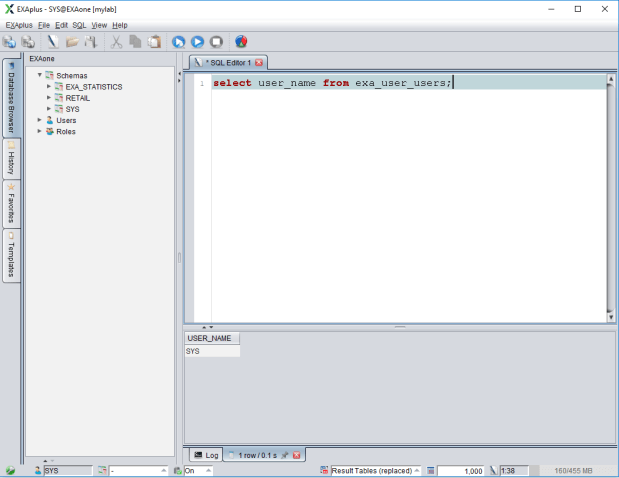
A command line version of EXAplus is also available. I will use it for my articles subsequently because it works better than pictures from the GUI for that purpose. You will be able to copy & paste commands from the article that way, for example. If you install the Community Edition on a Windows host like I did, you get to the command line EXAplus this way: Open a cmd shell. Then
C:\>cd \Program Files (x86)\EXASOL\EXASolution-6.0\EXAplus

C:\Program Files (x86)\EXASOL\EXASolution-6.0\EXAplus>exaplusx64 -help
That gives you a basic help for the EXAplus CLI. I connect now as superuser to my Community Edition:
C:\Program Files (x86)\EXASOL\EXASolution-6.0\EXAplus>exaplusx64 -c 192.168.56.101:8563 -u sys -p exasol -lang EN
EXAplus 6.0.8 (c) EXASOL AG

Tuesday, May 15, 2018 2:13:50 PM CEST
Connected to database EXAone as user sys.
EXASolution 6.0.8 (c) EXASOL AG

SQL_EXA>
For those of you who are used to SQL*Plus, EXAplus will appear quite familiar:
SQL_EXA> col column_name for a40;
COLUMN   column_name ON
FORMAT   a40
SQL_EXA> desc exa_user_users;
EXA: desc exa_user_users;

COLUMN_NAME                              SQL_TYPE                                 NULLABLE DISTRIBUTION_KEY
---------------------------------------- ---------------------------------------- -------- ----------------
USER_NAME                                VARCHAR(128) UTF8
CREATED                                  TIMESTAMP
USER_PRIORITY                            VARCHAR(128) UTF8
USER_COMMENT                             VARCHAR(2000) UTF8

4 rows in resultset.

SQL_EXA> @c:/blogpostings/whoami;
EXA: select user_name from exa_user_users;

USER_NAME
--------------------------------------------------------------------------------------------------------------------------------
SYS

1 row in resultset.
I placed a file named whoami.sql in c:/blogpostings containing the SELECT command. Notice the mandatory ; at the end of each command.
Oh, and CURSOR UP and DOWN scrolls you through the history of commands out of the box 🙂
What is #Exasol?
Exasol is the name of a company based in Nuremberg, Germany and the name of its major product: An in-memory analytic database.
That database leads the recent TPC-H benchmarks, delivering outstanding performance while running on commodity hardware.
Technically, Exasol is a clustered RDBMS using a shared nothing architecture. Availability is achieved with spare nodes, like in this diagram:
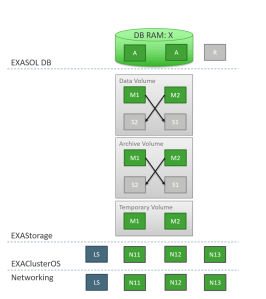 That shows a 2+1 cluster with two active nodes and one spare node. The nodes are running on Linux CentOS with an additional layer on top of it named EXAClusterOS that acts as a clusterware. Each active node stores its own data as well as replicated data from neighbor nodes, so node failure can be tolerated without losing data, the data being stored on EXAStorage – think of it as a database filesystem.
Data is stored in compressed columnar format on disk and loaded into the memory of the nodes in that format, to the effect that popular data can be processed in memory in parallel with very high speed. Exasol doesn’t require much tuning if any. One key feature in that area is that indexes are being generated automatically if required by queries and these indexes are also dropped automatically when they do no longer contribute to query performance.
Exasol follows the ACID standard and always operates in transaction isolation level SERIALIZABLE. Historically, Exasol started as an accelerator layer on top of Oracle – which is why being Oracle compatible has been a priority from the start. Meanwhile, Exasol is an autonomous RDBMS and technology leader for analytic in-memory databases. Due to its growing popularity among customers worldwide, the company is growing at high speed.
That goes out to you who wonder ‚What company is that where Uwe went to?‘ Expect some more articles about Exasol to come.
How to cancel SQL statements in #Oracle 18c

A nice 18c New Feature is that you can cancel a certain SQL statement without using Resource Manager techniques. Here’s an example:
SQL> select banner_full from v$version;

BANNER_FULL
--------------------------------------------------------------------------------
Oracle Database 18c Enterprise Edition Release 18.0.0.0.0 - Production
Version 18.1.0.0.0

SQL> select distinct sid from v$mystat;

     SID
---------
      477

SQL> begin loop null; end loop; end;
     /
This produces an endless loop. Now I need the SQL_ID of the statement and the SERIAL# of the offending session:
SQL> select sql_text,sql_id from v$sql where sql_text like '%loop null; end loop%';

SQL_TEXT
--------------------------------------------------------------------------------
SQL_ID
-------------
begin loop null; end loop; end;
8gadd3yhtd150

select sql_text,sql_id from v$sql where sql_text like '%loop null; end loop%'
6vbb9d7zj9t5w


SQL> select serial# from v$session where sid=477;

   SERIAL#
----------
     10569
Now I can use the New Feature:
SQL> alter system cancel sql '477,10569,8gadd3yhtd150';

System altered.
The offending session gets
ERROR at line 1:
ORA-01013: user requested cancel of current operation
We waited for this functionality quite some time 🙂
-
Du durchsuchst derzeit die Archive der Kategorie TOI.
Pickleball spielen auf YouTube


 Pickleball spielen