Uwe Hesse

Dieser Benutzer hat keine biographischen Informationen freigegeben
Startseite: http://uhesse.com
How to reduce Buffer Busy Waits with Hash Partitioned Indexes in #Oracle
Veröffentlicht in TOI am Dezember 2, 2016

Buffer Busy Waits can be a serious problem for large OLTP systems on both tables and indexes. If e.g. many inserts from multiple sessions occur simultaneously, they may have to compete about the same index leaf blocks like the picture below shows:

Index Leaf Block Contention
For the demo below, I’m using 100 jobs running at the same time to simulate 100 end user session that do inserts into table t with an ordinary index i that is not yet partitioned:
SQL> create table t (id number, sometext varchar2(50));

Table created.

SQL> create index i on t(id);

Index created.

SQL> create sequence id_seq;

Sequence created.

SQL> create or replace procedure manyinserts as
     begin
      for i in 1..10000 loop
       insert into t values (id_seq.nextval, 'DOES THIS CAUSE BUFFER BUSY WAITS?');
      end loop;
      commit;
     end;
     /

Procedure created.

SQL> create or replace procedure manysessions as
     v_jobno number:=0;
     begin
      for i in 1..100 loop
       dbms_job.submit(v_jobno,'manyinserts;', sysdate);
      end loop;
      commit;
     end;
     /

Procedure created.

SQL> exec manysessions

PL/SQL procedure successfully completed.
After a couple of minutes the jobs are done and the table is populated:
SQL> select count(*) from t;

  COUNT(*)
----------
   1000000

SQL> select object_name,subobject_name,value
     from v$segment_statistics where owner='ADAM'
     and statistic_name='buffer busy waits'
     and object_name = 'I';

OBJECT_NAM SUBOBJECT_	   VALUE
---------- ---------- ----------
I			  167363
There have been Buffer Busy Waits on the table t as well of course, but let’s focus on the index here. Now the same load but with a Hash Partitioned index instead:
SQL> drop index i;

Index dropped.

SQL> truncate table t;

Table truncated.

SQL> create index i on t(id) global
     partition by hash(id) partitions 32;

Index created.
Notice that you have to say GLOBAL even though the table is not partitioned itself, so LOCAL is impossible. How about the effect?
SQL> exec manysessions

PL/SQL procedure successfully completed.

SQL> select count(*) from t;

  COUNT(*)
----------
   1000000

SQL> select object_name,subobject_name,value
     from v$segment_statistics where owner='ADAM'
     and statistic_name='buffer busy waits'
     and object_name = 'I';


OBJECT_NAM SUBOBJECT_	   VALUE
---------- ---------- ----------
I	   SYS_P249	     138
I	   SYS_P250	     122
I	   SYS_P251	     138
I	   SYS_P252	     120
I	   SYS_P253	     134
I	   SYS_P254	     116
I	   SYS_P255	     132
I	   SYS_P256	     129
I	   SYS_P257	     126
I	   SYS_P258	     140
I	   SYS_P259	     126
I	   SYS_P260	     129
I	   SYS_P261	     142
I	   SYS_P262	     142
I	   SYS_P263	     156
I	   SYS_P264	     155
I	   SYS_P265	     165
I	   SYS_P266	     121
I	   SYS_P267	     142
I	   SYS_P268	     148
I	   SYS_P269	     120
I	   SYS_P270	     112
I	   SYS_P271	     168
I	   SYS_P272	     130
I	   SYS_P273	     129
I	   SYS_P274	     137
I	   SYS_P275	     147
I	   SYS_P276	     131
I	   SYS_P277	     132
I	   SYS_P278	     136
I	   SYS_P279	     124
I	   SYS_P280	     138

32 rows selected.
Instead of having just one hot part, we now have as many ‚warm parts‘ as there are partitions, like the picture below tries to show:
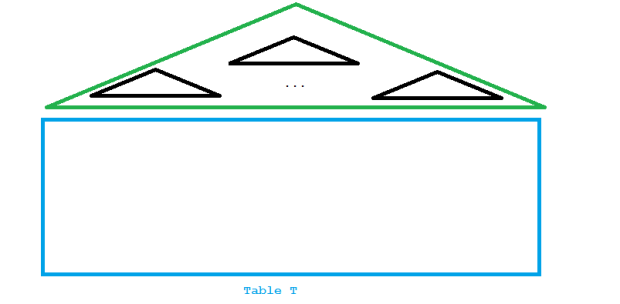
Reduced contention with hash partitioned index
Precisely this was achieved by the solution:
SQL> select sum(value) from v$segment_statistics
     where owner='ADAM'
     and statistic_name='buffer busy waits'
     and object_name = 'I';

SUM(VALUE)
----------
      4325

SQL> select 167363-4325 as waits_gone from dual;

WAITS_GONE
----------
    163038
Give me an Oracle Database and I don’t need a calculator 🙂
Watch me explaining the above on YouTube:
How Partial Indexing helps you save space in #Oracle 12c
Veröffentlicht in TOI am Dezember 1, 2016

Over time certain partitions may become less popular. In 12c, you don’t have to index these partitions anymore! This can save huge amounts of space and is one of the best 12c New Features in my opinion. Really a big deal if you are working with range partitioned tables where the phenomenon of old ranges becoming unpopular is very common. Let’s have a look, first at the problem:
SQL> select segment_name,partition_name ,bytes/1024/1024 from user_segments
     where segment_name like '%OLD';

SEGMENT_NA PARTITION_ BYTES/1024/1024
---------- ---------- ---------------
GLOBAL_OLD			   96
LOCAL_OLD  Q4			   22
LOCAL_OLD  Q3			   22
LOCAL_OLD  Q2			   22
LOCAL_OLD  Q1			   22
Without the New Feature, every part of the table is being indexed like shown on the below picture:
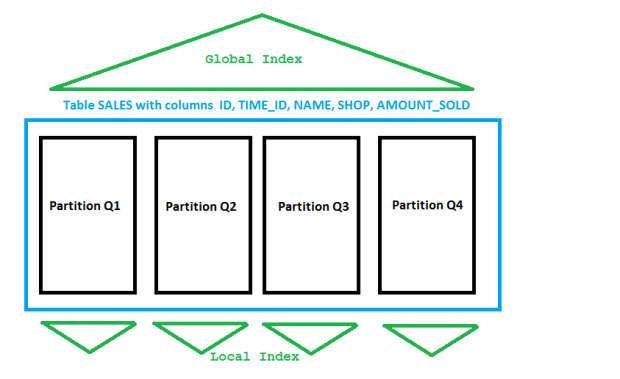
Ordinary Indexes on a partitioned table
Say partitions Q1, Q2 and Q3 are not popular any more, only Q4 is accessed frequently. In 12c I can do this:
SQL> alter table sales_range modify partition q1 indexing off;

Table altered.

SQL> alter table sales_range modify partition q2 indexing off;

Table altered.

SQL> alter table sales_range modify partition q3 indexing off;

Table altered.
This alone doesn’t affect indexes, though. They must be created with the new INDEXING PARTIAL clause now:
SQL> drop index local_old;

Index dropped.

SQL> drop index global_old;

Index dropped.

SQL> create index local_new on sales_range(time_id) indexing partial local nologging;

Index created.

SQL> create index global_new on sales_range(name) global indexing partial nologging;

Index created.
You may notice that these commands execute much faster now because less I/O needs to be done. And there is way less space consumed:
SQL> select segment_name,partition_name ,bytes/1024/1024 from user_segments
     where segment_name like '%NEW';
SEGMENT_NA PARTITION_ BYTES/1024/1024
---------- ---------- ---------------
LOCAL_NEW Q4 22
GLOBAL_NEW 24
That’s because the indexes look like this now:

Partial Indexes
Instead of dropping the old index you can also change it into using the New Feature:
SQL> select segment_name,partition_name ,bytes/1024/1024 from user_segments
     where segment_name like '%OLD%';

SEGMENT_NA PARTITION_ BYTES/1024/1024
---------- ---------- ---------------
GLOBAL_OLD			   96
LOCAL_OLD  Q4			   22
LOCAL_OLD  Q3			   22
LOCAL_OLD  Q2			   22
LOCAL_OLD  Q1			   22

SQL> alter index LOCAL_OLD indexing partial;

Index altered.
For a LOCAL index, that frees the space from the unpopular partitions immediately:
SQL> select segment_name,partition_name ,bytes/1024/1024 from user_segments
     where segment_name like '%OLD%';

SEGMENT_NA PARTITION_ BYTES/1024/1024
---------- ---------- ---------------
GLOBAL_OLD			   96
LOCAL_OLD  Q4			   22
That is different with a GLOBAL index:
SQL> alter index GLOBAL_OLD indexing partial;

Index altered.

SQL> select segment_name,partition_name ,bytes/1024/1024 from user_segments
     where segment_name like '%OLD%';

SEGMENT_NA PARTITION_ BYTES/1024/1024
---------- ---------- ---------------
GLOBAL_OLD			   96
LOCAL_OLD  Q4			   22
Still uses as much space as before, but now this releases space from unpopular parts of the index:
SQL> alter index global_old rebuild indexing partial;

Index altered.

SQL> select segment_name,partition_name ,bytes/1024/1024 from user_segments
     where segment_name like '%OLD%';

SEGMENT_NA PARTITION_ BYTES/1024/1024
---------- ---------- ---------------
LOCAL_OLD  Q4			   22
GLOBAL_OLD			   24
Cool 12c New Feature, isn’t it? 🙂
How to change RANGE- to INTERVAL-Partitioning in #Oracle
Veröffentlicht in TOI am November 30, 2016

An existing RANGE partitioned table can easily be changed to be INTERVAL partitioned with the SET INTERVAL command. My table has been created initially like this:
SQL> create table sales_range (id number, name varchar2(20),
 amount_sold number, shop varchar2(20), time_id date)
 partition by range (time_id)
 (
 partition q1 values less than (to_date('01.04.2016','dd.mm.yyyy')),
 partition q2 values less than (to_date('01.07.2016','dd.mm.yyyy')),
 partition q3 values less than (to_date('01.10.2016','dd.mm.yyyy')),
 partition q4 values less than (to_date('01.01.2017','dd.mm.yyyy'))
 );
That way, an insert that falls out of the last existing range fails:
SQL> insert into sales_range values (4000001,'Hesse',1999,'Birmingham',to_date('27.01.2017','dd.mm.yyyy'));
insert into sales_range values (4000001,'Hesse',1999,'Birmingham',to_date('27.01.2017','dd.mm.yyyy'))
            *
ERROR at line 1:
ORA-14400: inserted partition key does not map to any partition
Now instead of having to add a new range each time, the table can be changed to add that new range automatically if new rows require them. In other words, the 11g Feature Interval Partitioning can be added after the initial creation of the table:
SQL> alter table sales_range set interval(numtoYMinterval(3,'MONTH'));

Table altered.

SQL> insert into sales_range values (4000001,'Hesse',1999,'Birmingham',to_date('27.01.2017','dd.mm.yyyy'));

1 row created.

SQL> commit;

Commit complete.

SQL> col partition_name for a10
SQL> select partition_name from user_tab_partitions where table_name='SALES_RANGE';

PARTITION_
----------
SYS_P249
Q4
Q3
Q2
Q1
This is documented, of course. But the ALTER TABLE command is probably one of the most voluminous, so good luck in working your way through it until you find that part 😉
Pickleball spielen auf YouTube


 Pickleball spielen