Beiträge getaggt mit RMAN
How to do PDB PITR in #Oracle 12c
A logical error happened in one Pluggable Database. A PDB Point-In-Time-Recovery rewinds it while the others remain available and stay as they are.

Logical error in PDB2
The blue arrow represents the Multitenant Database cdb1 with all its containers. A while back in the past, a logical error affected only pdb2. cdb1 is in Archive Log Mode and backups from before the logical error of at least the root container and pdb2 are available. What happens now upon PDB PITR is quite similar to a Tablespace PITR: Backups of root and pdb2 are being restored. All other PDBs can be skipped. A PITR to rewind pdb2 only is done with the help of a temporary instance while cdb1 keeps running. Space is needed to restore the root container files to an auxiliary destination, while the pdb2 files will be restored over the existing files from pdb2:
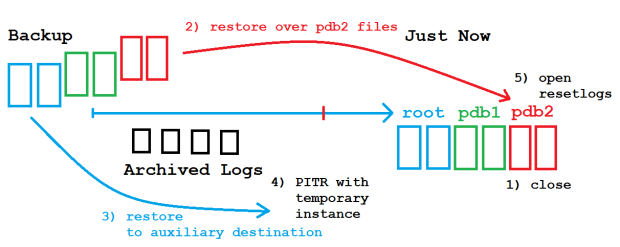
PDB PITR
Let’s see that in action!
[oracle@uhesse ~]$ export NLS_LANG=american_america.utf8
[oracle@uhesse ~]$ export NLS_DATE_FORMAT='yyyy-mm-dd hh24:mi:ss'

[oracle@uhesse ~]$ sqlplus sys/oracle_4U@pdb2 as sysdba

SQL> select * from scott.dept;

DEPTNO DNAME      LOC
------ ---------- ----------
    10 ACCOUNTING NEW YORK
    20 RESEARCH   DALLAS
    30 SALES      CHICAGO
    40 OPERATIONS BOSTON

SQL> select sysdate from dual;

SYSDATE
-------------------
2016-09-27 15:06:08

SQL> drop user scott cascade;

User dropped.
The drop user stands for the logical error. Now to the PDB PITR:
SQL> alter pluggable database pdb2 close immediate;

Pluggable database altered.

SQL> exit
Disconnected from Oracle Database 12c Enterprise Edition Release 12.1.0.2.0 - 64bit Production
With the Partitioning, OLAP, Advanced Analytics and Real Application Testing options
[oracle@edvmr1p0 ~]$ rman target /


RMAN> run{set until time='2016-09-27 15:06:05';restore pluggable database pdb2;
          recover pluggable database pdb2 auxiliary destination '/home/oracle/';
          alter pluggable database pdb2 open resetlogs;}

executing command: SET until clause

Starting restore at 2016-09-27 15:09:38
using target database control file instead of recovery catalog
allocated channel: ORA_DISK_1
channel ORA_DISK_1: SID=279 device type=DISK

channel ORA_DISK_1: starting datafile backup set restore
channel ORA_DISK_1: specifying datafile(s) to restore from backup set
channel ORA_DISK_1: restoring datafile 00012 to /u01/app/oracle/oradata/pdb2/system01.dbf
channel ORA_DISK_1: restoring datafile 00013 to /u01/app/oracle/oradata/pdb2/sysaux01.dbf
channel ORA_DISK_1: restoring datafile 00014 to /u01/app/oracle/oradata/pdb2/users01.dbf
channel ORA_DISK_1: reading from backup piece

/u01/app/oracle/fast_recovery_area/CDB1/3D69FAB014BF7D48E0532A40CE0A8038/backupset/2016_09_27/o1_mf_nnndf_TAG20160927T101919_cynkyhtd_.bkp
channel ORA_DISK_1: piece

handle=/u01/app/oracle/fast_recovery_area/CDB1/3D69FAB014BF7D48E0532A40CE0A8038/backupset/2016_09_27/o1_mf_nnndf_TAG20160927T101919_cynkyhtd_.b

kp tag=TAG20160927T101919
channel ORA_DISK_1: restored backup piece 1
channel ORA_DISK_1: restore complete, elapsed time: 00:00:15
Finished restore at 2016-09-27 15:09:55

Starting recover at 2016-09-27 15:09:55
current log archived
using channel ORA_DISK_1
RMAN-05026: WARNING: presuming following set of tablespaces applies to specified Point-in-Time

List of tablespaces expected to have UNDO segments
Tablespace SYSTEM
Tablespace UNDOTBS1

Creating automatic instance, with SID='gkon'

initialization parameters used for automatic instance:
db_name=CDB1
db_unique_name=gkon_pitr_pdb2_CDB1
compatible=12.1.0.2.0
db_block_size=8192
db_files=200
diagnostic_dest=/u01/app/oracle
_system_trig_enabled=FALSE
sga_target=752M
processes=200
db_create_file_dest=/home/oracle/
log_archive_dest_1='location=/home/oracle/'
enable_pluggable_database=true
_clone_one_pdb_recovery=true
#No auxiliary parameter file used


starting up automatic instance CDB1

Oracle instance started

Total System Global Area     788529152 bytes

Fixed Size                     2929352 bytes
Variable Size                218107192 bytes
Database Buffers             562036736 bytes
Redo Buffers                   5455872 bytes
Automatic instance created

contents of Memory Script:
{
# set requested point in time
set until  time "2016-09-27 15:06:05";
# restore the controlfile
restore clone controlfile;

# mount the controlfile
sql clone 'alter database mount clone database';
}
executing Memory Script

executing command: SET until clause

Starting restore at 2016-09-27 15:10:10
allocated channel: ORA_AUX_DISK_1
channel ORA_AUX_DISK_1: SID=165 device type=DISK

channel ORA_AUX_DISK_1: starting datafile backup set restore
channel ORA_AUX_DISK_1: restoring control file
channel ORA_AUX_DISK_1: reading from backup piece /u01/app/oracle/fast_recovery_area/CDB1/autobackup/2016_09_27/o1_mf_s_923661139_cynspmom_.bkp
channel ORA_AUX_DISK_1: piece handle=/u01/app/oracle/fast_recovery_area/CDB1/autobackup/2016_09_27/o1_mf_s_923661139_cynspmom_.bkp

tag=TAG20160927T123219
channel ORA_AUX_DISK_1: restored backup piece 1
channel ORA_AUX_DISK_1: restore complete, elapsed time: 00:00:01
output file name=/home/oracle/CDB1/controlfile/o1_mf_cyo2ymfv_.ctl
Finished restore at 2016-09-27 15:10:12

sql statement: alter database mount clone database

contents of Memory Script:
{
# set requested point in time
set until  time "2016-09-27 15:06:05";
# switch to valid datafilecopies
switch clone datafile  12 to datafilecopy
 "/u01/app/oracle/oradata/pdb2/system01.dbf";
switch clone datafile  13 to datafilecopy
 "/u01/app/oracle/oradata/pdb2/sysaux01.dbf";
switch clone datafile  14 to datafilecopy
 "/u01/app/oracle/oradata/pdb2/users01.dbf";
# set destinations for recovery set and auxiliary set datafiles
set newname for clone datafile  1 to new;
set newname for clone datafile  4 to new;
set newname for clone datafile  3 to new;
set newname for clone datafile  6 to new;
# restore the tablespaces in the recovery set and the auxiliary set
restore clone datafile  1, 4, 3, 6;

switch clone datafile all;
}
executing Memory Script

executing command: SET until clause

datafile 12 switched to datafile copy
input datafile copy RECID=7 STAMP=923670618 file name=/u01/app/oracle/oradata/pdb2/system01.dbf

datafile 13 switched to datafile copy
input datafile copy RECID=8 STAMP=923670618 file name=/u01/app/oracle/oradata/pdb2/sysaux01.dbf

datafile 14 switched to datafile copy
input datafile copy RECID=9 STAMP=923670618 file name=/u01/app/oracle/oradata/pdb2/users01.dbf

executing command: SET NEWNAME

executing command: SET NEWNAME

executing command: SET NEWNAME

executing command: SET NEWNAME

Starting restore at 2016-09-27 15:10:17
using channel ORA_AUX_DISK_1

channel ORA_AUX_DISK_1: starting datafile backup set restore
channel ORA_AUX_DISK_1: specifying datafile(s) to restore from backup set
channel ORA_AUX_DISK_1: restoring datafile 00001 to /home/oracle/CDB1/datafile/o1_mf_system_%u_.dbf
channel ORA_AUX_DISK_1: restoring datafile 00004 to /home/oracle/CDB1/datafile/o1_mf_undotbs1_%u_.dbf
channel ORA_AUX_DISK_1: restoring datafile 00003 to /home/oracle/CDB1/datafile/o1_mf_sysaux_%u_.dbf
channel ORA_AUX_DISK_1: restoring datafile 00006 to /home/oracle/CDB1/datafile/o1_mf_users_%u_.dbf
channel ORA_AUX_DISK_1: reading from backup piece

/u01/app/oracle/fast_recovery_area/CDB1/backupset/2016_09_27/o1_mf_nnndf_TAG20160927T101919_cynkxps1_.bkp
channel ORA_AUX_DISK_1: piece handle=/u01/app/oracle/fast_recovery_area/CDB1/backupset/2016_09_27/o1_mf_nnndf_TAG20160927T101919_cynkxps1_.bkp

tag=TAG20160927T101919
channel ORA_AUX_DISK_1: restored backup piece 1
channel ORA_AUX_DISK_1: restore complete, elapsed time: 00:00:25
Finished restore at 2016-09-27 15:10:42

datafile 1 switched to datafile copy
input datafile copy RECID=14 STAMP=923670642 file name=/home/oracle/CDB1/datafile/o1_mf_system_cyo2yshr_.dbf
datafile 4 switched to datafile copy
input datafile copy RECID=15 STAMP=923670642 file name=/home/oracle/CDB1/datafile/o1_mf_undotbs1_cyo2ysjc_.dbf
datafile 3 switched to datafile copy
input datafile copy RECID=16 STAMP=923670642 file name=/home/oracle/CDB1/datafile/o1_mf_sysaux_cyo2ysj1_.dbf
datafile 6 switched to datafile copy
input datafile copy RECID=17 STAMP=923670642 file name=/home/oracle/CDB1/datafile/o1_mf_users_cyo2ysjr_.dbf

contents of Memory Script:
{
# set requested point in time
set until  time "2016-09-27 15:06:05";
# online the datafiles restored or switched
sql clone "alter database datafile  1 online";
sql clone "alter database datafile  4 online";
sql clone "alter database datafile  3 online";
sql clone 'PDB2' "alter database datafile
 12 online";
sql clone 'PDB2' "alter database datafile
 13 online";
sql clone 'PDB2' "alter database datafile
 14 online";
sql clone "alter database datafile  6 online";
# recover pdb
recover clone database tablespace  "SYSTEM", "UNDOTBS1", "SYSAUX", "USERS" pluggable database
 'PDB2'   delete archivelog;
sql clone 'alter database open read only';
plsql <<>>;
plsql <<>>;
# shutdown clone before import
shutdown clone abort
plsql <<  'PDB2');
end; >>>;
}
executing Memory Script

executing command: SET until clause

sql statement: alter database datafile  1 online

sql statement: alter database datafile  4 online

sql statement: alter database datafile  3 online

sql statement: alter database datafile  12 online

sql statement: alter database datafile  13 online

sql statement: alter database datafile  14 online

sql statement: alter database datafile  6 online

Starting recover at 2016-09-27 15:10:43
using channel ORA_AUX_DISK_1

starting media recovery

archived log for thread 1 with sequence 43 is already on disk as file

/u01/app/oracle/fast_recovery_area/CDB1/archivelog/2016_09_27/o1_mf_1_43_cynm4w09_.arc
archived log for thread 1 with sequence 44 is already on disk as file

/u01/app/oracle/fast_recovery_area/CDB1/archivelog/2016_09_27/o1_mf_1_44_cynmy3k9_.arc
archived log for thread 1 with sequence 45 is already on disk as file

/u01/app/oracle/fast_recovery_area/CDB1/archivelog/2016_09_27/o1_mf_1_45_cynn3bds_.arc
archived log for thread 1 with sequence 46 is already on disk as file

/u01/app/oracle/fast_recovery_area/CDB1/archivelog/2016_09_27/o1_mf_1_46_cynn3d80_.arc
archived log for thread 1 with sequence 47 is already on disk as file

/u01/app/oracle/fast_recovery_area/CDB1/archivelog/2016_09_27/o1_mf_1_47_cynn6341_.arc
archived log for thread 1 with sequence 48 is already on disk as file

/u01/app/oracle/fast_recovery_area/CDB1/archivelog/2016_09_27/o1_mf_1_48_cynrz3bw_.arc
archived log for thread 1 with sequence 49 is already on disk as file

/u01/app/oracle/fast_recovery_area/CDB1/archivelog/2016_09_27/o1_mf_1_49_cyo2y39z_.arc
archived log file name=/u01/app/oracle/fast_recovery_area/CDB1/archivelog/2016_09_27/o1_mf_1_43_cynm4w09_.arc thread=1 sequence=43
archived log file name=/u01/app/oracle/fast_recovery_area/CDB1/archivelog/2016_09_27/o1_mf_1_44_cynmy3k9_.arc thread=1 sequence=44
archived log file name=/u01/app/oracle/fast_recovery_area/CDB1/archivelog/2016_09_27/o1_mf_1_45_cynn3bds_.arc thread=1 sequence=45
archived log file name=/u01/app/oracle/fast_recovery_area/CDB1/archivelog/2016_09_27/o1_mf_1_46_cynn3d80_.arc thread=1 sequence=46
archived log file name=/u01/app/oracle/fast_recovery_area/CDB1/archivelog/2016_09_27/o1_mf_1_47_cynn6341_.arc thread=1 sequence=47
archived log file name=/u01/app/oracle/fast_recovery_area/CDB1/archivelog/2016_09_27/o1_mf_1_48_cynrz3bw_.arc thread=1 sequence=48
archived log file name=/u01/app/oracle/fast_recovery_area/CDB1/archivelog/2016_09_27/o1_mf_1_49_cyo2y39z_.arc thread=1 sequence=49
media recovery complete, elapsed time: 00:00:04
Finished recover at 2016-09-27 15:10:47

sql statement: alter database open read only


Oracle instance shut down


Removing automatic instance
Automatic instance removed
auxiliary instance file /home/oracle/CDB1/datafile/o1_mf_sysaux_cyo2ysj1_.dbf deleted
auxiliary instance file /home/oracle/CDB1/controlfile/o1_mf_cyo2ymfv_.ctl deleted
Finished recover at 2016-09-27 15:10:51

Statement processed
Now how is the state of affairs after the PDB PITR?
RMAN> exit

[oracle@uhesse ~]$ sqlplus sys/oracle_4U@pdb2 as sysdba

SQL*Plus: Release 12.1.0.2.0 Production on Tue Sep 27 15:19:45 2016

Copyright (c) 1982, 2014, Oracle.  All rights reserved.


Connected to:
Oracle Database 12c Enterprise Edition Release 12.1.0.2.0 - 64bit Production
With the Partitioning, OLAP, Advanced Analytics and Real Application Testing options

SQL> select count(*) from scott.dept;

  COUNT(*)
----------
         4

SQL> select DB_INCARNATION#,PDB_INCARNATION#,INCARNATION_TIME from v$pdb_incarnation;

DB_INCARNATION# PDB_INCARNATION# INCARNATION_TIME
--------------- ---------------- -------------------
              2                2 2016-09-27 15:06:29
              2                0 2015-03-17 16:49:58

SQL> connect / as sysdba
Connected.
SQL> select sequence#,status from v$log;

 SEQUENCE# STATUS
---------- ------------------------------------------------
        49 INACTIVE
        50 CURRENT
        48 INACTIVE

SQL> select INCARNATION#,RESETLOGS_TIME from v$database_incarnation;

INCARNATION# RESETLOGS_TIME
------------ -------------------
           1 2014-07-07 05:38:47
           2 2015-03-17 16:49:58
The logical error inside pdb2 is undone! In spite of the RESETLOGS clause, the CDB stays in the same incarnation as before and the Online Logs are not initialized. The new view V$PDB_INCARNATION confirms the creation of a new incarnation for pdb2, though.
I took this from a live demonstration at my present Oracle Database 12c New Features class. It has been done with 12.1, where Flashback on the PDB layer is not available. Hope you find it useful 🙂
How to use DURATION with RMAN backups in #Oracle

The DURATION clause enables you to reduce the performance impact of RMAN backups respectively it sets a certain time limit for the backup.
Let’s suppose your RMAN backup takes one hour now and you take it online while end users work with the database. This reduces the performance impact of the online backup by half approximately:
RMAN> backup duration 02:00 minimize load database;
The first two digits are hours, the second two digits are minutes. Above command tells RMAN to spend 02 hours and 00 minutes with the backup that takes normally one hour. That way, RMAN gets throttled down, causing roughly half the load on the system than otherwise.
In another scenario, let’s suppose that you want to limit the backup run to take only 30 minutes every night, because you want to run a batch job afterwards that must not be impacted by the backup. Without the limit, backup takes one hour. You are fine with backing up only half of your datafiles every night. This command does the trick:
RMAN> backup duration 00:30 partial minimize time database
      not backed up since time='sysdate-1' filesperset 1;
RMAN will backup as many datafiles as possible within 30 minutes, generating one backuset per datafile. It stops after 30 minutes. Tomorrow, the remaining datafiles are being backed up. Drawback is that it takes longer in case to recover the datafiles that have two days old backups.
This is one little topic from the Oracle Database 12c Backup and Recovery Workshop that I deliver this week in Prague. Great city, by the way 🙂
RMAN old feature: Restore datafile without backup

Say I have created a new tablespace recently and did not yet take a backup of the datafile. Now I lose that datafile. Dilemma? No, because I can do an ALTER DATABASE CREATE DATAFILE. Sounds complex? Well even if I wouldn’t be aware of that possibility, a simple RMAN restore will work – as if there were a backup:
RMAN> create table adam.nu tablespace tbs1 as select * from adam.sales where rownum<=10000;
Statement processed
RMAN> alter system switch logfile;

Statement processed

RMAN> host 'echo kaputt > /u01/app/oracle/oradata/prima/tbs1.dbf';

host command complete

RMAN> select count(*) from adam.nu;

RMAN-00571: ===========================================================
RMAN-00569: =============== ERROR MESSAGE STACK FOLLOWS ===============
RMAN-00571: ===========================================================
RMAN-03002: failure of sql statement command at 10/20/2015 11:50:12
ORA-01115: IO error reading block from file  (block # )
ORA-01110: data file 5: '/u01/app/oracle/oradata/prima/tbs1.dbf'
ORA-27072: File I/O error
Additional information: 4
Additional information: 131

RMAN> alter database datafile 5 offline;

Statement processed

RMAN> restore datafile 5;

Starting restore at 2015-10-20 11:50:43
allocated channel: ORA_DISK_1
channel ORA_DISK_1: SID=187 device type=DISK

creating datafile file number=5 name=/u01/app/oracle/oradata/prima/tbs1.dbf
restore not done; all files read only, offline, or already restored
Finished restore at 2015-10-20 11:50:45

RMAN> recover datafile 5;

Starting recover at 2015-10-20 11:50:52
using channel ORA_DISK_1

starting media recovery
media recovery complete, elapsed time: 00:00:01

Finished recover at 2015-10-20 11:50:53

RMAN> alter database datafile 5 online;

Statement processed

RMAN> select count(*) from adam.nu;

  COUNT(*)
----------
     10000
Cool isn’t it? Requires that you have all archived logs available since the creation of the tablespace. And besides the SQL commands inside the RMAN shell, it is not a 12c new feature. It works that way since forever, as far as I recall. Don’t believe it, test it! Maybe not on a production system 😉
RMAN old feature: Restore datafile without backup https://t.co/SIZpDigUH4
— Uwe Hesse (@UweHesse) October 20, 2015
Pickleball spielen auf YouTube


 Pickleball spielen