Beiträge getaggt mit Multitenant
How to do PDB PITR in #Oracle 12c
A logical error happened in one Pluggable Database. A PDB Point-In-Time-Recovery rewinds it while the others remain available and stay as they are.

Logical error in PDB2
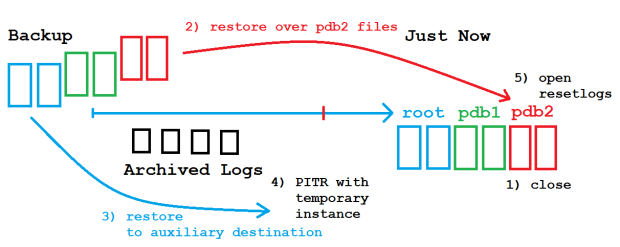
The blue arrow represents the Multitenant Database cdb1 with all its containers. A while back in the past, a logical error affected only pdb2. cdb1 is in Archive Log Mode and backups from before the logical error of at least the root container and pdb2 are available. What happens now upon PDB PITR is quite similar to a Tablespace PITR: Backups of root and pdb2 are being restored. All other PDBs can be skipped. A PITR to rewind pdb2 only is done with the help of a temporary instance while cdb1 keeps running. Space is needed to restore the root container files to an auxiliary destination, while the pdb2 files will be restored over the existing files from pdb2:
PDB PITR
Let’s see that in action!
[oracle@uhesse ~]$ export NLS_LANG=american_america.utf8
[oracle@uhesse ~]$ export NLS_DATE_FORMAT='yyyy-mm-dd hh24:mi:ss'

[oracle@uhesse ~]$ sqlplus sys/oracle_4U@pdb2 as sysdba

SQL> select * from scott.dept;

DEPTNO DNAME      LOC
------ ---------- ----------
    10 ACCOUNTING NEW YORK
    20 RESEARCH   DALLAS
    30 SALES      CHICAGO
    40 OPERATIONS BOSTON

SQL> select sysdate from dual;

SYSDATE
-------------------
2016-09-27 15:06:08

SQL> drop user scott cascade;

User dropped.
The drop user stands for the logical error. Now to the PDB PITR:
SQL> alter pluggable database pdb2 close immediate;

Pluggable database altered.

SQL> exit
Disconnected from Oracle Database 12c Enterprise Edition Release 12.1.0.2.0 - 64bit Production
With the Partitioning, OLAP, Advanced Analytics and Real Application Testing options
[oracle@edvmr1p0 ~]$ rman target /


RMAN> run{set until time='2016-09-27 15:06:05';restore pluggable database pdb2;
          recover pluggable database pdb2 auxiliary destination '/home/oracle/';
          alter pluggable database pdb2 open resetlogs;}

executing command: SET until clause

Starting restore at 2016-09-27 15:09:38
using target database control file instead of recovery catalog
allocated channel: ORA_DISK_1
channel ORA_DISK_1: SID=279 device type=DISK

channel ORA_DISK_1: starting datafile backup set restore
channel ORA_DISK_1: specifying datafile(s) to restore from backup set
channel ORA_DISK_1: restoring datafile 00012 to /u01/app/oracle/oradata/pdb2/system01.dbf
channel ORA_DISK_1: restoring datafile 00013 to /u01/app/oracle/oradata/pdb2/sysaux01.dbf
channel ORA_DISK_1: restoring datafile 00014 to /u01/app/oracle/oradata/pdb2/users01.dbf
channel ORA_DISK_1: reading from backup piece

/u01/app/oracle/fast_recovery_area/CDB1/3D69FAB014BF7D48E0532A40CE0A8038/backupset/2016_09_27/o1_mf_nnndf_TAG20160927T101919_cynkyhtd_.bkp
channel ORA_DISK_1: piece

handle=/u01/app/oracle/fast_recovery_area/CDB1/3D69FAB014BF7D48E0532A40CE0A8038/backupset/2016_09_27/o1_mf_nnndf_TAG20160927T101919_cynkyhtd_.b

kp tag=TAG20160927T101919
channel ORA_DISK_1: restored backup piece 1
channel ORA_DISK_1: restore complete, elapsed time: 00:00:15
Finished restore at 2016-09-27 15:09:55

Starting recover at 2016-09-27 15:09:55
current log archived
using channel ORA_DISK_1
RMAN-05026: WARNING: presuming following set of tablespaces applies to specified Point-in-Time

List of tablespaces expected to have UNDO segments
Tablespace SYSTEM
Tablespace UNDOTBS1

Creating automatic instance, with SID='gkon'

initialization parameters used for automatic instance:
db_name=CDB1
db_unique_name=gkon_pitr_pdb2_CDB1
compatible=12.1.0.2.0
db_block_size=8192
db_files=200
diagnostic_dest=/u01/app/oracle
_system_trig_enabled=FALSE
sga_target=752M
processes=200
db_create_file_dest=/home/oracle/
log_archive_dest_1='location=/home/oracle/'
enable_pluggable_database=true
_clone_one_pdb_recovery=true
#No auxiliary parameter file used


starting up automatic instance CDB1

Oracle instance started

Total System Global Area     788529152 bytes

Fixed Size                     2929352 bytes
Variable Size                218107192 bytes
Database Buffers             562036736 bytes
Redo Buffers                   5455872 bytes
Automatic instance created

contents of Memory Script:
{
# set requested point in time
set until  time "2016-09-27 15:06:05";
# restore the controlfile
restore clone controlfile;

# mount the controlfile
sql clone 'alter database mount clone database';
}
executing Memory Script

executing command: SET until clause

Starting restore at 2016-09-27 15:10:10
allocated channel: ORA_AUX_DISK_1
channel ORA_AUX_DISK_1: SID=165 device type=DISK

channel ORA_AUX_DISK_1: starting datafile backup set restore
channel ORA_AUX_DISK_1: restoring control file
channel ORA_AUX_DISK_1: reading from backup piece /u01/app/oracle/fast_recovery_area/CDB1/autobackup/2016_09_27/o1_mf_s_923661139_cynspmom_.bkp
channel ORA_AUX_DISK_1: piece handle=/u01/app/oracle/fast_recovery_area/CDB1/autobackup/2016_09_27/o1_mf_s_923661139_cynspmom_.bkp

tag=TAG20160927T123219
channel ORA_AUX_DISK_1: restored backup piece 1
channel ORA_AUX_DISK_1: restore complete, elapsed time: 00:00:01
output file name=/home/oracle/CDB1/controlfile/o1_mf_cyo2ymfv_.ctl
Finished restore at 2016-09-27 15:10:12

sql statement: alter database mount clone database

contents of Memory Script:
{
# set requested point in time
set until  time "2016-09-27 15:06:05";
# switch to valid datafilecopies
switch clone datafile  12 to datafilecopy
 "/u01/app/oracle/oradata/pdb2/system01.dbf";
switch clone datafile  13 to datafilecopy
 "/u01/app/oracle/oradata/pdb2/sysaux01.dbf";
switch clone datafile  14 to datafilecopy
 "/u01/app/oracle/oradata/pdb2/users01.dbf";
# set destinations for recovery set and auxiliary set datafiles
set newname for clone datafile  1 to new;
set newname for clone datafile  4 to new;
set newname for clone datafile  3 to new;
set newname for clone datafile  6 to new;
# restore the tablespaces in the recovery set and the auxiliary set
restore clone datafile  1, 4, 3, 6;

switch clone datafile all;
}
executing Memory Script

executing command: SET until clause

datafile 12 switched to datafile copy
input datafile copy RECID=7 STAMP=923670618 file name=/u01/app/oracle/oradata/pdb2/system01.dbf

datafile 13 switched to datafile copy
input datafile copy RECID=8 STAMP=923670618 file name=/u01/app/oracle/oradata/pdb2/sysaux01.dbf

datafile 14 switched to datafile copy
input datafile copy RECID=9 STAMP=923670618 file name=/u01/app/oracle/oradata/pdb2/users01.dbf

executing command: SET NEWNAME

executing command: SET NEWNAME

executing command: SET NEWNAME

executing command: SET NEWNAME

Starting restore at 2016-09-27 15:10:17
using channel ORA_AUX_DISK_1

channel ORA_AUX_DISK_1: starting datafile backup set restore
channel ORA_AUX_DISK_1: specifying datafile(s) to restore from backup set
channel ORA_AUX_DISK_1: restoring datafile 00001 to /home/oracle/CDB1/datafile/o1_mf_system_%u_.dbf
channel ORA_AUX_DISK_1: restoring datafile 00004 to /home/oracle/CDB1/datafile/o1_mf_undotbs1_%u_.dbf
channel ORA_AUX_DISK_1: restoring datafile 00003 to /home/oracle/CDB1/datafile/o1_mf_sysaux_%u_.dbf
channel ORA_AUX_DISK_1: restoring datafile 00006 to /home/oracle/CDB1/datafile/o1_mf_users_%u_.dbf
channel ORA_AUX_DISK_1: reading from backup piece

/u01/app/oracle/fast_recovery_area/CDB1/backupset/2016_09_27/o1_mf_nnndf_TAG20160927T101919_cynkxps1_.bkp
channel ORA_AUX_DISK_1: piece handle=/u01/app/oracle/fast_recovery_area/CDB1/backupset/2016_09_27/o1_mf_nnndf_TAG20160927T101919_cynkxps1_.bkp

tag=TAG20160927T101919
channel ORA_AUX_DISK_1: restored backup piece 1
channel ORA_AUX_DISK_1: restore complete, elapsed time: 00:00:25
Finished restore at 2016-09-27 15:10:42

datafile 1 switched to datafile copy
input datafile copy RECID=14 STAMP=923670642 file name=/home/oracle/CDB1/datafile/o1_mf_system_cyo2yshr_.dbf
datafile 4 switched to datafile copy
input datafile copy RECID=15 STAMP=923670642 file name=/home/oracle/CDB1/datafile/o1_mf_undotbs1_cyo2ysjc_.dbf
datafile 3 switched to datafile copy
input datafile copy RECID=16 STAMP=923670642 file name=/home/oracle/CDB1/datafile/o1_mf_sysaux_cyo2ysj1_.dbf
datafile 6 switched to datafile copy
input datafile copy RECID=17 STAMP=923670642 file name=/home/oracle/CDB1/datafile/o1_mf_users_cyo2ysjr_.dbf

contents of Memory Script:
{
# set requested point in time
set until  time "2016-09-27 15:06:05";
# online the datafiles restored or switched
sql clone "alter database datafile  1 online";
sql clone "alter database datafile  4 online";
sql clone "alter database datafile  3 online";
sql clone 'PDB2' "alter database datafile
 12 online";
sql clone 'PDB2' "alter database datafile
 13 online";
sql clone 'PDB2' "alter database datafile
 14 online";
sql clone "alter database datafile  6 online";
# recover pdb
recover clone database tablespace  "SYSTEM", "UNDOTBS1", "SYSAUX", "USERS" pluggable database
 'PDB2'   delete archivelog;
sql clone 'alter database open read only';
plsql <<>>;
plsql <<>>;
# shutdown clone before import
shutdown clone abort
plsql <<  'PDB2');
end; >>>;
}
executing Memory Script

executing command: SET until clause

sql statement: alter database datafile  1 online

sql statement: alter database datafile  4 online

sql statement: alter database datafile  3 online

sql statement: alter database datafile  12 online

sql statement: alter database datafile  13 online

sql statement: alter database datafile  14 online

sql statement: alter database datafile  6 online

Starting recover at 2016-09-27 15:10:43
using channel ORA_AUX_DISK_1

starting media recovery

archived log for thread 1 with sequence 43 is already on disk as file

/u01/app/oracle/fast_recovery_area/CDB1/archivelog/2016_09_27/o1_mf_1_43_cynm4w09_.arc
archived log for thread 1 with sequence 44 is already on disk as file

/u01/app/oracle/fast_recovery_area/CDB1/archivelog/2016_09_27/o1_mf_1_44_cynmy3k9_.arc
archived log for thread 1 with sequence 45 is already on disk as file

/u01/app/oracle/fast_recovery_area/CDB1/archivelog/2016_09_27/o1_mf_1_45_cynn3bds_.arc
archived log for thread 1 with sequence 46 is already on disk as file

/u01/app/oracle/fast_recovery_area/CDB1/archivelog/2016_09_27/o1_mf_1_46_cynn3d80_.arc
archived log for thread 1 with sequence 47 is already on disk as file

/u01/app/oracle/fast_recovery_area/CDB1/archivelog/2016_09_27/o1_mf_1_47_cynn6341_.arc
archived log for thread 1 with sequence 48 is already on disk as file

/u01/app/oracle/fast_recovery_area/CDB1/archivelog/2016_09_27/o1_mf_1_48_cynrz3bw_.arc
archived log for thread 1 with sequence 49 is already on disk as file

/u01/app/oracle/fast_recovery_area/CDB1/archivelog/2016_09_27/o1_mf_1_49_cyo2y39z_.arc
archived log file name=/u01/app/oracle/fast_recovery_area/CDB1/archivelog/2016_09_27/o1_mf_1_43_cynm4w09_.arc thread=1 sequence=43
archived log file name=/u01/app/oracle/fast_recovery_area/CDB1/archivelog/2016_09_27/o1_mf_1_44_cynmy3k9_.arc thread=1 sequence=44
archived log file name=/u01/app/oracle/fast_recovery_area/CDB1/archivelog/2016_09_27/o1_mf_1_45_cynn3bds_.arc thread=1 sequence=45
archived log file name=/u01/app/oracle/fast_recovery_area/CDB1/archivelog/2016_09_27/o1_mf_1_46_cynn3d80_.arc thread=1 sequence=46
archived log file name=/u01/app/oracle/fast_recovery_area/CDB1/archivelog/2016_09_27/o1_mf_1_47_cynn6341_.arc thread=1 sequence=47
archived log file name=/u01/app/oracle/fast_recovery_area/CDB1/archivelog/2016_09_27/o1_mf_1_48_cynrz3bw_.arc thread=1 sequence=48
archived log file name=/u01/app/oracle/fast_recovery_area/CDB1/archivelog/2016_09_27/o1_mf_1_49_cyo2y39z_.arc thread=1 sequence=49
media recovery complete, elapsed time: 00:00:04
Finished recover at 2016-09-27 15:10:47

sql statement: alter database open read only


Oracle instance shut down


Removing automatic instance
Automatic instance removed
auxiliary instance file /home/oracle/CDB1/datafile/o1_mf_sysaux_cyo2ysj1_.dbf deleted
auxiliary instance file /home/oracle/CDB1/controlfile/o1_mf_cyo2ymfv_.ctl deleted
Finished recover at 2016-09-27 15:10:51

Statement processed
Now how is the state of affairs after the PDB PITR?
RMAN> exit

[oracle@uhesse ~]$ sqlplus sys/oracle_4U@pdb2 as sysdba

SQL*Plus: Release 12.1.0.2.0 Production on Tue Sep 27 15:19:45 2016

Copyright (c) 1982, 2014, Oracle.  All rights reserved.


Connected to:
Oracle Database 12c Enterprise Edition Release 12.1.0.2.0 - 64bit Production
With the Partitioning, OLAP, Advanced Analytics and Real Application Testing options

SQL> select count(*) from scott.dept;

  COUNT(*)
----------
         4

SQL> select DB_INCARNATION#,PDB_INCARNATION#,INCARNATION_TIME from v$pdb_incarnation;

DB_INCARNATION# PDB_INCARNATION# INCARNATION_TIME
--------------- ---------------- -------------------
              2                2 2016-09-27 15:06:29
              2                0 2015-03-17 16:49:58

SQL> connect / as sysdba
Connected.
SQL> select sequence#,status from v$log;

 SEQUENCE# STATUS
---------- ------------------------------------------------
        49 INACTIVE
        50 CURRENT
        48 INACTIVE

SQL> select INCARNATION#,RESETLOGS_TIME from v$database_incarnation;

INCARNATION# RESETLOGS_TIME
------------ -------------------
           1 2014-07-07 05:38:47
           2 2015-03-17 16:49:58
The logical error inside pdb2 is undone! In spite of the RESETLOGS clause, the CDB stays in the same incarnation as before and the Online Logs are not initialized. The new view V$PDB_INCARNATION confirms the creation of a new incarnation for pdb2, though.
I took this from a live demonstration at my present Oracle Database 12c New Features class. It has been done with 12.1, where Flashback on the PDB layer is not available. Hope you find it useful 🙂
Upgrade a Pluggable Database in #Oracle 12c
This is how an upgrade with pluggable databases looks conceptually:
You have two multitenant databases from different versions in place. Preferably they share the same storage, which allows to do the upgrade without having to move any datafiles

You unplug the pluggable database from the first multitenant database, then you drop it. That is a fast logical operation that does not delete any files

Next step is to plug in the pluggable database into the multitenant database from the higher version
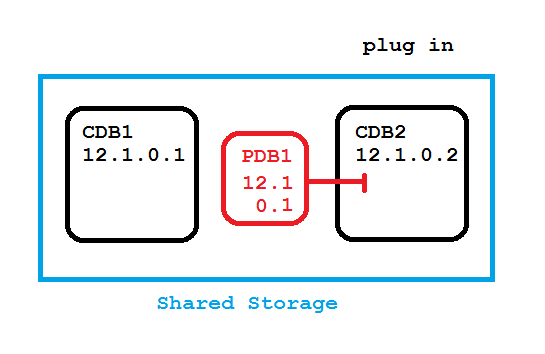
So far the operations were very fast (seconds). Next step takes longer, when you upgrade the pluggable database in its new destination
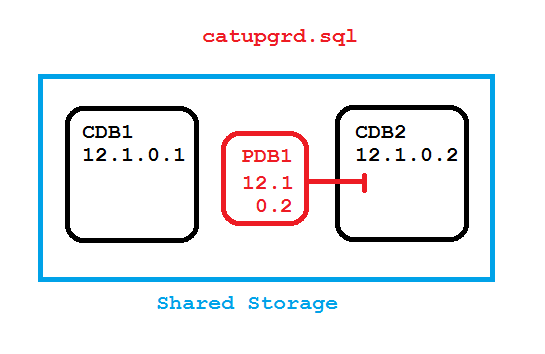
Now let’s see that with details:
SQL> select banner from v$version;

BANNER
--------------------------------------------------------------------------------
Oracle Database 12c Enterprise Edition Release 12.1.0.1.0 - 64bit Production
PL/SQL Release 12.1.0.1.0 - Production
CORE    12.1.0.1.0      Production
TNS for Linux: Version 12.1.0.1.0 - Production
NLSRTL Version 12.1.0.1.0 - Production

SQL> select name from v$datafile;

NAME
--------------------------------------------------------------------------------
/oradata/CDB1/system01.dbf
/oradata/CDB1/pdbseed/system01.dbf
/oradata/CDB1/sysaux01.dbf
/oradata/CDB1/pdbseed/sysaux01.dbf
/oradata/CDB1/undotbs01.dbf
/oradata/CDB1/users01.dbf

6 rows selected.

SQL> host mkdir /oradata/PDB1

SQL> create pluggable database PDB1 admin user adm identified by oracle
  2  file_name_convert=('/oradata/CDB1/pdbseed/','/oradata/PDB1/');

Pluggable database created.

SQL> alter pluggable database all open;

Pluggable database altered.

SQL> alter session set container=PDB1;

Session altered.

SQL> create tablespace users datafile '/oradata/PDB1/users01.dbf' size 100m;

Tablespace created.

SQL> alter pluggable database default tablespace users;

Pluggable database altered.

SQL> grant dba to adam identified by adam;

Grant succeeded.

SQL> create table adam.t as select * from dual;

Table created.
The PDB should have its own subfolder underneath /oradata respectively in the DATA diskgroup IMHO. Makes not much sense to have the PDB subfolder underneath the CDBs subfolder because it may get plugged into other CDBs. Your PDB names should be unique across the enterprise anyway, also because of the PDB service that is named after the PDB.
I’m about to upgrade PDB1, so I run the pre upgrade script that comes with the new version
SQL> connect / as sysdba
Connected.

SQL> @/u01/app/oracle/product/12.1.0.2/rdbms/admin/preupgrd.sql

Loading Pre-Upgrade Package...


***************************************************************************
Executing Pre-Upgrade Checks in CDB$ROOT...
***************************************************************************


      ************************************************************

                 ====>> ERRORS FOUND for CDB$ROOT <<==== The following are *** ERROR LEVEL CONDITIONS ***
that must be addressed prior to attempting your upgrade. Failure to do so will result in a failed upgrade.
You MUST resolve the above errors prior to upgrade
************************************************************
************************************************************
====>> PRE-UPGRADE RESULTS for CDB$ROOT <<==== ACTIONS REQUIRED:
1. Review results of the pre-upgrade checks: /u01/app/oracle/cfgtoollogs/CDB1/preupgrade/preupgrade.log
2. Execute in the SOURCE environment BEFORE upgrade: /u01/app/oracle/cfgtoollogs/CDB1/preupgrade/preupgrade_fixups.sql
3. Execute in the NEW environment AFTER upgrade: /u01/app/oracle/cfgtoollogs/CDB1/preupgrade/postupgrade_fixups.sql
************************************************************
***************************************************************************
Pre-Upgrade Checks in CDB$ROOT Completed.
***************************************************************************
***************************************************************************
***************************************************************************
SQL> @/u01/app/oracle/cfgtoollogs/CDB1/preupgrade/preupgrade_fixups
Pre-Upgrade Fixup Script Generated on 2015-12-29 07:02:21  Version: 12.1.0.2 Build: 010
Beginning Pre-Upgrade Fixups...
Executing in container CDB$ROOT

**********************************************************************
                      [Pre-Upgrade Recommendations]
**********************************************************************

                        *****************************************
                        ********* Dictionary Statistics *********
                        *****************************************

Please gather dictionary statistics 24 hours prior to
upgrading the database.
To gather dictionary statistics execute the following command
while connected as SYSDBA:
    EXECUTE dbms_stats.gather_dictionary_stats;

^^^ MANUAL ACTION SUGGESTED ^^^


           **************************************************
                ************* Fixup Summary ************

No fixup routines were executed.

           **************************************************
**************** Pre-Upgrade Fixup Script Complete *********************
SQL> EXECUTE dbms_stats.gather_dictionary_stats
Not much to fix in this case. I’m now ready to unplug and drop the PBD
SQL> alter pluggable database PDB1 close immediate;
SQL> alter pluggable database PDB1 unplug into '/home/oracle/PDB1.xml';
SQL> drop pluggable database PDB1;
PDB1.xml contains a brief description of the PDB and needs to be available for the destination CDB. Keep in mind that no files have been deleted
SQL> exit
Disconnected from Oracle Database 12c Enterprise Edition Release 12.1.0.1.0 - 64bit Production
With the Partitioning, OLAP, Advanced Analytics and Real Application Testing options
oracle@localhost:~$ . oraenv
ORACLE_SID = [CDB1] ? CDB2
The Oracle base remains unchanged with value /u01/app/oracle
oracle@localhost:~$ sqlplus / as sysdba

SQL*Plus: Release 12.1.0.2.0 Production on Tue Dec 29 07:11:16 2015

Copyright (c) 1982, 2014, Oracle.  All rights reserved.


Connected to:
Oracle Database 12c Enterprise Edition Release 12.1.0.2.0 - 64bit Production
With the Partitioning, OLAP, Advanced Analytics and Real Application Testing options

SQL> select banner from v$version;

BANNER
--------------------------------------------------------------------------------
Oracle Database 12c Enterprise Edition Release 12.1.0.2.0 - 64bit Production
PL/SQL Release 12.1.0.2.0 - Production
CORE    12.1.0.2.0      Production
TNS for Linux: Version 12.1.0.2.0 - Production
NLSRTL Version 12.1.0.2.0 - Production

SQL> select name from v$datafile;

NAME
--------------------------------------------------------------------------------
/oradata/CDB2/system01.dbf
/oradata/CDB2/pdbseed/system01.dbf
/oradata/CDB2/sysaux01.dbf
/oradata/CDB2/pdbseed/sysaux01.dbf
/oradata/CDB2/undotbs01.dbf
/oradata/CDB2/users01.dbf

6 rows selected.
The destination CDB is on 12.1.0.2 and shares the storage with the source CDB running on 12.1.0.1. Actually, they are both running on the same server. Now I will check if there are any potential problems with the plug in
SQL> SET SERVEROUTPUT ON
DECLARE
compatible CONSTANT VARCHAR2(3) := CASE
DBMS_PDB.CHECK_PLUG_COMPATIBILITY(
pdb_descr_file => '/home/oracle/PDB1.xml',
pdb_name => 'PDB1')
WHEN TRUE THEN 'YES' ELSE 'NO'
END;
BEGIN
DBMS_OUTPUT.PUT_LINE(compatible);
END;
/SQL>   2    3    4    5    6    7    8    9   10   11
NO

PL/SQL procedure successfully completed.

SQL> select message, status from pdb_plug_in_violations where type like '%ERR%';

MESSAGE
--------------------------------------------------------------------------------
STATUS
---------
PDB's version does not match CDB's version: PDB's version 12.1.0.0.0. CDB's vers
ion 12.1.0.2.0.
PENDING
Now that was to be expected: The PDB is coming from a lower version. Will fix that after the plug in
SQL> create pluggable database PDB1 using '/home/oracle/PDB1.xml' nocopy;

Pluggable database created.

SQL> alter pluggable database PDB1 open upgrade;

Warning: PDB altered with errors.

SQL> exit
Disconnected from Oracle Database 12c Enterprise Edition Release 12.1.0.2.0 - 64bit Production
With the Partitioning, OLAP, Advanced Analytics and Real Application Testing options
We saw the first three phases so far and everything was quite fast. Not so with the next step
oracle@localhost:~$ cd $ORACLE_HOME/rdbms/admin
oracle@localhost:/u01/app/oracle/product/12.1.0.2/rdbms/admin$ $ORACLE_HOME/perl/bin/perl catctl.pl -c 'PDB1' catupgrd.sql

Argument list for [catctl.pl]
SQL Process Count     n = 0
SQL PDB Process Count N = 0
Input Directory       d = 0
Phase Logging Table   t = 0
Log Dir               l = 0
Script                s = 0
Serial Run            S = 0
Upgrade Mode active   M = 0
Start Phase           p = 0
End Phase             P = 0
Log Id                i = 0
Run in                c = PDB1
Do not run in         C = 0
Echo OFF              e = 1
No Post Upgrade       x = 0
Reverse Order         r = 0
Open Mode Normal      o = 0
Debug catcon.pm       z = 0
Debug catctl.pl       Z = 0
Display Phases        y = 0
Child Process         I = 0

catctl.pl version: 12.1.0.2.0
Oracle Base           = /u01/app/oracle

Analyzing file catupgrd.sql
Log files in /u01/app/oracle/product/12.1.0.2/rdbms/admin
catcon: ALL catcon-related output will be written to catupgrd_catcon_17942.lst
catcon: See catupgrd*.log files for output generated by scripts
catcon: See catupgrd_*.lst files for spool files, if any
Number of Cpus        = 2
Parallel PDB Upgrades = 2
SQL PDB Process Count = 2
SQL Process Count     = 0
New SQL Process Count = 2

[CONTAINER NAMES]

CDB$ROOT
PDB$SEED
PDB1
PDB Inclusion:[PDB1] Exclusion:[]

Start processing of PDB1
[/u01/app/oracle/product/12.1.0.2/perl/bin/perl catctl.pl -c 'PDB1' -I -i pdb1 -n 2 catupgrd.sql]

Argument list for [catctl.pl]
SQL Process Count     n = 2
SQL PDB Process Count N = 0
Input Directory       d = 0
Phase Logging Table   t = 0
Log Dir               l = 0
Script                s = 0
Serial Run            S = 0
Upgrade Mode active   M = 0
Start Phase           p = 0
End Phase             P = 0
Log Id                i = pdb1
Run in                c = PDB1
Do not run in         C = 0
Echo OFF              e = 1
No Post Upgrade       x = 0
Reverse Order         r = 0
Open Mode Normal      o = 0
Debug catcon.pm       z = 0
Debug catctl.pl       Z = 0
Display Phases        y = 0
Child Process         I = 1

catctl.pl version: 12.1.0.2.0
Oracle Base           = /u01/app/oracle

Analyzing file catupgrd.sql
Log files in /u01/app/oracle/product/12.1.0.2/rdbms/admin
catcon: ALL catcon-related output will be written to catupgrdpdb1_catcon_18184.lst
catcon: See catupgrdpdb1*.log files for output generated by scripts
catcon: See catupgrdpdb1_*.lst files for spool files, if any
Number of Cpus        = 2
SQL PDB Process Count = 2
SQL Process Count     = 2

[CONTAINER NAMES]

CDB$ROOT
PDB$SEED
PDB1
PDB Inclusion:[PDB1] Exclusion:[]

------------------------------------------------------
Phases [0-73]         Start Time:[2015_12_29 07:19:01]
Container Lists Inclusion:[PDB1] Exclusion:[NONE]
------------------------------------------------------
Serial   Phase #: 0    PDB1 Files: 1     Time: 14s
Serial   Phase #: 1    PDB1 Files: 5     Time: 46s
Restart  Phase #: 2    PDB1 Files: 1     Time: 0s
Parallel Phase #: 3    PDB1 Files: 18    Time: 17s
Restart  Phase #: 4    PDB1 Files: 1     Time: 0s
Serial   Phase #: 5    PDB1 Files: 5     Time: 17s
Serial   Phase #: 6    PDB1 Files: 1     Time: 10s
Serial   Phase #: 7    PDB1 Files: 4     Time: 6s
Restart  Phase #: 8    PDB1 Files: 1     Time: 0s
Parallel Phase #: 9    PDB1 Files: 62    Time: 68s
Restart  Phase #:10    PDB1 Files: 1     Time: 0s
Serial   Phase #:11    PDB1 Files: 1     Time: 13s
Restart  Phase #:12    PDB1 Files: 1     Time: 0s
Parallel Phase #:13    PDB1 Files: 91    Time: 6s
Restart  Phase #:14    PDB1 Files: 1     Time: 0s
Parallel Phase #:15    PDB1 Files: 111   Time: 13s
Restart  Phase #:16    PDB1 Files: 1     Time: 0s
Serial   Phase #:17    PDB1 Files: 3     Time: 1s
Restart  Phase #:18    PDB1 Files: 1     Time: 0s
Parallel Phase #:19    PDB1 Files: 32    Time: 26s
Restart  Phase #:20    PDB1 Files: 1     Time: 0s
Serial   Phase #:21    PDB1 Files: 3     Time: 7s
Restart  Phase #:22    PDB1 Files: 1     Time: 0s
Parallel Phase #:23    PDB1 Files: 23    Time: 104s
Restart  Phase #:24    PDB1 Files: 1     Time: 0s
Parallel Phase #:25    PDB1 Files: 11    Time: 40s
Restart  Phase #:26    PDB1 Files: 1     Time: 0s
Serial   Phase #:27    PDB1 Files: 1     Time: 1s
Restart  Phase #:28    PDB1 Files: 1     Time: 0s
Serial   Phase #:30    PDB1 Files: 1     Time: 0s
Serial   Phase #:31    PDB1 Files: 257   Time: 23s
Serial   Phase #:32    PDB1 Files: 1     Time: 0s
Restart  Phase #:33    PDB1 Files: 1     Time: 1s
Serial   Phase #:34    PDB1 Files: 1     Time: 2s
Restart  Phase #:35    PDB1 Files: 1     Time: 0s
Restart  Phase #:36    PDB1 Files: 1     Time: 1s
Serial   Phase #:37    PDB1 Files: 4     Time: 44s
Restart  Phase #:38    PDB1 Files: 1     Time: 0s
Parallel Phase #:39    PDB1 Files: 13    Time: 67s
Restart  Phase #:40    PDB1 Files: 1     Time: 0s
Parallel Phase #:41    PDB1 Files: 10    Time: 6s
Restart  Phase #:42    PDB1 Files: 1     Time: 0s
Serial   Phase #:43    PDB1 Files: 1     Time: 6s
Restart  Phase #:44    PDB1 Files: 1     Time: 0s
Serial   Phase #:45    PDB1 Files: 1     Time: 1s
Serial   Phase #:46    PDB1 Files: 1     Time: 0s
Restart  Phase #:47    PDB1 Files: 1     Time: 0s
Serial   Phase #:48    PDB1 Files: 1     Time: 140s
Restart  Phase #:49    PDB1 Files: 1     Time: 0s
Serial   Phase #:50    PDB1 Files: 1     Time: 33s
Restart  Phase #:51    PDB1 Files: 1     Time: 0s
Serial   Phase #:52    PDB1 Files: 1     Time: 0s
Restart  Phase #:53    PDB1 Files: 1     Time: 0s
Serial   Phase #:54    PDB1 Files: 1     Time: 38s
Restart  Phase #:55    PDB1 Files: 1     Time: 0s
Serial   Phase #:56    PDB1 Files: 1     Time: 12s
Restart  Phase #:57    PDB1 Files: 1     Time: 0s
Serial   Phase #:58    PDB1 Files: 1     Time: 0s
Restart  Phase #:59    PDB1 Files: 1     Time: 0s
Serial   Phase #:60    PDB1 Files: 1     Time: 0s
Restart  Phase #:61    PDB1 Files: 1     Time: 0s
Serial   Phase #:62    PDB1 Files: 1     Time: 1s
Restart  Phase #:63    PDB1 Files: 1     Time: 0s
Serial   Phase #:64    PDB1 Files: 1     Time: 1s
Serial   Phase #:65    PDB1 Files: 1 Calling sqlpatch [...] Time: 42s
Serial   Phase #:66    PDB1 Files: 1     Time: 1s
Serial   Phase #:68    PDB1 Files: 1     Time: 8s
Serial   Phase #:69    PDB1 Files: 1 Calling sqlpatch [...] Time: 53s
Serial   Phase #:70    PDB1 Files: 1     Time: 91s
Serial   Phase #:71    PDB1 Files: 1     Time: 0s
Serial   Phase #:72    PDB1 Files: 1     Time: 5s
Serial   Phase #:73    PDB1 Files: 1     Time: 0s

------------------------------------------------------
Phases [0-73]         End Time:[2015_12_29 07:35:06]
Container Lists Inclusion:[PDB1] Exclusion:[NONE]
------------------------------------------------------

Grand Total Time: 966s PDB1

LOG FILES: (catupgrdpdb1*.log)

Upgrade Summary Report Located in:
/u01/app/oracle/product/12.1.0.2/cfgtoollogs/CDB2/upgrade/upg_summary.log

Total Upgrade Time:          [0d:0h:16m:6s]

     Time: 969s For PDB(s)

Grand Total Time: 969s

LOG FILES: (catupgrd*.log)

Grand Total Upgrade Time:    [0d:0h:16m:9s]
Even this tiny PDB with very few objects in it took 16 minutes. I have seen this step taking more than 45 minutes on other occasions.
oracle@localhost:/u01/app/oracle/product/12.1.0.2/rdbms/admin$ sqlplus / as sysdba

SQL*Plus: Release 12.1.0.2.0 Production on Tue Dec 29 12:45:36 2015

Copyright (c) 1982, 2014, Oracle.  All rights reserved.


Connected to:
Oracle Database 12c Enterprise Edition Release 12.1.0.2.0 - 64bit Production
With the Partitioning, OLAP, Advanced Analytics and Real Application Testing options

SQL> select name,open_mode from v$pdbs;

NAME                           OPEN_MODE
------------------------------ ----------
PDB$SEED                       READ ONLY
PDB1                           MOUNTED

SQL> alter pluggable database PDB1 open;

Pluggable database altered.

SQL> @/u01/app/oracle/cfgtoollogs/CDB1/preupgrade/postupgrade_fixups
Post Upgrade Fixup Script Generated on 2015-12-29 07:02:21  Version: 12.1.0.2 Build: 010
Beginning Post-Upgrade Fixups...

**********************************************************************
                     [Post-Upgrade Recommendations]
**********************************************************************

                        *****************************************
                        ******** Fixed Object Statistics ********
                        *****************************************

Please create stats on fixed objects two weeks
after the upgrade using the command:
   EXECUTE DBMS_STATS.GATHER_FIXED_OBJECTS_STATS;

^^^ MANUAL ACTION SUGGESTED ^^^


           **************************************************
                ************* Fixup Summary ************

No fixup routines were executed.

           **************************************************
*************** Post Upgrade Fixup Script Complete ********************

PL/SQL procedure successfully completed.

SQL> EXECUTE DBMS_STATS.GATHER_FIXED_OBJECTS_STATS

PL/SQL procedure successfully completed.
Done! I was using the excellent Pre-Built Virtualbox VM prepared by Roy Swonger, Mike Dietrich and The Database Upgrade Team for this demonstration. Great job guys, thank you for that!
In other words: You can easily test it yourself without having to believe it 🙂
Popular on https://t.co/jpLJM0RkaU: Upgrade a Pluggable Database in #Oracle 12c https://t.co/eUvuwndqwA pic.twitter.com/Te6Rtid4XT
— Uwe Hesse (@UweHesse) January 3, 2016
New 12c Default: Controlfile Autobackup On – But only for Multitenant
This a a little discovery from my present Oracle Database 12c New Features course in Copenhagen: The default setting for Controlfile Autobackup has changed to ON – but only for Multitenant, apparently:
$ rman target sys/oracle_4U@cdb1

Recovery Manager: Release 12.1.0.1.0 - Production on Wed Sep 24 13:28:39 2014

Copyright (c) 1982, 2013, Oracle and/or its affiliates.  All rights reserved.

connected to target database: CDB1 (DBID=832467154)

RMAN> select cdb from v$database;

using target database control file instead of recovery catalog
CDB
---
YES

RMAN> show controlfile autobackup;

RMAN configuration parameters for database with db_unique_name CDB1 are:
CONFIGURE CONTROLFILE AUTOBACKUP ON; # default
Above you see the setting for a container database (CDB). Now an ordinary (Non-CDB) 12c Database:
$ rman target sys/oracle_4U@orcl

Recovery Manager: Release 12.1.0.1.0 - Production on Wed Sep 24 13:33:27 2014

Copyright (c) 1982, 2013, Oracle and/or its affiliates.  All rights reserved.

connected to target database: ORCL (DBID=1386527354)

RMAN> select cdb from v$database;

using target database control file instead of recovery catalog
CDB
---
NO

RMAN> show controlfile autobackup;

RMAN configuration parameters for database with db_unique_name ORCL are:
CONFIGURE CONTROLFILE AUTOBACKUP OFF; # default
I really wonder why we have this difference! Is that still so with 12.1.0.2? Don’t believe it, test it! 🙂
Pickleball spielen auf YouTube


 Pickleball spielen