Beiträge getaggt mit Data Guard
FASTSYNC Redo Transport for Data Guard in #Oracle 12c
FASTSYNC is a new LogXptMode for Data Guard in 12c. It enables Maximum Availability protection mode at larger distances with less performance impact than LogXptMode SYNC has had before. The old SYNC behavior looks like this:
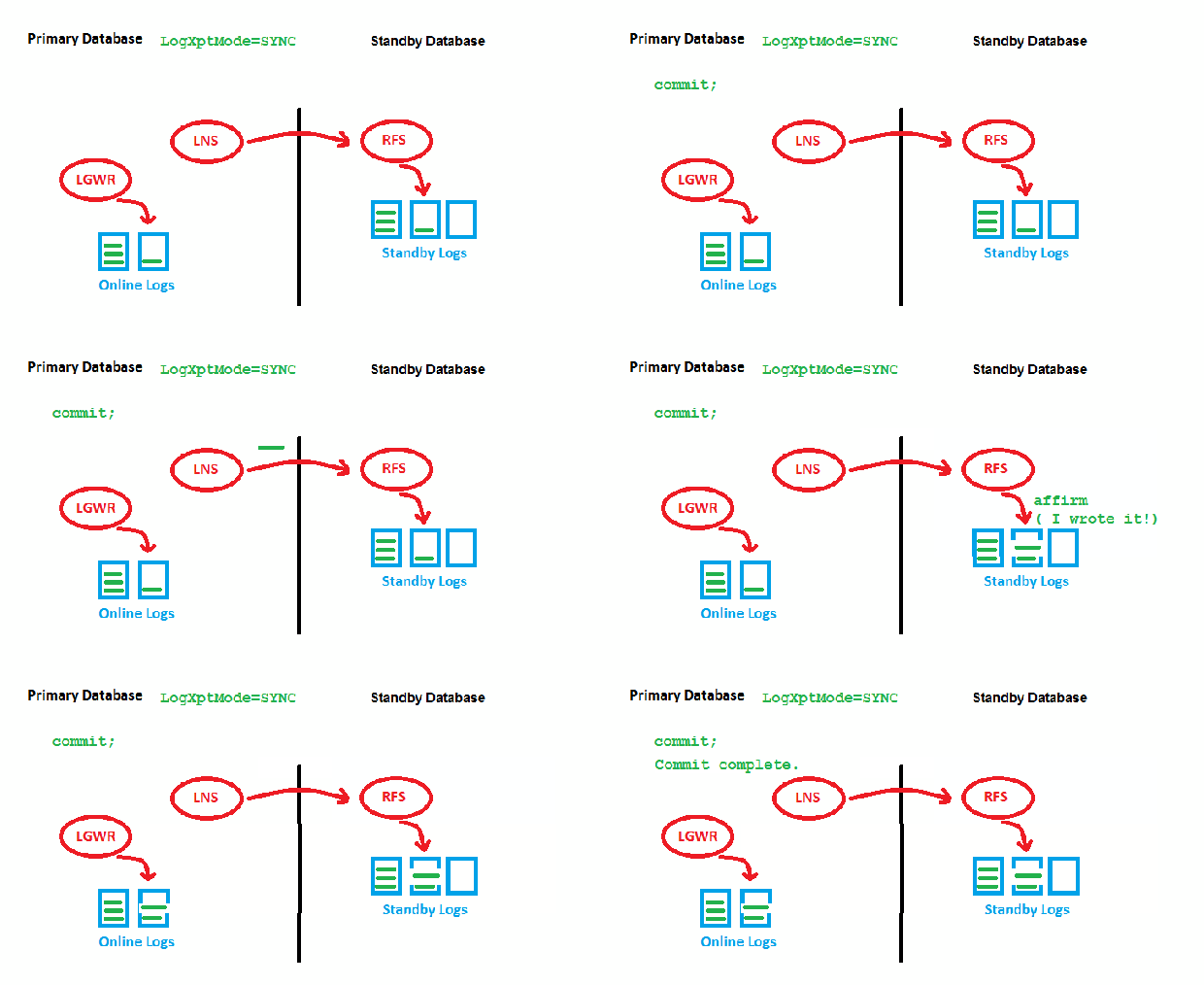
LogXptMode=SYNC
The point is that we need to wait for two acknowledgements by RFS (got it & wrote it) before we can write the redo entry locally and get the transaction committed. This may slow down the speed of transactions on the Primary, especially with long distances. Now to the new feature:
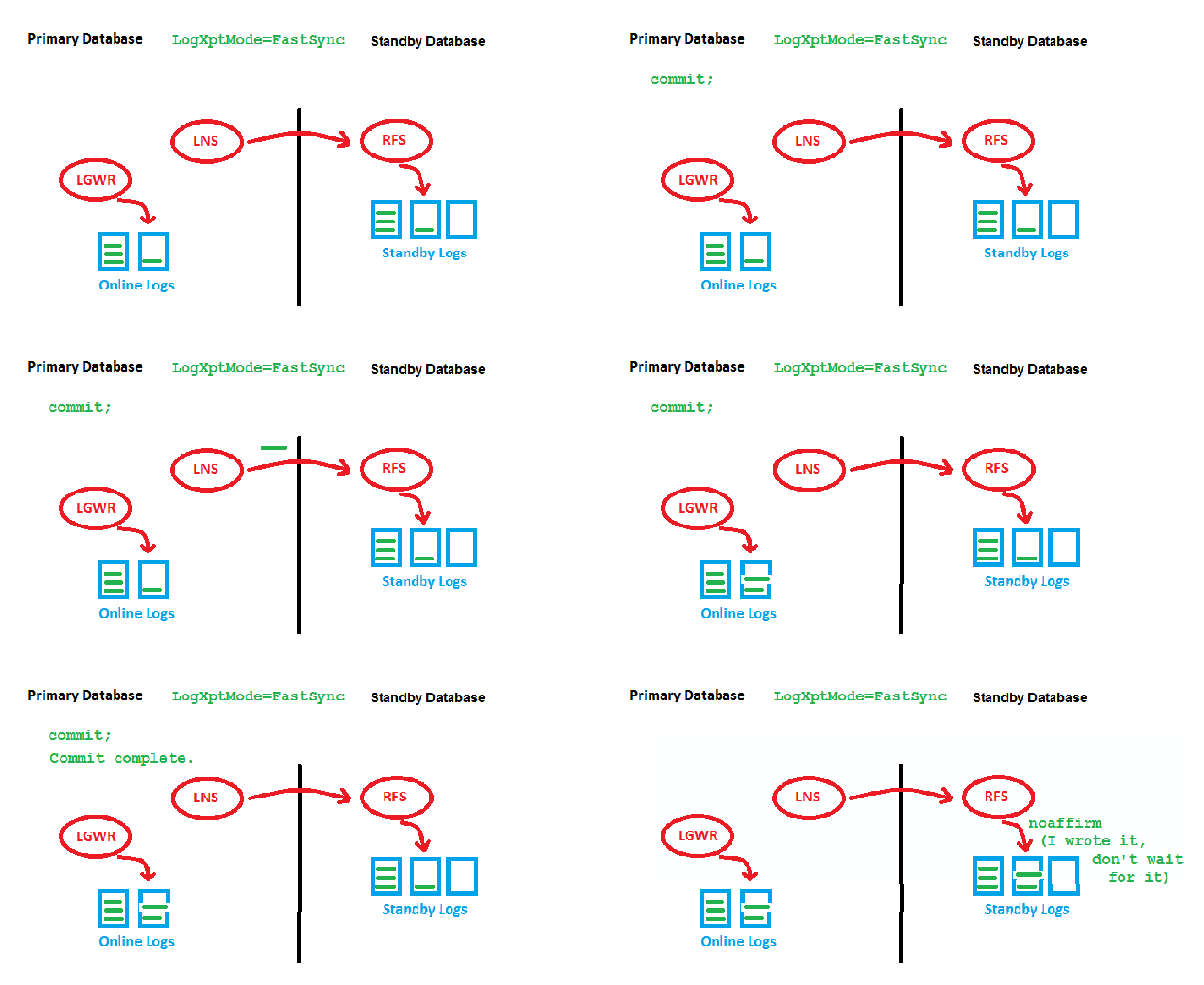
LogXptMode=FASTSYNC
Here, we wait only for the first acknowledgement (got it) by RFS before we can write locally. There is still a possible performance impact with large distances here, but it is less than before. This is how it looks implemented:
DGMGRL> show configuration;

Configuration - myconf

  Protection Mode: MaxAvailability
  Members:
  prima - Primary database
    physt - (*) Physical standby database

Fast-Start Failover: ENABLED

Configuration Status:
SUCCESS   (status updated 26 seconds ago)

DGMGRL> show database physt logxptmode
  LogXptMode = 'fastsync'
DGMGRL> exit
[oracle@uhesse ~]$ sqlplus sys/oracle@prima as sysdba

SQL*Plus: Release 12.1.0.2.0 Production on Sat Aug 1 10:41:27 2015

Copyright (c) 1982, 2014, Oracle.  All rights reserved.


Connected to:
Oracle Database 12c Enterprise Edition Release 12.1.0.2.0 - 64bit Production
With the Partitioning, OLAP, Advanced Analytics and Real Application Testing options

SQL> show parameter log_archive_dest_2

NAME				     TYPE	 VALUE
------------------------------------ ----------- ------------------------------
log_archive_dest_2		     string	 service="physt", SYNC NOAFFIRM
						  delay=0 optional compression=
						 disable max_failure=0 max_conn
						 ections=1 reopen=300 db_unique
						 _name="physt" net_timeout=30,
						 valid_for=(online_logfile,all_
						 roles)
My configuration uses Fast-Start Failover, just to show that this is no restriction. Possible but not required is the usage of FASTSYNC together with Far Sync Instances. You can’t have Maximum Protection with FASTSYNC, though:
DGMGRL> disable fast_start failover;
Disabled.
DGMGRL> edit configuration set protection mode as maxprotection;
Error: ORA-16627: operation disallowed since no standby databases would remain to support protection mode

Failed.
DGMGRL> edit database physt set property logxptmode=sync;
Property "logxptmode" updated
DGMGRL> edit configuration set protection mode as maxprotection;
Succeeded.
Addendum: As my dear colleague Joel Goodman pointed out, the name of the process that does the Redo Transport from Primary to Standby has changed from LNS to NSS (for synchronous Redo Transport):
SQL> select name,description from v$bgprocess where paddr<>'00';

NAME  DESCRIPTION
----- ----------------------------------------------------------------
PMON  process cleanup
VKTM  Virtual Keeper of TiMe process
GEN0  generic0
DIAG  diagnosibility process
DBRM  DataBase Resource Manager
VKRM  Virtual sKeduler for Resource Manager
PSP0  process spawner 0
DIA0  diagnosibility process 0
MMAN  Memory Manager
DBW0  db writer process 0
MRP0  Managed Standby Recovery
TMON  Transport Monitor
ARC0  Archival Process 0
ARC1  Archival Process 1
ARC2  Archival Process 2
ARC3  Archival Process 3
ARC4  Archival Process 4
NSS2  Redo transport NSS2
LGWR  Redo etc.
CKPT  checkpoint
RVWR  Recovery Writer
SMON  System Monitor Process
SMCO  Space Manager Process
RECO  distributed recovery
LREG  Listener Registration
CJQ0  Job Queue Coordinator
PXMN  PX Monitor
AQPC  AQ Process Coord
DMON  DG Broker Monitor Process
RSM0  Data Guard Broker Resource Guard Process 0
NSV1  Data Guard Broker NetSlave Process 1
INSV  Data Guard Broker INstance SlaVe Process
FSFP  Data Guard Broker FSFO Pinger
MMON  Manageability Monitor Process
MMNL  Manageability Monitor Process 2

35 rows selected.
I’m not quite sure, but I think that was even in 11gR2 already the case. Just kept the old name in sketches as a habit 🙂
Become an #Oracle Certified Expert for Data Guard!
It is with great pride that I can announce a new certification being available – Oracle Database 12c: Data Guard Administration.
We wanted this for years and finally got it now, after having put much effort and expertise into the development of the exam. It is presently in beta and offered with a discount. Come and get it!
What happens to the Standby when you move a datafile on the Primary?
In 12c, we have introduced online datafile movement as a new feature. Now does that impact an existing standby database? I got asked that yesterday during an online webinar. My answer was that I expect no impact at all on the standby database since redo apply doesn’t care about the physical placement of the datafile on the primary. But I added also that this is just an educated guess because I didn’t test that yet. Now I did:
You know, I like to practice what I preach: Don’t believe it, test it! 🙂
Pickleball spielen auf YouTube


 Pickleball spielen