Beiträge getaggt mit 11g New Features
„Total Recall“: Brief introduction into Flashback Data Archive
With Oracle Database 11g, we have a new Option available, called Total Recall. This option extends the possibility to do Flashback Query, introduced in 9i already.
We can now designate particular tables for being able to track back all the changes on them even after years. This option addresses especially legal requirements to keep history for certain data for several years. With Total Recall resp. Flashback Data Archive, this can be achieved quite comfortable and efficient. In order to demonstrate that, I create a demo user, giving him the DBA role (kind of „quick & dirty“ of course, but makes the demo easier):
SQL> grant dba to quaid identified by quaid;

Grant succeeded.

SQL> connect quaid/quaid
Connected.

SQL> create tablespace flatbs
 datafile '/u01/app/oracle/oradata/orcl/flatbs01.dbf' size 50m;

Tablespace created.
This tablespace is just an ordinary tablespace, but I am going to use it to hold the Flashback Archive, created now:
SQL> create flashback archive fla_10y
 tablespace flatbs retention 10 year;

Flashback archive created.
If I designate a table to fla_10y, I will be able to do Flashback Query on that table even after 10 years – provided I have the space to hold that history in the tablespace(s), associated to that Flashback Archive. Following creates two ordinary tables with ordinary rows in them:
SQL> create table norecall
 (id number, name varchar2(50));

Table created.

SQL> create table totalrecall
 (id number, name varchar2(50));

Table created.

SQL> insert into norecall values (1,'QUAID');

1 row created.

SQL> insert into  totalrecall values (1,'QUAID');

1 row created.

SQL> commit;

Commit complete.
I want to be able to keep the history of the second table for 10 years:
SQL> alter table totalrecall flashback archive fla_10y;

Table altered.

SQL> select to_char(systimestamp,'yyyy-mm-dd:hh24:mi:ss')
 from dual;

TO_CHAR(SYSTIMESTAM
-------------------
2009-10-21:10:55:47
I will do DML on the two tables now. As you probably know, this leads to the creation of before images in the undo tablespace, which we can use to look into the past of the tables – but most likely not after 10 years, because the before images in the undo tablespace are getting overwritten somewhen.
SQL> delete from norecall;

1 row deleted.

SQL> commit;

Commit complete.

SQL> select * from norecall as of timestamp
 to_timestamp('2009-10-21:10:55:47','yyyy-mm-dd:hh24:mi:ss');

 ID NAME
---------- --------------------------------------------------
 1 QUAID

SQL>  delete from  totalrecall;

1 row deleted.

SQL> commit;

Commit complete.
The select above is a Flashback Query, as it is possible since 9i. I will now make sure, that there are no before images left in the undo tablespace by creating a new one and dropping the old one.
SQL> create undo tablespace undonew datafile
'/u01/app/oracle/oradata/orcl/undonew01.dbf' size 50m;
Tablespace created.
SQL> alter system set undo_tablespace='UNDONEW';
System altered.
SQL> select * from norecall as of timestamp
to_timestamp('2009-10-21:10:55:47','yyyy-mm-dd:hh24:mi:ss');
ID NAME
---------- --------------------------------------------------
1 QUAID
As long as the old undo tablespace is still there, it may still get used for a conventional Flashback Query. But no longer after the drop tablespace. The before images of the history-tracked table, though, are saved into the Flashback Archive (getting compressed during the transfer), which would be the same, if the content of the old undo tablespace gets overwritten by new before images. That’s why I still can do Flashback Query with totalrecall:
SQL> connect / as sysdba
Connected.
SQL> shutdown immediate

SQL> startup

SQL> drop tablespace undotbs1 including contents and datafiles;

Tablespace dropped.
SQL> connect quaid/quaid
Connected.

SQL> select * from norecall as of timestamp
 to_timestamp('2009-10-21:10:55:47','yyyy-mm-dd:hh24:mi:ss');
select * from norecall as of timestamp
 *
ERROR at line 1:
ORA-01555: snapshot too old: rollback segment number  with name "" too small

SQL> select * from totalrecall as of timestamp
 to_timestamp('2009-10-21:10:55:47','yyyy-mm-dd:hh24:mi:ss');

 ID NAME
---------- --------------------------------------------------
 1 QUAID
I will insert a new row into the ordinary table to demonstrate further differences between it and the history tracked table:
SQL> insert into norecall values (2,'John Doe');
1 row created.
SQL> commit;
Commit complete.
SQL> select to_char(sysdate,'yyyy-mm-dd:hh24:mi:ss') from dual;
TO_CHAR(SYSDATE,'YY
-------------------
2009-10-23:02:14:28
Upto this point of the story, the shown features are the same in 11g release 1 already available. Following are new features of 11g release 2: We are now able to do DDL statements on the history-tracked tables and can still do Flashback Query!
SQL> alter table norecall drop column name;

Table altered.

SQL> select * from norecall  as of timestamp
 2  to_timestamp('2009-10-23:02:14:28','yyyy-mm-dd:hh24:mi:ss');
select * from norecall  as of timestamp
 *
ERROR at line 1:
ORA-01466: unable to read data - table definition has changed

SQL> select to_char(sysdate,'yyyy-mm-dd:hh24:mi:ss') from dual;

TO_CHAR(SYSDATE,'YY
-------------------
2009-10-23:02:17:06

SQL> truncate table norecall;

Table truncated.

SQL> select * from norecall  as of timestamp
 2  to_timestamp('2009-10-23:02:17:06','yyyy-mm-dd:hh24:mi:ss');
select * from norecall  as of timestamp
 *
ERROR at line 1:
ORA-01466: unable to read data - table definition has changed
Above demonstrated that DDL on an ordinary table makes Flashback Query behind the DDL impossible. That was nothing new. New is:
SQL> alter table totalrecall drop column name;

Table altered.

SQL> select * from totalrecall as of timestamp
 to_timestamp('2009-10-21:10:55:47','yyyy-mm-dd:hh24:mi:ss');

 ID NAME
---------- --------------------------------------------------
 1 QUAID

SQL> truncate table totalrecall;

Table truncated.

SQL> select * from totalrecall as of timestamp
 to_timestamp('2009-10-21:10:55:47','yyyy-mm-dd:hh24:mi:ss');

 ID NAME
---------- --------------------------------------------------
 1 QUAID
With 11g release 2, we can do Flashback Query behind DDL on tables in the Flashback Archive! In 11g release 1, DDL on history-tracked tables was prohibited, which was a show-stopper for many customers. One DDL, we still can’t get through is of course:
SQL> drop table totalrecall;
drop table totalrecall
 *
ERROR at line 1:
ORA-55610: Invalid DDL statement on history-tracked table
Real-Time SQL Monitoring with Database Control
Another Oracle Database 11g Release 2 „Enterprise Manager New Feature“ is Real-Time SQL Monitoring. On the command line, that was already possible with 11g Release 1, where the views V$SQL_MONITOR and V$SQL_PLAN_MONITOR have been introduced. Now with the new Release, we can do that with the GUI. I have prepared a little demonstration for that by creating a larger sales table (560 M), so that the select statement takes more than 30 seconds on my tiny system. That gives me enough time to watch it real-time and capture the screen:
First we go to the Performance page, Top Activity as usual to spot our High Load statements. Notice the additional card named SQL Monitoring
 The statement did run several times before, so there are already statistics from previous runs on the screen. Now while the statement is running, we can leave the refresh rate to 15 seconds or refresh manually:
 The statement is shown with a duration of 20 seconds and still running. After completion, the screen looks like that:
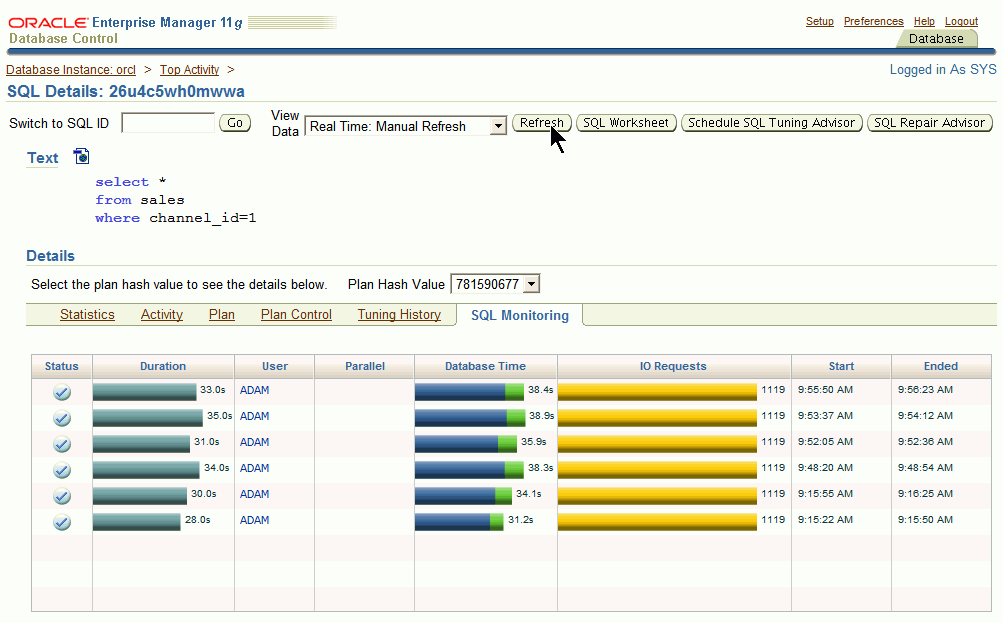
Now isn’t that a nice feature to observe the most critical and long running statements in Real-Time?
P.S.: As I just got aware (thanks to Niall Litchfield) this was already possible with Database Control in Release 1 – just from a less obvious place in that tool. So just take it as a 11g New Feature, not as 11g R2 New Feature 🙂
Oracle Database Security: Auditing & Transparent Data Encryption (TDE)
I just did a Webinar about Oracle Database Security (free of charge, one hour duration). We have had some technical problems with the audio and therefore a delay, though, for which I have to apologize. I have talked there about the following:
Standard Auditing (AUDIT_TRAIL parameter)
sys Auditing into an OS file, owned by root (AUDIT_SYS_OPERATIONS & AUDIT_SYSLOG_LEVEL parameter)
Fine Grained Auditing (DBMS_FGA package)
Transparent Data Encryption for columns (10g New Feature) and tablespaces (11g New Feature)
You may download the presentation of that webinar together with my demonstrations as PDFs from here, if you are interested.
Also, I have placed a link on the downloads page to the recorded Webinar. By the way, I usually do those Webinars & LVC courses with a Webcam, but during the troubleshooting measurements in order to get my Headset running under WebEx, we switched the Webcam off.
 Click here to view the Security webinar recording online
Pickleball spielen auf YouTube


 Pickleball spielen