FASTSYNC Redo Transport for Data Guard in #Oracle 12c
FASTSYNC is a new LogXptMode for Data Guard in 12c. It enables Maximum Availability protection mode at larger distances with less performance impact than LogXptMode SYNC has had before. The old SYNC behavior looks like this:
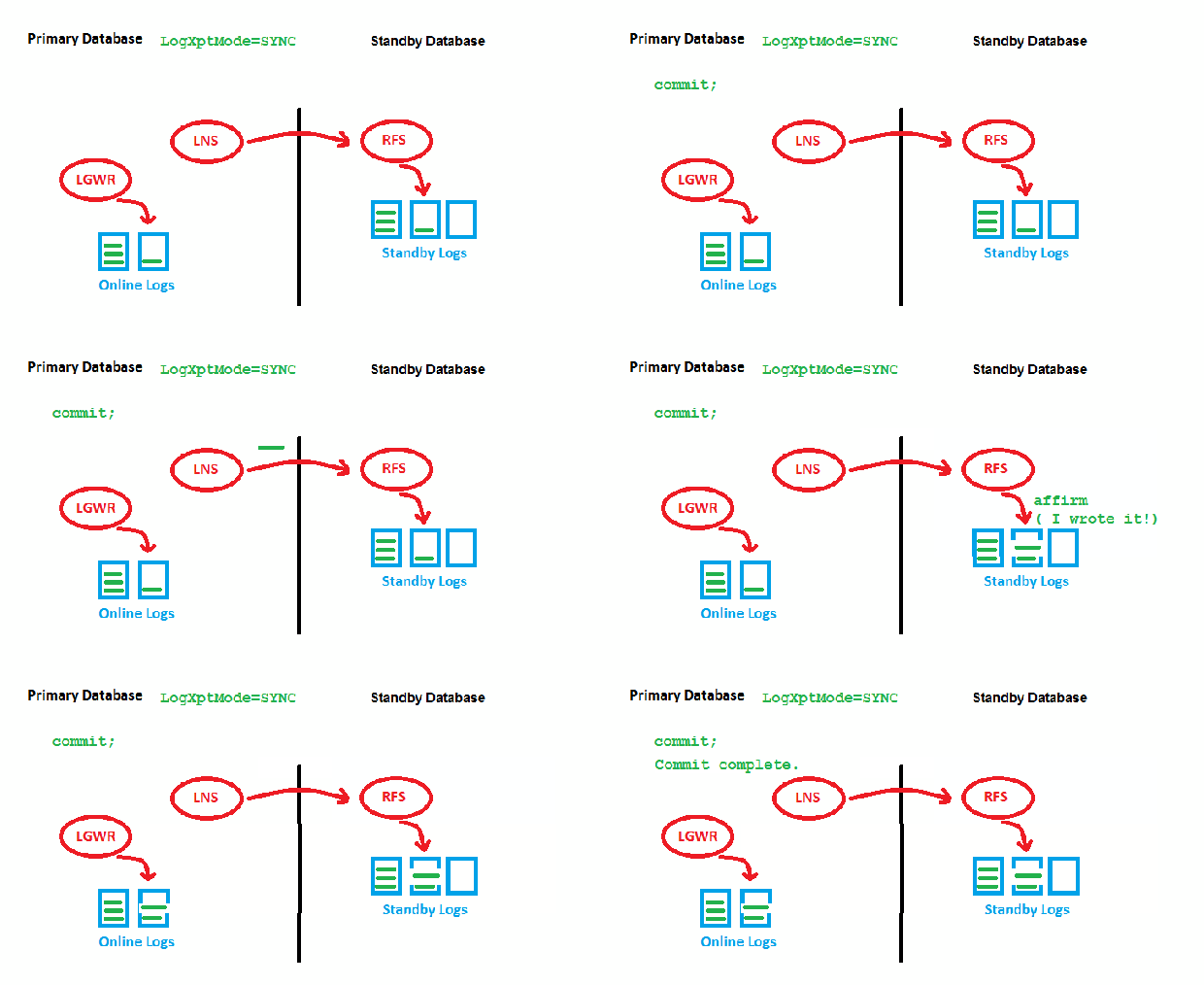
LogXptMode=SYNC
The point is that we need to wait for two acknowledgements by RFS (got it & wrote it) before we can write the redo entry locally and get the transaction committed. This may slow down the speed of transactions on the Primary, especially with long distances. Now to the new feature:
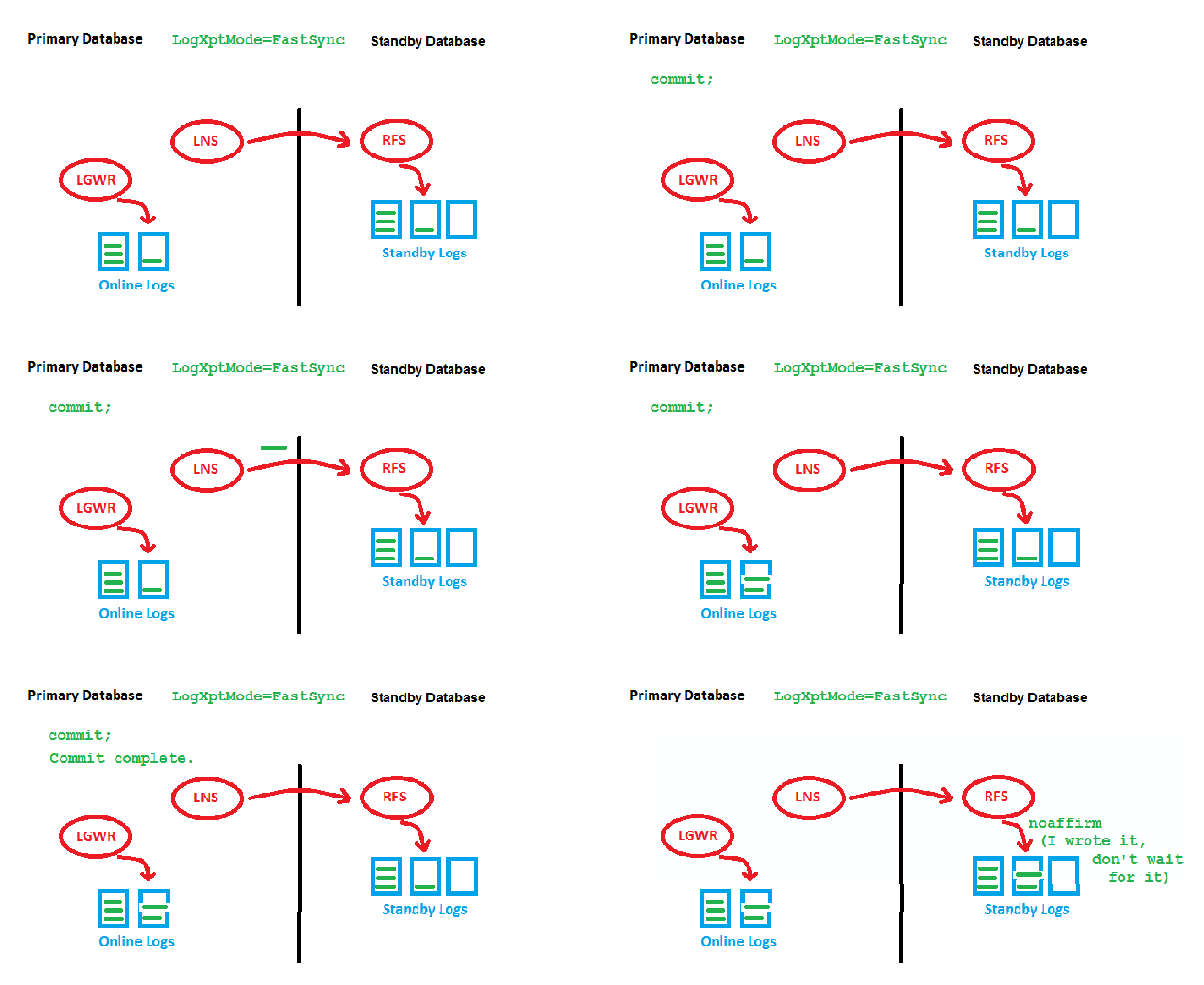
LogXptMode=FASTSYNC
Here, we wait only for the first acknowledgement (got it) by RFS before we can write locally. There is still a possible performance impact with large distances here, but it is less than before. This is how it looks implemented:
DGMGRL> show configuration;

Configuration - myconf

  Protection Mode: MaxAvailability
  Members:
  prima - Primary database
    physt - (*) Physical standby database

Fast-Start Failover: ENABLED

Configuration Status:
SUCCESS   (status updated 26 seconds ago)

DGMGRL> show database physt logxptmode
  LogXptMode = 'fastsync'
DGMGRL> exit
[oracle@uhesse ~]$ sqlplus sys/oracle@prima as sysdba

SQL*Plus: Release 12.1.0.2.0 Production on Sat Aug 1 10:41:27 2015

Copyright (c) 1982, 2014, Oracle.  All rights reserved.


Connected to:
Oracle Database 12c Enterprise Edition Release 12.1.0.2.0 - 64bit Production
With the Partitioning, OLAP, Advanced Analytics and Real Application Testing options

SQL> show parameter log_archive_dest_2

NAME				     TYPE	 VALUE
------------------------------------ ----------- ------------------------------
log_archive_dest_2		     string	 service="physt", SYNC NOAFFIRM
						  delay=0 optional compression=
						 disable max_failure=0 max_conn
						 ections=1 reopen=300 db_unique
						 _name="physt" net_timeout=30,
						 valid_for=(online_logfile,all_
						 roles)
My configuration uses Fast-Start Failover, just to show that this is no restriction. Possible but not required is the usage of FASTSYNC together with Far Sync Instances. You can’t have Maximum Protection with FASTSYNC, though:
DGMGRL> disable fast_start failover;
Disabled.
DGMGRL> edit configuration set protection mode as maxprotection;
Error: ORA-16627: operation disallowed since no standby databases would remain to support protection mode

Failed.
DGMGRL> edit database physt set property logxptmode=sync;
Property "logxptmode" updated
DGMGRL> edit configuration set protection mode as maxprotection;
Succeeded.
Addendum: As my dear colleague Joel Goodman pointed out, the name of the process that does the Redo Transport from Primary to Standby has changed from LNS to NSS (for synchronous Redo Transport):
SQL> select name,description from v$bgprocess where paddr<>'00';

NAME  DESCRIPTION
----- ----------------------------------------------------------------
PMON  process cleanup
VKTM  Virtual Keeper of TiMe process
GEN0  generic0
DIAG  diagnosibility process
DBRM  DataBase Resource Manager
VKRM  Virtual sKeduler for Resource Manager
PSP0  process spawner 0
DIA0  diagnosibility process 0
MMAN  Memory Manager
DBW0  db writer process 0
MRP0  Managed Standby Recovery
TMON  Transport Monitor
ARC0  Archival Process 0
ARC1  Archival Process 1
ARC2  Archival Process 2
ARC3  Archival Process 3
ARC4  Archival Process 4
NSS2  Redo transport NSS2
LGWR  Redo etc.
CKPT  checkpoint
RVWR  Recovery Writer
SMON  System Monitor Process
SMCO  Space Manager Process
RECO  distributed recovery
LREG  Listener Registration
CJQ0  Job Queue Coordinator
PXMN  PX Monitor
AQPC  AQ Process Coord
DMON  DG Broker Monitor Process
RSM0  Data Guard Broker Resource Guard Process 0
NSV1  Data Guard Broker NetSlave Process 1
INSV  Data Guard Broker INstance SlaVe Process
FSFP  Data Guard Broker FSFO Pinger
MMON  Manageability Monitor Process
MMNL  Manageability Monitor Process 2

35 rows selected.
I’m not quite sure, but I think that was even in 11gR2 already the case. Just kept the old name in sketches as a habit 🙂
Less Performance Impact with Unified Auditing in #Oracle 12c
There is a new auditing architecture in place with Oracle Database 12c, called Unified Auditing. Why would you want to use it? Because it has significantly less performance impact than the old approach. We buffer now audit records in the SGA and write them asynchronously to disk, that’s the trick:

Other benefits of the new approach are that we have now one centralized way (and one syntax also) to deal with all the various auditing features that have been introduced over time, like Fine Grained Auditing etc. But the key improvement in my opinion is the reduced performance impact, because that was often hurting customers in the past. Let’s see it in action! First, I will record a baseline without any auditing:
[oracle@uhesse ~]$ sqlplus / as sysdba

SQL*Plus: Release 12.1.0.2.0 Production on Fri Jul 31 08:54:32 2015

Copyright (c) 1982, 2014, Oracle.  All rights reserved.


Connected to:
Oracle Database 12c Enterprise Edition Release 12.1.0.2.0 - 64bit Production
With the Partitioning, OLAP, Advanced Analytics and Real Application Testing options

SQL> select value from v$option where parameter='Unified Auditing';

VALUE
----------------------------------------------------------------
FALSE

SQL> @audit_baseline
Connected.

Table truncated.


Noaudit succeeded.


PL/SQL procedure successfully completed.

Connected.

PL/SQL procedure successfully completed.

Elapsed: 00:00:06.07
Connected.

PL/SQL procedure successfully completed.
SQL> host cat audit_baseline.sql
connect / as sysdba
truncate table aud$;
noaudit select on adam.sales;
exec dbms_workload_repository.create_snapshot

connect adam/adam
set timing on
declare v_product adam.sales.product%type;
begin
for i in 1..100000 loop
select product into v_product from adam.sales where id=i;
end loop;
end;
/
set timing off

connect / as sysdba
exec dbms_workload_repository.create_snapshot
So that is just 100k SELECT against a 600M MB table with an index on ID without auditing so far. Key sections of the AWR report for the baseline:


The most resource consuming SQL in that period was the AWR snapshot itself. Now let’s see how the old way to audit impacts performance here:
SQL>  show parameter audit_trail

NAME_COL_PLUS_SHOW_PARAM                 TYPE        VALUE_COL_PLUS_SHOW_PARAM
---------------------------------------- ----------- ----------------------------------------
audit_trail                              string      DB, EXTENDED
SQL> @oldaudit
Connected.

Table truncated.


Audit succeeded.


PL/SQL procedure successfully completed.

Connected.

PL/SQL procedure successfully completed.

Elapsed: 00:00:56.42
Connected.

PL/SQL procedure successfully completed.
SQL> host cat oldaudit.sql
connect / as sysdba
truncate table aud$;
audit select on adam.sales by access;
exec dbms_workload_repository.create_snapshot

connect adam/adam
set timing on
declare v_product adam.sales.product%type;
begin
for i in 1..100000 loop
select product into v_product from adam.sales where id=i;
end loop;
end;
/
set timing off

connect / as sysdba
exec dbms_workload_repository.create_snapshot
That was almost 10 times slower! The AWR report confirms that and shows why it is so much slower now:
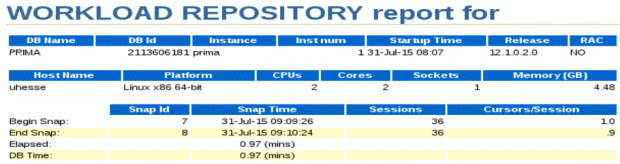

It’s because of the 100k inserts into the audit trail, done synchronously to the SELECTs. The audit trail is showing them here:
SQL> select sql_text,sql_bind from dba_audit_trail where rownum<=10;
SQL_TEXT                                           SQL_BIND
-------------------------------------------------- ----------
SELECT PRODUCT FROM ADAM.SALES WHERE ID=:B1         #1(1):1
SELECT PRODUCT FROM ADAM.SALES WHERE ID=:B1         #1(1):2
SELECT PRODUCT FROM ADAM.SALES WHERE ID=:B1         #1(1):3
SELECT PRODUCT FROM ADAM.SALES WHERE ID=:B1         #1(1):4
SELECT PRODUCT FROM ADAM.SALES WHERE ID=:B1         #1(1):5
SELECT PRODUCT FROM ADAM.SALES WHERE ID=:B1         #1(1):6
SELECT PRODUCT FROM ADAM.SALES WHERE ID=:B1         #1(1):7
SELECT PRODUCT FROM ADAM.SALES WHERE ID=:B1         #1(1):8
SELECT PRODUCT FROM ADAM.SALES WHERE ID=:B1         #1(1):9
SELECT PRODUCT FROM ADAM.SALES WHERE ID=:B1         #1(2):10
10 rows selected.
SQL> select count(*) from dba_audit_trail where sql_text like '%SELECT PRODUCT FROM ADAM.SALES WHERE ID=:B1%';

  COUNT(*)
----------
    100000
Now I will turn on Unified Auditing – that requires a relinking of the software while the database is down. Afterwards:
SQL> select value from v$option where parameter='Unified Auditing';

VALUE
----------------------------------------------------------------
TRUE

SQL> @newaudit
Connected.

Audit policy created.


Audit succeeded.


PL/SQL procedure successfully completed.

Connected.

PL/SQL procedure successfully completed.

Elapsed: 00:00:11.90
Connected.

PL/SQL procedure successfully completed.
SQL> host cat newaudit.sql
connect / as sysdba
create audit policy audsales actions select on adam.sales;
audit policy audsales;
exec dbms_workload_repository.create_snapshot

connect adam/adam
set timing on
declare v_product adam.sales.product%type;
begin
for i in 1..100000 loop
select product into v_product from adam.sales where id=i;
end loop;
end;
/
set timing off

connect / as sysdba
exec dbms_workload_repository.create_snapshot
That was still slower than the baseline, but much better than with the old method! Let’s see the AWR report for the last run:
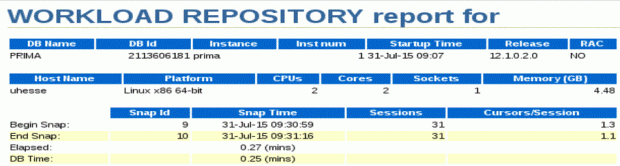

Similar to the first (baseline) run, the snapshot is the most resource consuming SQL during the period. DB time as well as elapsed time are shorter by far than with the old audit architecture. The 100k SELECTs together with the bind variables have been captured here as well:
SQL> select sql_text,sql_binds from unified_audit_trail where rownum<=10;
SQL_TEXT                                                     SQL_BINDS
------------------------------------------------------------ ----------
ALTER DATABASE OPEN
create audit policy audsales actions select on adam.sales
audit policy audsales
SELECT PRODUCT FROM ADAM.SALES WHERE ID=:B1                   #1(1):1
SELECT PRODUCT FROM ADAM.SALES WHERE ID=:B1                   #1(1):2
SELECT PRODUCT FROM ADAM.SALES WHERE ID=:B1                   #1(1):3
SELECT PRODUCT FROM ADAM.SALES WHERE ID=:B1                   #1(1):4
SELECT PRODUCT FROM ADAM.SALES WHERE ID=:B1                   #1(1):5
SELECT PRODUCT FROM ADAM.SALES WHERE ID=:B1                   #1(1):6
SELECT PRODUCT FROM ADAM.SALES WHERE ID=:B1                   #1(1):7
10 rows selected.
SQL> select count(*) from unified_audit_trail where sql_text like '%SELECT PRODUCT FROM ADAM.SALES WHERE ID=:B1%';

  COUNT(*)
----------
    100000
The first three lines above show that sys operations are also recorded in the same (Unified!) Audit Trail, by the way. There is much more to say and to learn about Unified Auditing of course, but this may give you a kind of motivation to evaluate it, especially if you have had performance issues in the past related to auditing. As always: Don’t believe it, test it! 🙂
See me here in a video clip, explaining the above. Subscription to Oracle Learning Streams is free for OCP and OCE and included for 30 days after an Oracle University class.
A Practical Guide To #Oracle Database 12c Unified Auditing https://t.co/awCxVlGvFa Free for OCP, OCE and for 30 days after a class with us
— Uwe Hesse (@UweHesse) October 21, 2015
Multiple invisible indexes on the same column in #Oracle 12c
After invisible indexes got introduced in 11g, they have now been enhanced in 12c: You can have multiple indexes on the same set of columns with that feature. Why would you want to use that? Actually, this is always the first question I ask when I see a new feature – sometimes it’s really hard to answer 🙂
Here, a plausible use case could be that you expect a new index on the same column to be an improvement over the existing old index, but you are not 100% sure. So instead of just dropping the old index, you make it invisible first to see the outcome:
[oracle@uhesse ~]$ sqlplus adam/adam

SQL*Plus: Release 12.1.0.2.0 Production on Tue Jul 28 08:11:16 2015

Copyright (c) 1982, 2014, Oracle.  All rights reserved.

Last Successful login time: Tue Jul 28 2015 08:00:34 +02:00

Connected to:
Oracle Database 12c Enterprise Edition Release 12.1.0.2.0 - 64bit Production
With the Partitioning, OLAP, Advanced Analytics and Real Application Testing options

SQL> col index_name for a10
SQL> select index_name,index_type,visibility from user_indexes;

INDEX_NAME INDEX_TYPE		       VISIBILIT
---------- --------------------------- ---------
BSTAR	   NORMAL		       VISIBLE

SQL> col segment_name for a10
SQL> select segment_name,bytes/1024/1024 from user_segments;

SEGMENT_NA BYTES/1024/1024
---------- ---------------
BSTAR		       160
SALES		       600

SQL> set timing on
SQL> select count(*) from sales where channel_id=3;

  COUNT(*)
----------
   2000000

Elapsed: 00:00:00.18
SQL> set timing off
SQL> @lastplan

PLAN_TABLE_OUTPUT
--------------------------------------------------------------------------------
SQL_ID	b7cvb9nu10qdb, child number 0
-------------------------------------
select count(*) from sales where channel_id=3

Plan hash value: 2525234362

---------------------------------------------------------------------------
| Id  | Operation	  | Name  | Rows  | Bytes | Cost (%CPU)| Time	  |
---------------------------------------------------------------------------
|   0 | SELECT STATEMENT  |	  |	  |	  |  3872 (100)|	  |
|   1 |  SORT AGGREGATE   |	  |	1 |	3 |	       |	  |

PLAN_TABLE_OUTPUT
--------------------------------------------------------------------------------
|*  2 |   INDEX RANGE SCAN| BSTAR |  2000K|  5859K|  3872   (1)| 00:00:01 |
---------------------------------------------------------------------------

Predicate Information (identified by operation id):
---------------------------------------------------

   2 - access("CHANNEL_ID"=3)


19 rows selected.
So I have an ordinary B* index here that supports my query, but I suspect that it would work better with a bitmap index. In older versions, you would get this if you try to create it with the old index still existing:
SQL> create bitmap index bmap on sales(channel_id) nologging;
create bitmap index bmap on sales(channel_id) nologging
                                  *
ERROR at line 1:
ORA-01408: such column list already indexed
Enter the 12c New Feature:
SQL> alter index bstar invisible;

Index altered.

SQL> create bitmap index bmap on sales(channel_id) nologging;

Index created.
Now I can check if the new index is really an improvement while the old index remains in place and is still being maintained by the system. So in case the new index turns out to be a bad idea – no problem to fall back on the old one!
SQL> select index_name,index_type,visibility from user_indexes;

INDEX_NAME INDEX_TYPE		       VISIBILIT
---------- --------------------------- ---------
BMAP	   BITMAP		       VISIBLE
BSTAR	   NORMAL		       INVISIBLE

SQL> select segment_name,bytes/1024/1024 from user_segments;

SEGMENT_NA BYTES/1024/1024
---------- ---------------
BMAP			 9
BSTAR		       160
SALES		       600

SQL> set timing on
SQL> select count(*) from sales where channel_id=3;

  COUNT(*)
----------
   2000000

Elapsed: 00:00:00.01
SQL> @lastplan

PLAN_TABLE_OUTPUT
------------------------------------------------------------------------------------
SQL_ID	b7cvb9nu10qdb, child number 0
------------------------------------------------------------------------------------
select count(*) from sales where channel_id=3

Plan hash value: 3722975061

------------------------------------------------------------------------------------
| Id  | Operation		    | Name | Rows  | Bytes | Cost (%CPU)| Time	   |
------------------------------------------------------------------------------------
|   0 | SELECT STATEMENT	    |	   |	   |	   |   216 (100)|	   |
|   1 |  SORT AGGREGATE 	    |	   |	 1 |	 3 |		|	   |

PLAN_TABLE_OUTPUT
------------------------------------------------------------------------------------
|   2 |   BITMAP CONVERSION COUNT   |	   |  2000K|  5859K|   216   (0)| 00:00:01 |
|*  3 |    BITMAP INDEX SINGLE VALUE| BMAP |	   |	   |		|	   |
------------------------------------------------------------------------------------

Predicate Information (identified by operation id):
---------------------------------------------------

   3 - access("CHANNEL_ID"=3)


20 rows selected.
Looks like everything is better with the new index, right? Let’s see what the optimizer thinks about it:
SQL> alter index bmap invisible;

Index altered.

SQL> select index_name,index_type,visibility from user_indexes;

INDEX_NAME INDEX_TYPE		       VISIBILIT
---------- --------------------------- ---------
BMAP	   BITMAP		       INVISIBLE
BSTAR	   NORMAL		       INVISIBLE

SQL> alter session set optimizer_use_invisible_indexes=true;

Session altered.

SQL> select count(*) from sales where channel_id=3;

  COUNT(*)
----------
   2000000

SQL> @lastplan

PLAN_TABLE_OUTPUT
-------------------------------------------------------------------------------------
SQL_ID	b7cvb9nu10qdb, child number 0
-------------------------------------------------------------------------------------
select count(*) from sales where channel_id=3

Plan hash value: 3722975061

------------------------------------------------------------------------------------
| Id  | Operation		    | Name | Rows  | Bytes | Cost (%CPU)| Time	   |
------------------------------------------------------------------------------------
|   0 | SELECT STATEMENT	    |	   |	   |	   |   216 (100)|	   |
|   1 |  SORT AGGREGATE 	    |	   |	 1 |	 3 |		|	   |

PLAN_TABLE_OUTPUT
------------------------------------------------------------------------------------
|   2 |   BITMAP CONVERSION COUNT   |	   |  2000K|  5859K|   216   (0)| 00:00:01 |
|*  3 |    BITMAP INDEX SINGLE VALUE| BMAP |	   |	   |		|	   |
------------------------------------------------------------------------------------

Predicate Information (identified by operation id):
---------------------------------------------------

   3 - access("CHANNEL_ID"=3)


20 rows selected.
The optimizer agrees that the new index is better. I could keep both indexes here in place, but remember that the old index still consumes space and requires internal maintenance. Therefore, I decide to drop the old index:
SQL> drop index bstar;

Index dropped.

SQL> alter index bmap visible;

Index altered.
Hope that helped to answer the question why you would want to use that 12c New Feature. As always:

Pickleball spielen auf YouTube


 Pickleball spielen