Another reason why you should use the Data Guard Broker for your #Oracle Standby
The Data Guard Broker is recommended for various reasons, this one is less obvious: It prevents a Split-Brain problem that may otherwise occur in certain situations. Let me show you:
[oracle@uhesse ~]$ dgmgrl sys/oracle@prima
DGMGRL for Linux: Version 12.1.0.2.0 - 64bit Production

Copyright (c) 2000, 2013, Oracle. All rights reserved.

Welcome to DGMGRL, type "help" for information.
Connected as SYSDBA.
DGMGRL> show configuration;

Configuration - myconf

  Protection Mode: MaxAvailability
  Members:
  prima - Primary database
    physt - Physical standby database

Fast-Start Failover: DISABLED

Configuration Status:
SUCCESS   (status updated 18 seconds ago)
This is my setup with 12c, but the demonstrated behavior is the same with 11g already. I will cause a crash of the primary database now, without damaging any files – like a power outage on the primary site:
[oracle@uhesse ~]$ ps -ef | grep smon
oracle    6279     1  0 08:30 ?        00:00:00 ora_smon_prima
oracle    6786     1  0 08:32 ?        00:00:00 ora_smon_physt
oracle    7168  3489  0 08:43 pts/0    00:00:00 grep --color=auto smon
[oracle@uhesse ~]$ kill -9 6279
Don’t do that at home 🙂 Now the primary is gone, but of course I can failover to the standby:
[oracle@uhesse ~]$ dgmgrl sys/oracle@physt
DGMGRL for Linux: Version 12.1.0.2.0 - 64bit Production

Copyright (c) 2000, 2013, Oracle. All rights reserved.

Welcome to DGMGRL, type "help" for information.
Connected as SYSDBA.
DGMGRL> failover to physt;
Performing failover NOW, please wait...
Failover succeeded, new primary is "physt"
So far so good, my end users can continue to work now on the new primary. But what happens when the power outage is over and the ex-primary comes back up again?
[oracle@uhesse ~]$ sqlplus sys/oracle@prima as sysdba

SQL*Plus: Release 12.1.0.2.0 Production on Wed May 18 08:47:30 2016

Copyright (c) 1982, 2014, Oracle.  All rights reserved.

Connected to an idle instance.

SQL> startup
ORACLE instance started.

Total System Global Area 1258291200 bytes
Fixed Size		    2923920 bytes
Variable Size		  452985456 bytes
Database Buffers	  788529152 bytes
Redo Buffers		   13852672 bytes
Database mounted.
ORA-16649: possible failover to another database prevents this database from
being opened
The DMON background process of the new primary communicates with the DMON on the ex-primary, telling it that there cannot be two primary databases within the same Data Guard Broker configuration! Try the same scenario without the broker and you will observe the ex-primary coming up until status OPEN. Just wanted to let you know 🙂
FREE Webinar: Efficient techniques to create and maintain your #Oracle Standby Database
Join us with this FREE event on May 19, 13:00 CET and register now, because seats are limited.

I will be talking about
- how to create and maintain a 12c Standby Database in the most efficient way
- how to do switchover and failover
- how to keep up client connectivity after role changes
These topics will be live demonstrated – positively no slide show reading.
After this major part of the event, we will briefly advertise our digital learning offerings that relate to Oracle Database Core Technology and how you may take advantage of them.
Hope to see YOU in the session 🙂
Speakers: Put your Twitter Handle on the Windows taskbar!
If you speak often at conferences, sharing your screen to demo things, this could be helpful:

Throughout your presentation, the audience will be able to see your Twitter Handle, reminding them to include it with tweets about the event. I used to include it in the slides, but this is better, because it works also with live demonstrations where no slides are being showed. Which is incidentally my favorite way to do presentations 🙂
Now how can you do it? Quite easy, you open the Windows Control Panel and click on Region and Language. Then click on Additional settings:
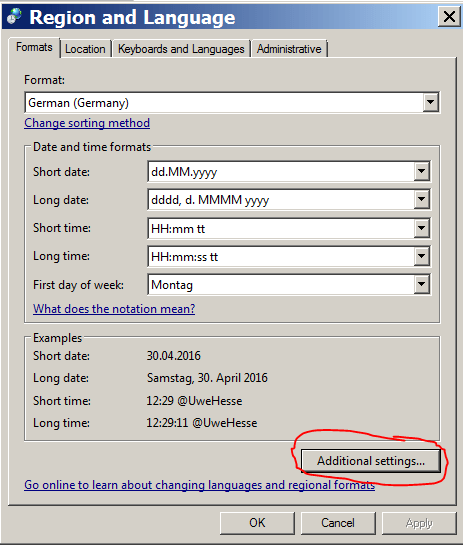
Then you insert your Twitter Handle (or any other text you like to see on the taskbar) as AM and PM symbol. Make sure to select Time formats with trailing tt:

That’s it. If you want the font size as large as on the first picture above, that can be done here:
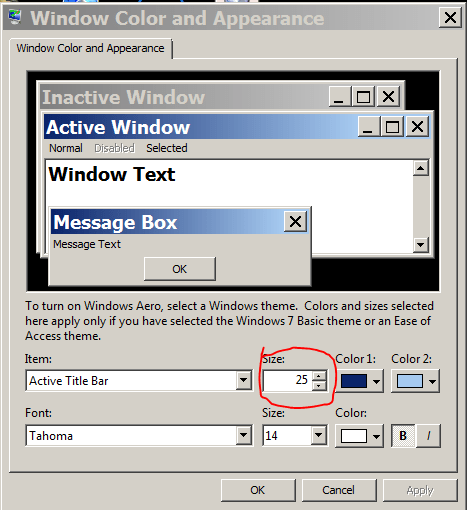
I did that with Windows 7 Professional 64 bit. Hope you find it useful 🙂
Pickleball spielen auf YouTube


 Pickleball spielen