Archiv für die Kategorie TOI
Joining Accenture Enkitec Group
I have accepted an offer by the Accenture Enkitec Group to join them starting next month. That unit is a kind of ’special force‘ inside the large Accenture Corporation with particular expertise in Oracle Database and Oracle Engineered Systems technology.
Although I feel quite a bit sad to leave Oracle after all those years, the opportunity to work together with all these bright people – you can see some of them here – outshines that largely 🙂
Common Users in #Oracle 12c – what are they good for?
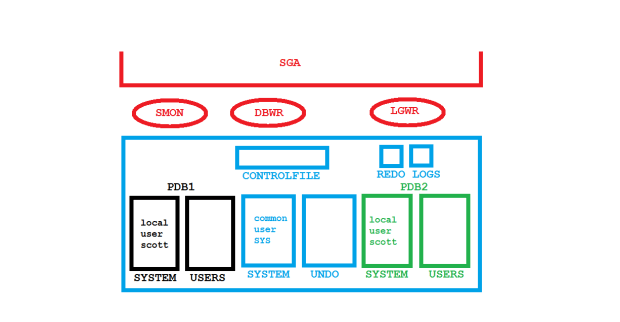
Common vs Local Users
A 12c Multitenant Database is designed to make consolidation easier. The PDBs have not only their application data in separate tablespaces, they also have their application metadata in separate SYSTEM tablespaces. That’s what makes it so easy and fast to unplug a PDB.
The SYSTEM tablespace of the CDB contains the internal metadata that is shared by all PDBs. Internal metadata (the dictionary tables) and internal objects (like the DBMS* packages) belong to Common Users, most prominently to SYS. We don’t have to install all that internal stuff inside of the PDBs, they can just refer to it.
The point is that Common Users are what enables the Multitenant Architecture in the first place. You as a DBA may also create them as a side aspect of the matter. Now what does that mean in practice?
[oracle@uhesse ~]$ sqlplus / as sysdba

SQL*Plus: Release 12.2.0.1.0 Production on Mon Feb 6 11:34:20 2017

Copyright (c) 1982, 2016, Oracle.  All rights reserved.


Connected to:
Oracle Database 12c Enterprise Edition Release 12.2.0.1.0 - 64bit Production

SQL> select name,open_mode,con_id from v$pdbs;

NAME	   OPEN_MODE	  CON_ID
---------- ---------- ----------
PDB$SEED   READ ONLY	       2
PDB1	   READ WRITE	       3
PDB2	   READ WRITE	       4
My demo system looks like the picture above with two PDBs apart from the seed. Let’s try to clarify the difference between SYS as a common user and SCOTT as two local users.
SQL> connect sys/oracle@pdb1 as sysdba
Connected.
SQL> select common from dba_users where username='SCOTT';

COM
---
NO

SQL> select common from dba_users where username='SYS';

COM
---
YES
SQL> delete from scott.dept where deptno=40;

1 row deleted.

SQL> commit;

Commit complete.

SQL> select * from scott.dept;

    DEPTNO DNAME	  LOC
---------- -------------- -------------
	10 ACCOUNTING	  NEW YORK
	20 RESEARCH	  DALLAS
	30 SALES	  CHICAGO
SQL> connect sys/oracle@pdb2 as sysdba
Connected.
SQL> select common from dba_users where username='SCOTT';

COM
---
NO

SQL> select common from dba_users where username='SYS';

COM
---
YES

SQL> select * from scott.dept;

    DEPTNO DNAME	  LOC
---------- -------------- -------------
	10 ACCOUNTING	  NEW YORK
	20 RESEARCH	  DALLAS
	30 SALES	  CHICAGO
	40 OPERATIONS	  BOSTON
There are two local users with incidentally the same name SCOTT in the two PDBs. The common user SYS is almighty in both PDBs. What common users do we have else visible in the PDBs?
SQL> select username from dba_users where common='YES';

USERNAME
-------------------------------------------------------
SYS
SYSTEM
SYSRAC
SYS$UMF
OUTLN
DBSNMP
APPQOSSYS
CTXSYS
SI_INFORMTN_SCHEMA
GSMADMIN_INTERNAL
ORDPLUGINS
MDSYS
ORDDATA
XDB
WMSYS
ORDSYS
GGSYS
ANONYMOUS
GSMCATUSER
SYSBACKUP
GSMUSER
DIP
SYSKM
ORACLE_OCM
SYSDG
REMOTE_SCHEDULER_AGENT
DBSFWUSER
XS$NULL
OJVMSYS
AUDSYS

30 rows selected.
Apart from SYS and SYSTEM, you see some more internal users on display here. Most of them are related to certain options. This is how these options become available throughout all PDBs. Notice that DBA_USERS shows only what is visible to that PDB. The second SCOTT from PDB2 is not listed, because that user is relevant only for PDB2. It is in other words a local user inside PDB2. CDB_USERS confirms that there are two SCOTT users:
SQL> connect / as sysdba
Connected.
SQL> select con_id,common from cdb_users where username='SCOTT';

    CON_ID COM
---------- ---
	 3 NO
	 4 NO
If you want to create a common user yourself, it must be prefixed with C##. A common user is immediately visible in all PDBs. That doesn’t mean that user has any rights, though.
SQL> connect / as sysdba
Connected.
SQL> create user c##adam identified by oracle container=all;

User created.

SQL> connect sys/oracle@pdb1 as sysdba
Connected.
SQL> select username,common from dba_users where username like 'C##%';

USERNAME   COM
---------- ---
C##ADAM    YES

SQL> connect sys/oracle@pdb2 as sysdba
Connected.
SQL> select username,common from dba_users where username like 'C##%';

USERNAME   COM
---------- ---
C##ADAM    YES

SQL> connect c##adam/oracle@pdb1
ERROR:
ORA-01045: user C##ADAM lacks CREATE SESSION privilege; logon denied


Warning: You are no longer connected to ORACLE.
SQL> connect c##adam/oracle@pdb2
ERROR:
ORA-01045: user C##ADAM lacks CREATE SESSION privilege; logon denied
Common users can get privileges granted as common or as local privileges:
SQL> grant create session to c##adam container=all;

Grant succeeded.

SQL> connect c##adam/oracle@pdb1
Connected.
SQL> connect c##adam/oracle@pdb2
Connected.
SQL> connect / as sysdba
Connected.
SQL> revoke create session from c##adam;
revoke create session from c##adam
*
ERROR at line 1:
ORA-65092: system privilege granted with a different scope to 'C##ADAM'


SQL> revoke create session from c##adam container=all;

Revoke succeeded.
Notice that container=all must be specified upon the revoke as well. That was a common privilege. Now for the local privilege:
SQL> connect sys/oracle@pdb1 as sysdba
Connected.
SQL> grant  create session to c##adam container=current;

Grant succeeded.

SQL> connect c##adam/oracle@pdb1
Connected.
SQL> connect c##adam/oracle@pdb2
ERROR:
ORA-01045: user C##ADAM lacks CREATE SESSION privilege; logon denied


Warning: You are no longer connected to ORACLE.
C##ADAM has the create session privilege only for PDB1, not for PDB2. It is in other words local to PDB1. The clause container=current is optional here and can be left out to achieve the same effect:
SQL> connect sys/oracle@pdb1 as sysdba
Connected.
SQL> revoke create session from c##adam container=current;

Revoke succeeded.

SQL> grant  create session to c##adam;

Grant succeeded.

SQL> revoke create session from c##adam;

Revoke succeeded.

SQL> grant  create session to c##adam container=current;

Grant succeeded.
The two revokes and the two grants have had the same effect. A typical use case for the creation of common users would be to get less powerful superusers like in this example. I would recommend to implement those with some reservation, not to speak about common roles, granting a mixture of local and common privileges to roles and roles to (common) roles. Much is possible but that doesn’t necessarily mean it is a good idea to do it 🙂
This article is pretty close to what I have presented in Mainz last week during the very well run DOAG Noon2Noon event:

Only that I was talking in German, which made it a bit easier 🙂
Fast-Start Failover for Maximum Protection in #Oracle 12c
Fast-Start Failover is supported with Maximum Protection in 12cR2. Also Multiple Observers can now monitor the same Data Guard Configuration simultaneously. I will show both in this article. Starting with a (Multitenant) Primary in Maximum Protection mode with two Standby Databases. It is still not recommended to have the highest protection mode configured with only one standby. So this is my starting point:
DGMGRL> show configuration;

Configuration - myconf

Protection Mode: MaxProtection
Members:
cdb1 - Primary database
cdb1sb - Physical standby database
cdb1sb2 - Physical standby database

Fast-Start Failover: DISABLED

Configuration Status:
SUCCESS (status updated 57 seconds ago)
All three databases have flashback turned on. I want to have a setup like this in the end:

FSFO with Max Protection and 2 Observers
This is how it’s been configured:
DGMGRL> edit database cdb1 set property faststartfailovertarget='cdb1sb,cdb1sb2';
Property "faststartfailovertarget" updated
DGMGRL> edit database cdb1sb set property faststartfailovertarget='cdb1,cdb1sb2';
Property "faststartfailovertarget" updated
DGMGRL> edit database cdb1sb2 set property faststartfailovertarget='cdb1,cdb1sb';
Property "faststartfailovertarget" updated
DGMGRL> enable fast_start failover;
Enabled.
On host uhesse4:
[oracle@uhesse4 ~]$ dgmgrl sys/oracle@cdb1
DGMGRL for Linux: Release 12.2.0.1.0 - Production on Fri Jan 13 17:20:52 2017

Copyright (c) 1982, 2016, Oracle and/or its affiliates.  All rights reserved.

Welcome to DGMGRL, type "help" for information.
Connected to "cdb1"
Connected as SYSDBA.
DGMGRL> start observer number_one;
[W000 01/13 17:21:04.85] FSFO target standby is cdb1sb
[W000 01/13 17:21:07.05] Observer trace level is set to USER
[W000 01/13 17:21:07.05] Try to connect to the primary.
[W000 01/13 17:21:07.05] Try to connect to the primary cdb1.
[W000 01/13 17:21:07.05] The standby cdb1sb is ready to be a FSFO target
[W000 01/13 17:21:09.06] Connection to the primary restored!
[W000 01/13 17:21:13.07] Disconnecting from database cdb1.
On host uhesse3:
[oracle@uhesse3 ~]$ dgmgrl sys/oracle@cdb1
DGMGRL for Linux: Release 12.2.0.1.0 - Production on Fri Jan 13 17:22:16 2017

Copyright (c) 1982, 2016, Oracle and/or its affiliates.  All rights reserved.

Welcome to DGMGRL, type "help" for information.
Connected to "cdb1"
Connected as SYSDBA.
DGMGRL> start observer number_two;
[W000 01/13 17:22:32.68] FSFO target standby is cdb1sb
[W000 01/13 17:22:34.85] Observer trace level is set to USER
[W000 01/13 17:22:34.85] Try to connect to the primary.
[W000 01/13 17:22:34.85] Try to connect to the primary cdb1.
[W000 01/13 17:22:34.85] The standby cdb1sb is ready to be a FSFO target
[W000 01/13 17:22:36.86] Connection to the primary restored!
[W000 01/13 17:22:40.86] Disconnecting from database cdb1.
This is now the state of the configuration:
DGMGRL> show configuration;

Configuration - myconf

  Protection Mode: MaxProtection
  Members:
  cdb1    - Primary database
    cdb1sb  - (*) Physical standby database
    cdb1sb2 - Physical standby database

Fast-Start Failover: ENABLED

Configuration Status:
SUCCESS   (status updated 33 seconds ago)

DGMGRL> show fast_start failover;

Fast-Start Failover: ENABLED

  Threshold:          15 seconds
  Target:             cdb1sb
  Candidate Targets:  cdb1sb,cdb1sb2
  Observers:      (*) number_two
                      number_one
  Lag Limit:          30 seconds (not in use)
  Shutdown Primary:   TRUE
  Auto-reinstate:     TRUE
  Observer Reconnect: (none)
  Observer Override:  FALSE

Configurable Failover Conditions
  Health Conditions:
    Corrupted Controlfile          YES
    Corrupted Dictionary           YES
    Inaccessible Logfile            NO
    Stuck Archiver                  NO
    Datafile Write Errors          YES

  Oracle Error Conditions:
    (none)
That protects against the failure of any two components in the configuration with automatic failover and zero data loss! For example the first standby may fail and then the primary. We failover to the second standby that becomes the new fast-start failover target:
[oracle@uhesse2 ~]$ ps -ef | grep smon
oracle   15087     1  0 17:40 ?        00:00:00 ora_smon_cdb1sb
oracle   15338  9765  0 17:49 pts/2    00:00:00 grep --color=auto smon
[oracle@uhesse2 ~]$ kill -9 15087
Above crashed the first standby. This is what the Observers report:
[W000 01/13 17:49:34.24] Failed to ping the standby.
[W000 01/13 17:49:37.25] Failed to ping the standby.
[W000 01/13 17:49:40.25] Failed to ping the standby.
[W000 01/13 17:49:43.25] Failed to ping the standby.
[W000 01/13 17:49:46.26] Failed to ping the standby.
[W000 01/13 17:49:46.26] Standby database has changed to cdb1sb2.
[W000 01/13 17:49:47.26] Try to connect to the primary.
[W000 01/13 17:49:47.26] Try to connect to the primary cdb1.
[W000 01/13 17:49:48.34] The standby cdb1sb2 is ready to be a FSFO target
[W000 01/13 17:49:53.35] Connection to the primary restored!
[W000 01/13 17:49:57.35] Disconnecting from database cdb1.
This is the state of the configuration now:
DGMGRL> show configuration;

Configuration - myconf

  Protection Mode: MaxProtection
  Members:
  cdb1    - Primary database
    Error: ORA-16778: redo transport error for one or more members

    cdb1sb2 - (*) Physical standby database
    cdb1sb  - Physical standby database
      Error: ORA-1034: ORACLE not available

Fast-Start Failover: ENABLED

Configuration Status:
ERROR   (status updated 14 seconds ago)
Notice that the Fast-Start Failover indicator (*) now points to cdb1sb2. Now the primary fails:
[oracle@uhesse1 ~]$ ps -ef | grep smon
oracle   21334     1  0 17:41 ?        00:00:00 ora_smon_cdb1
oracle   22077  5043  0 17:52 pts/0    00:00:00 grep --color=auto smon
[oracle@uhesse1 ~]$ kill -9 21334
This is what the Observers report:
[W000 01/13 17:52:54.04] Primary database cannot be reached.
[W000 01/13 17:52:54.04] Fast-Start Failover threshold has not exceeded. Retry for the next 15 seconds
[W000 01/13 17:52:55.05] Try to connect to the primary.
[W000 01/13 17:52:57.13] Primary database cannot be reached.
[W000 01/13 17:52:58.13] Try to connect to the primary.
[W000 01/13 17:53:06.38] Primary database cannot be reached.
[W000 01/13 17:53:06.38] Fast-Start Failover threshold has not exceeded. Retry for the next 3 seconds
[W000 01/13 17:53:07.39] Try to connect to the primary.
[W000 01/13 17:53:09.46] Primary database cannot be reached.
[W000 01/13 17:53:09.46] Fast-Start Failover threshold has expired.
[W000 01/13 17:53:09.46] Try to connect to the standby.
[W000 01/13 17:53:09.46] Making a last connection attempt to primary database before proceeding with Fast-Start Failover.
[W000 01/13 17:53:09.46] Check if the standby is ready for failover.
[S019 01/13 17:53:09.47] Fast-Start Failover started...

17:53:09.47  Friday, January 13, 2017
Initiating Fast-Start Failover to database "cdb1sb2"...
[S019 01/13 17:53:09.47] Initiating Fast-start Failover.
Performing failover NOW, please wait...
Failover succeeded, new primary is "cdb1sb2"
17:53:23.68  Friday, January 13, 2017
After having restarted the two crashed databases, they become automatically reinstated and the configuration then looks like this:
DGMGRL> show configuration;

Configuration - myconf

  Protection Mode: MaxProtection
  Members:
  cdb1sb2 - Primary database
    cdb1    - (*) Physical standby database
    cdb1sb  - Physical standby database

Fast-Start Failover: ENABLED

Configuration Status:
SUCCESS   (status updated 7 seconds ago)

DGMGRL> show fast_start failover;

Fast-Start Failover: ENABLED

  Threshold:          15 seconds
  Target:             cdb1
  Candidate Targets:  cdb1,cdb1sb
  Observers:      (*) number_two
                      number_one
  Lag Limit:          30 seconds (not in use)
  Shutdown Primary:   TRUE
  Auto-reinstate:     TRUE
  Observer Reconnect: (none)
  Observer Override:  FALSE

Configurable Failover Conditions
  Health Conditions:
    Corrupted Controlfile          YES
    Corrupted Dictionary           YES
    Inaccessible Logfile            NO
    Stuck Archiver                  NO
    Datafile Write Errors          YES

  Oracle Error Conditions:
    (none)
Switching back to make cdb1 primary – this is of course optional:
DGMGRL> switchover to cdb1;
Performing switchover NOW, please wait...
Operation requires a connection to database "cdb1"
Connecting ...
Connected to "cdb1"
Connected as SYSDBA.
New primary database "cdb1" is opening...
Operation requires start up of instance "cdb1sb2" on database "cdb1sb2"
Starting instance "cdb1sb2"...
ORACLE instance started.
Database mounted.
Connected to "cdb1sb2"
Switchover succeeded, new primary is "cdb1"
DGMGRL> show configuration;

Configuration - myconf

  Protection Mode: MaxProtection
  Members:
  cdb1    - Primary database
    cdb1sb  - (*) Physical standby database
    cdb1sb2 - Physical standby database

Fast-Start Failover: ENABLED

Configuration Status:
SUCCESS   (status updated 29 seconds ago)
I think this enhancement is really a big deal!
-
Du durchsuchst derzeit die Archive der Kategorie TOI.
Pickleball spielen auf YouTube


 Pickleball spielen