When you see that error upon trying to install or upgrade something on your Windows 7 64-bit machine, chances are that it is caused by a Windows Security update that you need to uninstall. There is probably no point in messing around with the registry or the application that you want to upgrade. Instead, remove the Windows update KB2918614 like this:
Open the control panel, then click Windows Update
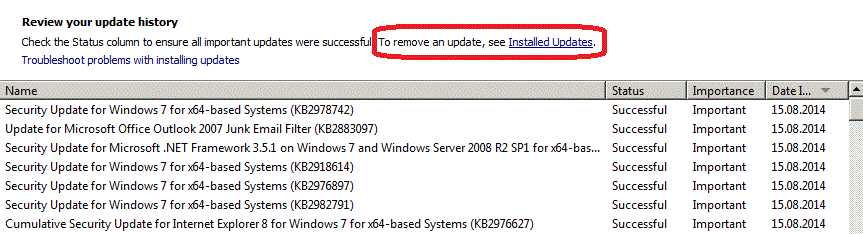
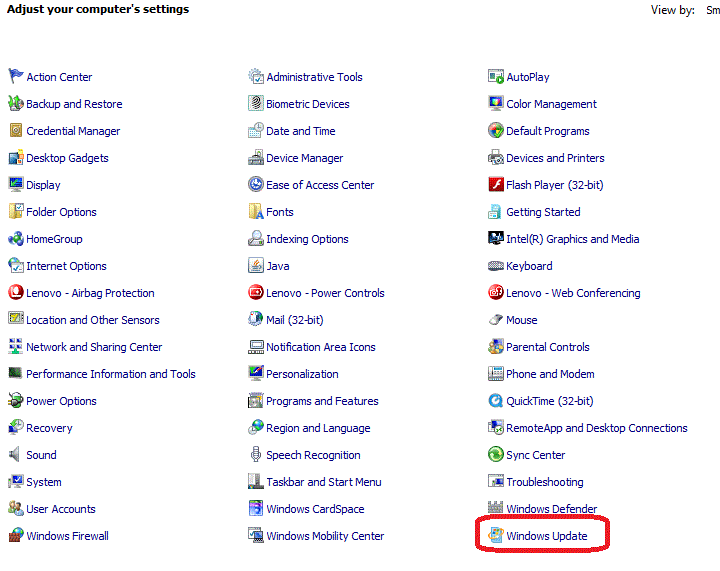 Click Update History and then Installed Updates:
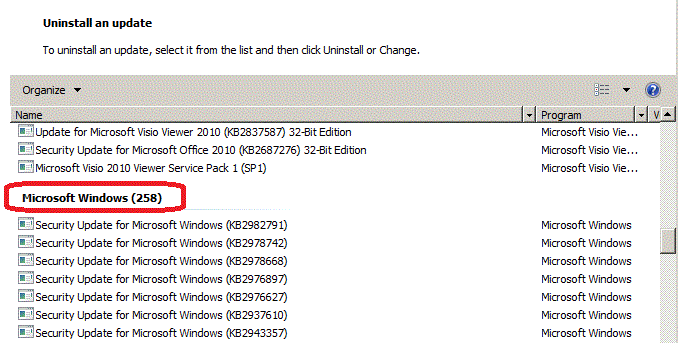
 Scroll down to Microsoft Windows and look for KB2918614 (I have removed it already before I took the screenshot):
 Finally, hide that update so you don’t get it installed later on again:
 I’m using a corporate notebook with automatic Windows security updates coming from time to time and encountered that problem while trying to upgrade VirtualBox to version 4.3.12. It is not a VirtualBox issue, though, other installs or upgrades may fail for the same reason. For me, this was a serious problem, because I rely on virtual machines for many demonstrations. Kudos to the virtualbox.org forums! They helped me resolve that problem within a day. Thank you once again, guys! 🙂


 Pickleball spielen
#1 von Dragan Mihal am September 6, 2014 - 08:53
Thank you very much. This advice has helped me to install the latest Java update after several unsuccessful attempts.
#2 von Uwe Hesse am September 6, 2014 - 09:32
You’re welcome 🙂 Thanks for taking the time to leave a feedback about your success!
#3 von Shellver am September 6, 2014 - 20:24
Thank you very much. My company was not receiving payments because they did not know how to fix the java. With your help we’re getting
#4 von Uwe Hesse am September 7, 2014 - 09:01
My pleasure – glad you have been able to resolve your problem and thanks for the feedback 🙂
#5 von Daniel am September 8, 2014 - 11:34
Thank you!!
#6 von nathan james am September 9, 2014 - 02:01
excellent!! Thank you so much!!
This was a huge problem for me. I was unable to download skype, itunes and 3 software packages i have recently bought.
such a simple fix for a huge problem.
Cheers !!
#7 von Marilyn am September 9, 2014 - 03:33
Thank you SOOOOOO very much. Worked like a charm. I let my computer guys know too! AND they thought they knew everything! But there is still a problem with the HP Print and Scan Doctor 4.4 telling me that my HP Officejet Pro N911a printer has a driver conflict, BUT it prints just fine NOW that I got the software installed with your help. BUT the scanner in the 4.4 program tells me that there is a driver error and to disconnect the printer while on, plug it back in, and restart the computer. That doesn’t change a thing. I STILL can’t scan from my printer to the computer–not with flat bed or the docu feed on top. I don’t know what to do next.
#8 von Vincent Voois am September 9, 2014 - 22:08
Ohw man, my hero! i had several other applications that failed to install. Did you reported this to Microsoft as well? Such security update is a serious flaw.
#9 von Olly am September 10, 2014 - 08:45
Thank You … been on this for 3 days – now solved 🙂
#10 von chromesearcher am September 10, 2014 - 15:00
Thank you!! Spent 5 hours trying solve this problem! I couldn’t install JDK 8 and neither oracle.com neither other sites didn’t give me a solution!
#11 von Peri am September 10, 2014 - 23:11
Hi I’ve tried to download java 3000000 times now and I’m at my wits end! I need to use it for the interactive blackboard for my uni course which has already started!
I completely uninstalled Java on the add/removed programmes page.
Since I have tried to download java install from the website both on and offline. I have turned my AV and firewall off! I followed your instructions and couldn’t restart my lap top! Had to start up repair for ages…! Finally got it back up and running and I noticed my Microsoft windows is not (295) it is (309)
Is that why my windows crashed? Please help! To boot my lap top is in Spanish! I’m English but lived abroad and totally forgot buying a laptop over there would be cheaper but not in my native language! So I’m translating everything either for my self or in order to try and get help!
Anyone????
#12 von NT am September 11, 2014 - 10:01
Thank you so much for your contributions
#13 von Rashid am September 15, 2014 - 18:25
Thanks Uhesse. I could not install Skype. It worked.
#14 von Vee am September 15, 2014 - 18:36
Thank you for needed that to get iTunes downloaded.
#15 von Billy am September 16, 2014 - 02:56
unintalled the Microsoft security update still can not install Java Key not valid for use in specified state
#16 von Sylvio Deutsch am September 16, 2014 - 07:21
It works also for win7 32 bits.
Thanks for the tip, invaluable!
#17 von Rakesh Kumar am September 16, 2014 - 11:47
Wonderful solution to an otherwise insoluble problem! My sons bought me a Fitbit Flex as a present and I successfully installed the software on my Mac, but nothing would make it work on my Win7 32-bit machine — until I found your solution. MUCH appreciated!!
#18 von JoeC am September 16, 2014 - 18:06
This fixed my problem. Thank you!
#19 von John am September 17, 2014 - 08:46
I also spent hours trying to reinstall itunes with this repeating error: “ key not valid for use in specified state “
Here is what finally worked.
1. Open control panel
2. Open Programs and Features.
3.Click itunes
4 Click Change
5 Click Repair.
Let me know if you also get success.
#20 von Ernie am September 17, 2014 - 14:05
Awesome!! I’ve been trying to repair my problem for 2 Days. I checked for any registry errors, uninstalled and downloaded and reinstalled the Visual Studio C++ 2008 SP1 as well as Visual Studio C++ 2005 SP1, however because my machine had been altered by the KB2918614 update it wouldn’t reinstall them either. And, when trying to reinstall it kept on reflecting the „Key not valid…..“ message. So, you’re advice to uninstall KB2918614 is much appreciated as my machine is once again doing what it’s supposed to do.
#21 von Pablo am September 18, 2014 - 01:57
Continue to have the „key not valid“ after uninstalling the prescribed update. Any suggestions?
#22 von atlcomputerrepair am September 18, 2014 - 11:51
This was driving me crazy! Thanks!
#23 von Carl Fuglein am September 18, 2014 - 20:00
God bless you sir. This has fixed a lot of problems for me installing a new computer.
#24 von Catherine am September 19, 2014 - 11:20
Thank you SO MUCH!!! I could not install any new software, and spent so many hours trying to solve the problem. Thanks again. Catherine
#25 von Julian Shaw am September 19, 2014 - 23:39
Thanks so much for your post, tearing hair out to try an re-install mobile stuff.. JS
#26 von Ashley am September 20, 2014 - 00:28
THANK YOU SO MUCH. After months without being able to update my iTunes, hours on the phone with Apple and Windows and following thread after thread after thread I have finally found relief. And such a simple fix too. THANKS A MILLION!!
#27 von Spudleyy am September 20, 2014 - 04:59
thankyou so much! i have been at it for hours trying to Install iTunes 11.4 so it recognizes my phone. Fianlly works !
#28 von Diane Leeman am September 21, 2014 - 05:08
Thank you so much for your help with my Windows 7 error „key not valid for use in specified state“. I spent hours trying to reinstall Skype which had inadvertently „disappeared“ from my computer. Your suggestion, so simple and elegant, rectified the problem. I really appreciate your assistance.
Diane Leeman, Australia
#29 von Craig am September 21, 2014 - 09:46
I got that error trying to download Google’s Sketchup Make. Thank you so very much for the solution! Worked brilliantly!
#30 von xXMrSkyXx am September 21, 2014 - 12:28
Thank you, for the advice. I’ve been trying to fix this error for a while now. I tried anti-malware, and virus scans off the wall. Then tried messing around with the keys and registries themselves… Neither worked. Then suddenly I tried this, and it worked! Grade-A fix, I will say.
#31 von sou am September 23, 2014 - 12:17
there’s thousands of updates… how do I find it?>
#32 von strebor777@shaw.ca am September 24, 2014 - 02:15
This worked great. Really appreciate the fix. Saved me a ton of time looking for the resolution.
#33 von Sriraj am September 25, 2014 - 10:43
Try this if it works..
NOTE : You might need to enable the view hidden folder and files option
Windows 8 computers
Go to C:\ProgramData\Microsoft\ „Crypto“
Windows 7
Goto C:\AppData\Microsoft\
Here you should see a folder named as „Crypto“
Either delete it right away or cut and paste on desktop and then delete.
Try installing again….
This should work
#34 von Andreas am September 25, 2014 - 18:04
I rebuilt a laptop and used the Windows easy transfer program to a new laptop. When I tried to install software such as Java, where I first noticed the error, and obviously after this Microsoft update installed, I could not install anything until I removed this KB update. Thanks for your help
#35 von Celso am September 26, 2014 - 00:34
Thank you, man. This advice has helped me to reinstall the skype and others softwares after several unsuccessful attempts. I was looking for the solution since Aug in brazilian foruns, but nothing because I was searching the message in portuguese only: It is displayed translated to portuguese here. Now I intend to help some users to solve that here. Best Regards. Celso
#36 von Nelly am September 28, 2014 - 03:33
very,very helpful, but I didn’t „hide“ the offending update the first time and had to uninstall it again in order to install some other software. So, can you explain how to hide this naughty update, for ever? Many thanks…
#37 von Crystal am September 28, 2014 - 04:48
Thank you!!! !!!!!!This was a big help (after I spent a hours working on what I thought was an iTunes issue)!
#38 von Devere Gambet am Oktober 2, 2014 - 22:51
My good man- thanks to you!. Best wishes for providing help
#39 von mera am Oktober 3, 2014 - 19:03
thank you alot
#40 von Dominique t am Oktober 7, 2014 - 08:42
Thank you so much ! You’re a life saver !
#41 von Nunya Biznet am Oktober 8, 2014 - 17:33
I could not install Microsoft Office 2010 64bit onto my Dell 2400 laptop until I did this. Thanks!
#42 von Tennismom#1 am Oktober 8, 2014 - 22:36
ok I have uninstalled KB2918614 and still not able to install software. What else may I try?
#43 von Tennismom#1 am Oktober 8, 2014 - 22:48
OK fixed the problem by renaming the RSA file…thanks
#44 von Eric Pardee am Oktober 9, 2014 - 04:20
You are awesome, thank you. This fixed failed install of client for Sage HRMS 2014
#45 von John Webb am Oktober 10, 2014 - 03:21
Very helpful fix. Thank you.
#46 von Matthew Green am Oktober 11, 2014 - 09:26
Many thanks for sharing – this helped to resolve a problem installing Skype
#47 von arqmau am Oktober 11, 2014 - 14:25
desde bolivia le agradezco la informacion
#48 von Sivajadam Lakshman Ganga am Oktober 14, 2014 - 15:00
Thank you very much. This advice has helped me to install the PGP after several unsuccessful attempts.
#49 von Kyle am Oktober 22, 2014 - 03:20
Thanks so much original poster, and post #33. This combined solved my problem.
#50 von Alan am Oktober 30, 2014 - 23:47
Thank you so much! This helped fix Skype, nVidia PhysX and a whole host of other install issues I was having! Op is a legend!
#51 von pclark716 am Oktober 31, 2014 - 13:39
Worked with Vista too! Had been having trouble updating iTunes and Skype – getting that “key not valid for use in specified state” error. Completely uninstalled both and still got the error when I tried to reinstall them. Ran a MS fix that supposedly repaired any registry problems and still couldn’t install iTunes or Skype. Found the Security Update KB2918614 – dated 8/16/2014. Uninstalled it and then tried again to install iTunes and Skype. Success! Thank you!
#52 von MitchT am November 6, 2014 - 04:32
OMG this is the only thing that worked! I’ve been trying to get rid of the „key not valid for use in specified state“ PhysX error for over two months, for two games:
-Medal of Honor
-Mafia II
Dude, or more accurately, Uwe Hesse – Lord Master of Gods, how did you even find this!!!
I’m not worthy,
Jim
#53 von sam am November 9, 2014 - 15:49
really amazing ,,,,, it solve my issue with WinZip setup. I could spent rest of my life trying ,,, 🙂
Thank you very much. appreciate your help.
#54 von Hazar am November 13, 2014 - 10:46
Thanks so much it worked for me and i am able to install Lync 2013. Thanks so much again 🙂
#55 von L Donaya Jackson am November 20, 2014 - 01:57
Got my Zune 30G software installed finally because of you…thanks a million.
#56 von LT am November 21, 2014 - 07:57
Thank you. Fixed my install issue with iTunes, Java, etc.
#57 von Ariana am November 21, 2014 - 08:00
thank you JOHN!!! #19!!! 🙂
#58 von gorgi991 am November 22, 2014 - 15:34
thank you very much,i was looking for a solution for two months now
i was so desperate that i was extracting the msi files with winrar,and run the exe instant,thanks again
#59 von Benson am Dezember 7, 2014 - 23:53
thank you!!! worked perfectly!!!! you are the shizzzzz!!!!
#60 von Hugh am Dezember 26, 2014 - 23:43
I don’t know how long it’s been since I was able to get my iTunes working again! Thank you, Sir!
#61 von Dave am Februar 5, 2015 - 03:11
Great steps and explanation. Fixed two reported issues we had for users‘ on Java Run Time 1.6.0_20 applications. Thanks for great write up.
#62 von Rahma am Februar 28, 2015 - 17:13
Thank you very much. It worked!!!
#63 von Mirela am Mai 14, 2015 - 08:48
One more onestly thank u! 🙂
#64 von VesperOz (@Dark_Howler) am Juli 13, 2015 - 21:37
Thank you for the fix. Oddly I’ve never had a problem installing programs until today.
#65 von ratish am August 25, 2015 - 23:48
Thank you – this fix worked !!
#66 von paul am Oktober 12, 2015 - 03:58
Thank you it fixed my mobile broadband installation as well.
#67 von srikanth am November 4, 2015 - 07:06
Thanks i fixed my problem
#68 von jane doe am November 16, 2016 - 09:51
Thank you so much. That error message prevented me from downloading quite a bit of stuff. I would make repeated attempts searching for a solution and then giving up. Finally came across your webpage which was simple, easy to follow and most importantly resolved a pain in my backside. Again Thanks!