Uwe Hesse

Dieser Benutzer hat keine biographischen Informationen freigegeben
Startseite: http://uhesse.com
Enjoying a great conference at the #DOAG2016
Veröffentlicht in TOI am November 16, 2016
It’s DOAG season again and the Oracle Community is having a good time here! That includes me, presenting about the Multitenant architecture:
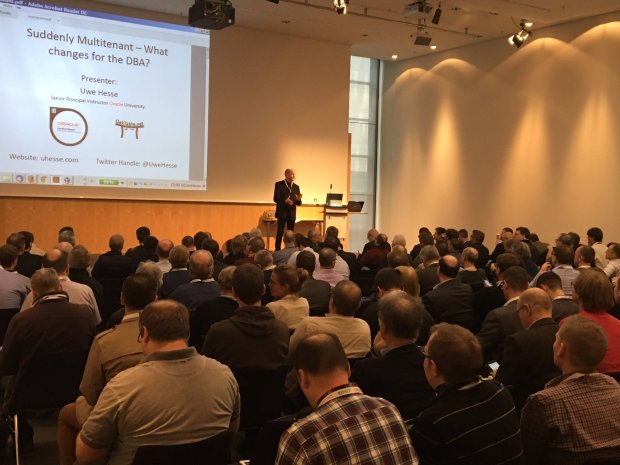
That talk was well received by a friendly audience, thank you guys! Do you know the James Taylor song „That’s why I’m here!“
Pretty much describes my feelings about it 🙂
The conference is well-organized (We’re Germans, you know) and maintained by the great DOAG crew as always. Keep up the good work!
FLASHBACK PLUGGABLE DATABASE now available in #Oracle 12cR2
Veröffentlicht in TOI am November 9, 2016

With the current release 12.2, flashback can be done on the PDB layer. As a prerequisite, the database must be put into local undo mode. That means that each PDB has its own undo tablespace. Some other 12.2 features like hot PDB cloning also require this, so chances are that most 12cR2 multitenant databases will be using that mode.
SQL> select banner from v$version;

BANNER
--------------------------------------------------------------------
Oracle Database 12c Enterprise Edition Release 12.2.0.1.0 - 64bit Pr
oduction

PL/SQL Release 12.2.0.1.0 - Production
CORE    12.2.0.1.0      Production
TNS for Linux: Version 12.2.0.1.0 - Production
NLSRTL Version 12.2.0.1.0 - Production

SQL> select name,open_mode,con_id from v$pdbs;

NAME            OPEN_MODE  CON_ID
--------------- ---------- ------
PDB$SEED        READ ONLY       2
PDB1            READ WRITE      3

SQL> select name,con_id from v$tablespace;

NAME            CON_ID
--------------- ------
SYSAUX               1
SYSTEM               1
UNDOTBS1             1
USERS                1
TEMP                 1
SYSTEM               2
SYSAUX               2
SYSTEM               3
TEMP                 2
SYSAUX               3
TEMP                 3

11 rows selected.
Initially, this database operates in what we call now shared undo mode: There is only one undo tablespace in the root container that is shared by all PDBs. Let’s change that to local undo mode:
SQL> shutdown immediate
Database closed.
Database dismounted.
ORACLE instance shut down.
SQL> startup upgrade
ORACLE instance started.

Total System Global Area 1426063360 bytes
Fixed Size                  8792776 bytes
Variable Size             486540600 bytes
Database Buffers          922746880 bytes
Redo Buffers                7983104 bytes
Database mounted.
Database opened.
SQL> alter database local undo on;

Database altered.

SQL> shutdown immediate
Database closed.
Database dismounted.
ORACLE instance shut down.
SQL> startup
ORACLE instance started.

Total System Global Area 1426063360 bytes
Fixed Size                  8792776 bytes
Variable Size             486540600 bytes
Database Buffers          922746880 bytes
Redo Buffers                7983104 bytes
Database mounted.
Database opened.
SQL> select name,con_id from v$tablespace;

NAME            CON_ID
--------------- ------
SYSAUX               1
SYSTEM               1
UNDOTBS1             1
USERS                1
TEMP                 1
SYSTEM               2
SYSAUX               2
SYSTEM               3
TEMP                 2
SYSAUX               3
TEMP                 3
UNDO_1               2

12 rows selected.
CON_ID 2 is the seed PDB, which got a local undo tablespace already. The pdb1 gets it as soon as it is opened:
SQL> alter pluggable database all open;

SQL> select name,con_id from v$tablespace;

NAME       CON_ID
---------- ------
SYSAUX          1
SYSTEM          1
UNDOTBS1        1
USERS           1
TEMP            1
SYSTEM          2
SYSAUX          2
SYSTEM          3
TEMP            2
SYSAUX          3
TEMP            3
UNDO_1          2
UNDO_1          3

SQL> select name from v$datafile where con_id=3;

NAME
--------------------------------------------------------------------
/u02/app/oracle/oradata/pdb1/system01.dbf
/u02/app/oracle/oradata/pdb1/sysaux01.dbf
/u02/app/oracle/oradata/pdb1/pdb1_i1_undo.dbf
Now to the flashback!
SQL> select flashback_on from v$database;

FLASHBACK_ON
------------------
YES

SQL> alter pluggable database pdb1 close immediate;

Pluggable database altered.

SQL> flashback pluggable database pdb1 to timestamp systimestamp - interval '2' minute;

Flashback complete.

SQL> alter pluggable database pdb1 open resetlogs;

Pluggable database altered.
Of course, that works much faster than a PDB PITR 🙂
How to speed up Data Pump Import by suppressing redo generation in #Oracle 12c
Veröffentlicht in TOI am Oktober 25, 2016

With your database in archive log mode, a Data Pump Import may be severely slowed down by the writing of much redo into online logs and the the generation of many archive logs. A 12c New Feature enables you to avoid that slow down by suppressing redo generation for the import only. You can keep the database in archive log mode the whole time. Let’s see that in action!
First without the new feature:
[oracle@uhesse ~]$ sqlplus adam/adam

SQL*Plus: Release 12.1.0.2.0 Production on Tue Oct 25 20:25:25 2016

Copyright (c) 1982, 2014, Oracle.  All rights reserved.

Last Successful login time: Tue Oct 25 2016 20:24:55 +02:00

Connected to:
Oracle Database 12c Enterprise Edition Release 12.1.0.2.0 - 64bit Production
With the Partitioning, OLAP, Advanced Analytics and Real Application Testing options

SQL> select log_mode from v$database;

LOG_MODE
------------------------------------
ARCHIVELOG

SQL> select * from v$recovery_area_usage;

FILE_TYPE		       PERCENT_SPACE_USED PERCENT_SPACE_RECLAIMABLE NUMBER_OF_FILES	CON_ID
------------------------------ ------------------ ------------------------- --------------- ----------
CONTROL FILE					0			  0		  0	     0
REDO LOG					0			  0		  0	     0
ARCHIVED LOG				    15.37			 15		 10	     0
BACKUP PIECE				    25.17			  0		  2	     0
IMAGE COPY					0			  0		  0	     0
FLASHBACK LOG					0			  0		  0	     0
FOREIGN ARCHIVED LOG				0			  0		  0	     0
AUXILIARY DATAFILE COPY 			0			  0		  0	     0

8 rows selected.

SQL> exit
Disconnected from Oracle Database 12c Enterprise Edition Release 12.1.0.2.0 - 64bit Production
With the Partitioning, OLAP, Advanced Analytics and Real Application Testing options
[oracle@uhesse ~]$ impdp adam/adam tables=sales directory=DPDIR

Import: Release 12.1.0.2.0 - Production on Tue Oct 25 20:26:45 2016

Copyright (c) 1982, 2014, Oracle and/or its affiliates.  All rights reserved.

Connected to: Oracle Database 12c Enterprise Edition Release 12.1.0.2.0 - 64bit Production
With the Partitioning, OLAP, Advanced Analytics and Real Application Testing options
Master table "ADAM"."SYS_IMPORT_TABLE_01" successfully loaded/unloaded
Starting "ADAM"."SYS_IMPORT_TABLE_01":  adam/******** tables=sales directory=DPDIR
Processing object type TABLE_EXPORT/TABLE/TABLE
Processing object type TABLE_EXPORT/TABLE/TABLE_DATA
. . imported "ADAM"."SALES"                              510.9 MB 10000000 rows
Processing object type TABLE_EXPORT/TABLE/STATISTICS/TABLE_STATISTICS
Processing object type TABLE_EXPORT/TABLE/STATISTICS/MARKER
Job "ADAM"."SYS_IMPORT_TABLE_01" successfully completed at Tue Oct 25 20:29:46 2016 elapsed 0 00:03:00
[oracle@uhesse ~]$ sqlplus adam/adam

SQL*Plus: Release 12.1.0.2.0 Production on Tue Oct 25 20:30:03 2016

Copyright (c) 1982, 2014, Oracle.  All rights reserved.

Last Successful login time: Tue Oct 25 2016 20:26:45 +02:00

Connected to:
Oracle Database 12c Enterprise Edition Release 12.1.0.2.0 - 64bit Production
With the Partitioning, OLAP, Advanced Analytics and Real Application Testing options

SQL> select * from v$recovery_area_usage;

FILE_TYPE		       PERCENT_SPACE_USED PERCENT_SPACE_RECLAIMABLE NUMBER_OF_FILES	CON_ID
------------------------------ ------------------ ------------------------- --------------- ----------
CONTROL FILE					0			  0		  0	     0
REDO LOG					0			  0		  0	     0
ARCHIVED LOG				    30.63			 15		 17	     0
BACKUP PIECE				    25.17			  0		  2	     0
IMAGE COPY					0			  0		  0	     0
FLASHBACK LOG					0			  0		  0	     0
FOREIGN ARCHIVED LOG				0			  0		  0	     0
AUXILIARY DATAFILE COPY 			0			  0		  0	     0

8 rows selected.
The import took 3 minutes and generated 7 archive logs. Now with the new feature:
SQL> drop table sales purge;

Table dropped.

SQL> exit
Disconnected from Oracle Database 12c Enterprise Edition Release 12.1.0.2.0 - 64bit Production
With the Partitioning, OLAP, Advanced Analytics and Real Application Testing options
[oracle@uhesse ~]$ impdp adam/adam tables=adam.sales directory=DPDIR transform=disable_archive_logging:Y

Import: Release 12.1.0.2.0 - Production on Tue Oct 25 20:31:20 2016

Copyright (c) 1982, 2014, Oracle and/or its affiliates.  All rights reserved.

Connected to: Oracle Database 12c Enterprise Edition Release 12.1.0.2.0 - 64bit Production
With the Partitioning, OLAP, Advanced Analytics and Real Application Testing options
Master table "ADAM"."SYS_IMPORT_TABLE_01" successfully loaded/unloaded
Starting "ADAM"."SYS_IMPORT_TABLE_01":  adam/******** tables=adam.sales directory=DPDIR transform=disable_archive_logging:Y
Processing object type TABLE_EXPORT/TABLE/TABLE
Processing object type TABLE_EXPORT/TABLE/TABLE_DATA
. . imported "ADAM"."SALES"                              510.9 MB 10000000 rows
Processing object type TABLE_EXPORT/TABLE/STATISTICS/TABLE_STATISTICS
Processing object type TABLE_EXPORT/TABLE/STATISTICS/MARKER
Job "ADAM"."SYS_IMPORT_TABLE_01" successfully completed at Tue Oct 25 20:32:15 2016 elapsed 0 00:00:54

[oracle@uhesse ~]$ sqlplus adam/adam

SQL*Plus: Release 12.1.0.2.0 Production on Tue Oct 25 20:32:25 2016

Copyright (c) 1982, 2014, Oracle.  All rights reserved.

Last Successful login time: Tue Oct 25 2016 20:31:20 +02:00

Connected to:
Oracle Database 12c Enterprise Edition Release 12.1.0.2.0 - 64bit Production
With the Partitioning, OLAP, Advanced Analytics and Real Application Testing options

SQL> select * from v$recovery_area_usage;

FILE_TYPE		       PERCENT_SPACE_USED PERCENT_SPACE_RECLAIMABLE NUMBER_OF_FILES	CON_ID
------------------------------ ------------------ ------------------------- --------------- ----------
CONTROL FILE					0			  0		  0	     0
REDO LOG					0			  0		  0	     0
ARCHIVED LOG				    30.63			 15		 17	     0
BACKUP PIECE				    25.17			  0		  2	     0
IMAGE COPY					0			  0		  0	     0
FLASHBACK LOG					0			  0		  0	     0
FOREIGN ARCHIVED LOG				0			  0		  0	     0
AUXILIARY DATAFILE COPY 			0			  0		  0	     0

8 rows selected.

SQL> select logging from user_tables where table_name='SALES';

LOGGING
---------
YES
About three times faster and no archive log generated! The table is still in logging mode after the import. Keep in mind to take a backup of the datafile that contains the table now, though! For the same reason you should take a backup after a NOLOGGING operation 🙂
Pickleball spielen auf YouTube


 Pickleball spielen